AI agent for pmo managers
Vendor Deliverable Acceptance Agent
Accept only deliverables that meet the contract criteria and release payment against proof
What it does
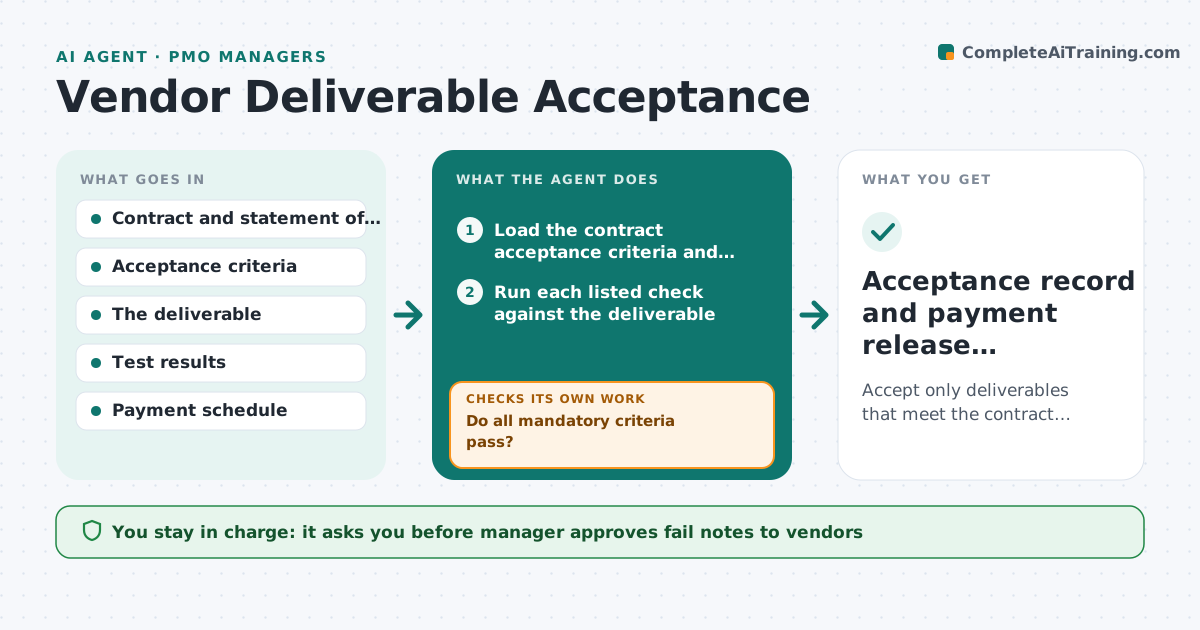
A vendor delivers a document or a build, the project is busy, and someone signs it off with a quick look. Weeks later the gaps show up and the payment is already released. This agent checks each delivery against the contract. It reads the acceptance criteria and runs every listed check, such as required sections, test results, performance figures or format rules, and records pass or fail with evidence. For any failure it drafts a precise note to the vendor, tracks the resubmission date and repeats the checks on the new version. It never skips a criterion. The manager approves acceptance and the release of payment. Edge case: a vendor delivers 9 of 10 items. The agent records a partial delivery and shows which payment milestone is affected.
How it works
Follow the arrows from top to bottom. The orange dashed arrow is the loop: when a check fails, the agent goes back and tries again.
Read the steps as a list
- Vendor submits a deliverable
- Load the contract acceptance criteria and payment milestone
- Run each listed check against the deliverable
- Record pass or fail with evidence per criterion
- Do all mandatory criteria pass?If not: Draft a fail note with evidence and track resubmission. Back to step 3.
- PMO manager approves the note to the vendorThe agent waits here for your OK.
- Send note and set a resubmission due date
- Rerun failed checks on the resubmitted version
- Is the resubmission within the contract cure period?If not: Escalate a contract breach to the manager with dates. Back to step 8.
- Manager approves acceptance and payment releaseThe agent waits here for your OK.
- Acceptance record and payment release instruction
How it decides
Each criterion is pass or fail based on evidence. A deliverable is accepted only when all mandatory criteria pass. Optional criteria produce notes.
- All mandatory criteria must pass for acceptance
- Partial deliveries are logged against the relevant milestone
- A cure period overrun is escalated at once
- Evidence for each result is saved with the record
Make it yours
Every agent is a starting point. You choose these settings for your own situation.
- Contract cure period in days
- Format of the acceptance record
- Who must sign off besides the manager
- Checks that can be run automatically
- Reminder timing for resubmissions
What keeps you in control
It always asks you first
- Manager approves fail notes to vendors
- Manager approves acceptance and payment release
Hard limits
- Never releases payment itself
- Never waives a criterion
It stops when
- Done: deliverable accepted and payment instruction filed
- Stop: repeated failures beyond the cure period, hand to the manager
Set it up
We guide you through the set-up, step by step
Members get the full set-up guide for this agent. No technical skills needed: you copy, paste and upload.
- One set of instructions to paste into your AI, with the clicks for ChatGPT, Claude, Microsoft 365 Copilot, Gemini and Grok
- The agent then walks you through connecting your own data, one source at a time
- A downloadable copy with the flow chart, the rules and the full guide