AI agent for supplier relationship managers
Vendor SLA Breach Follow-Up Agent
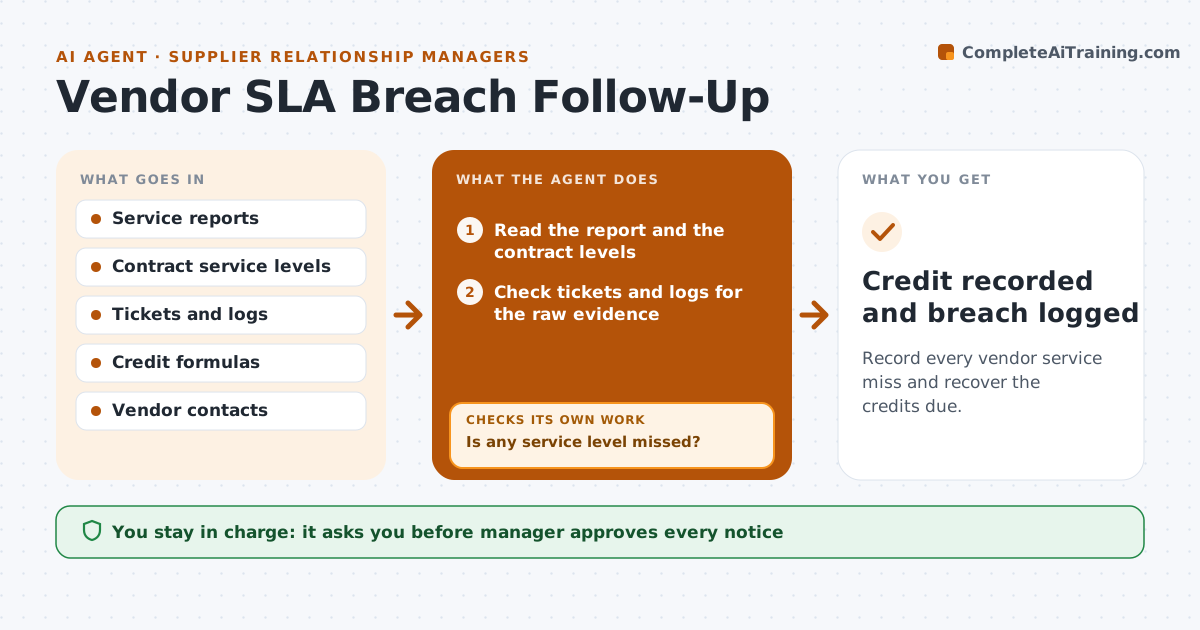
Record every vendor service miss and recover the credits due.
What it does
Contracts promise service levels, but misses are rarely recorded, so credits are never claimed. This agent compares each service report with the contract's levels for response time, uptime and resolution. It flags breaches, gathers the evidence from tickets and logs, and works out the credit due under the contract. It drafts a breach notice and credit request. After the manager approves, it sends the notice, tracks the response and records the credit. It checks the evidence in the raw logs, not only the vendor's own summary, because the two often differ. After the notice goes out it watches for the vendor's reply and the credit on the next invoice. Edge case: if the vendor disputes a breach, it rereads the evidence and attaches a timeline to the follow-up.
How it works
Follow the arrows from top to bottom. The orange dashed arrow is the loop: when a check fails, the agent goes back and tries again.
Read the steps as a list
- Monthly service report arrives
- Read the report and the contract levels
- Check tickets and logs for the raw evidence
- Is any service level missed?If not: Log the month as compliant. Back to step 2.
- Calculate the credit under the contract
- Draft the breach notice and credit request
- Manager approves the noticeThe agent waits here for your OK.
- Send the notice and set a reply date
- Did the vendor accept and credit the amount?If not: Attach a timeline of the evidence and draft a follow-up. Back to step 5.
- Credit recorded and breach logged
How it decides
It flags a breach when the report or the raw evidence shows a level missed, and applies the contract's credit formula.
- Use the raw logs when they differ from the vendor's report
- Apply the contract's credit formula exactly
- Flag repeated breaches in a quarter for contract review
- Follow up after 14 days of silence
Make it yours
Every agent is a starting point. You choose these settings for your own situation.
- Service levels tracked
- Follow-up days (default 14)
- Credit formula
- Vendors included
What keeps you in control
It always asks you first
- Manager approves every notice
Hard limits
- Never send a notice without approval
- Never claim a credit the contract does not give
It stops when
- Done: credit applied or the breach is closed
- Stop: the vendor disputes and the manager negotiates
Set it up
We guide you through the set-up, step by step
Members get the full set-up guide for this agent. No technical skills needed: you copy, paste and upload.
- One set of instructions to paste into your AI, with the clicks for ChatGPT, Claude, Microsoft 365 Copilot, Gemini and Grok
- The agent then walks you through connecting your own data, one source at a time
- A downloadable copy with the flow chart, the rules and the full guide