AI agent for receptionists
Visitor Check-in and Host Notification Agent
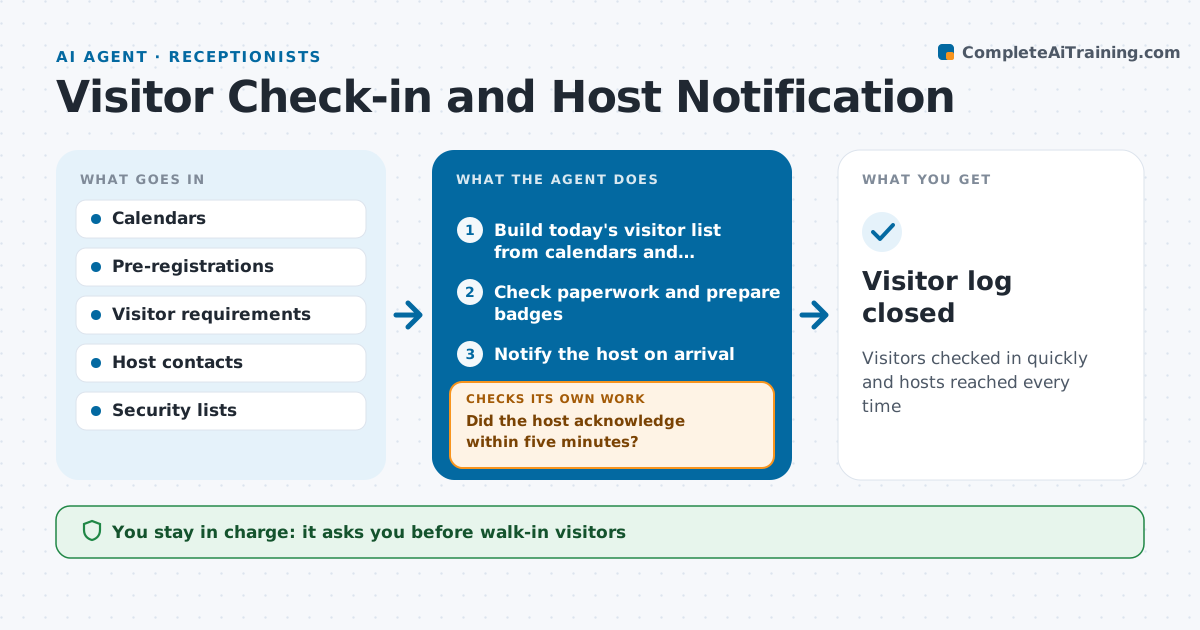
Visitors checked in quickly and hosts reached every time
What it does
Visitors left waiting in the lobby and hosts who never get the message make a poor first impression. Each morning this agent builds the day's visitor list from calendars and pre-registrations. It checks each visitor has what is needed, such as a signed agreement or safety briefing, and prepares badges. When a visitor arrives, it notifies the host by chat and text. If the host does not acknowledge within five minutes, it tries the host's backup or team, then alerts the receptionist. At the end of the day it checks that every visitor signed out. The receptionist approves walk-ins and any visitor missing paperwork. Edge case: a visitor on a do-not-admit list is flagged quietly to the receptionist and security, never announced at the desk.
How it works
Follow the arrows from top to bottom. The orange dashed arrow is the loop: when a check fails, the agent goes back and tries again.
Read the steps as a list
- Morning setup or visitor arrives
- Build today's visitor list from calendars and registrations
- Check paperwork and prepare badges
- Receptionist approves walk-ins and missing paperworkThe agent waits here for your OK.
- Notify the host on arrival
- Did the host acknowledge within five minutes?If not: notify the backup contact, then alert the receptionist. Back to step 5.
- Check all visitors signed out at day end
- Visitor log closed
How it decides
It requires all paperwork before badge printing and escalates hosts who don't respond.
- No badge without required paperwork
- Escalate unacknowledged hosts after 5 minutes
- Do-not-admit matches go quietly to security
Make it yours
Every agent is a starting point. You choose these settings for your own situation.
- Acknowledgement wait time
- Paperwork needed by visitor type
- Notification channels
- Sign-out reminder time
What keeps you in control
It always asks you first
- Walk-in visitors
- Exceptions to paperwork
Hard limits
- Never admits flagged visitors
- Visitor data kept only as long as policy allows
It stops when
- Done: all visitors signed out
- Stop: building emergency, switch to evacuation list
Set it up
We guide you through the set-up, step by step
Members get the full set-up guide for this agent. No technical skills needed: you copy, paste and upload.
- One set of instructions to paste into your AI, with the clicks for ChatGPT, Claude, Microsoft 365 Copilot, Gemini and Grok
- The agent then walks you through connecting your own data, one source at a time
- A downloadable copy with the flow chart, the rules and the full guide