AI agent for tour guides
Visitor Feedback Improvement Agent
Better tour ratings through changes based on repeated feedback
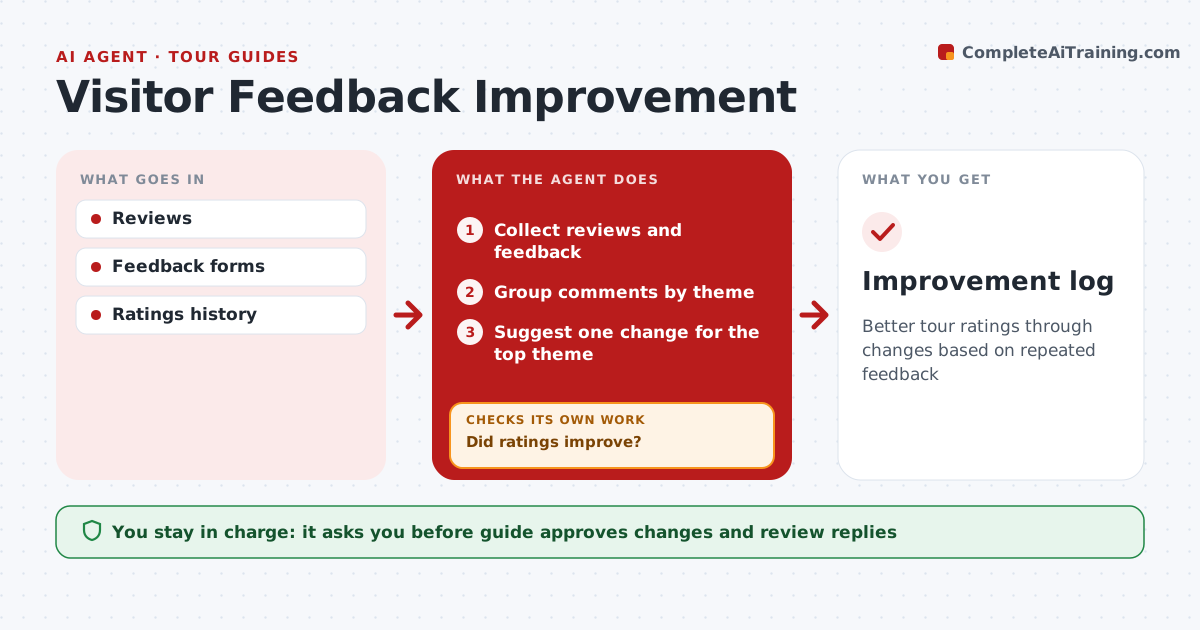
What it does
Guides get reviews on several booking platforms plus their own feedback forms, but rarely turn them into specific changes. Each month this agent collects new reviews and groups comments by theme, such as pace, hearing the guide, story choice, meeting point or length. Three or more mentions make a theme. It suggests one concrete change for the top theme, one change at a time, and the guide approves it. The next month it tracks mentions of that theme. If complaints did not drop, it suggests a different change instead of repeating the same one. It also drafts polite replies to reviews, which the guide edits and posts. Edge case: a single harsh review is never treated as a pattern on its own, however strongly it is worded.
How it works
Follow the arrows from top to bottom. The orange dashed arrow is the loop: when a check fails, the agent goes back and tries again.
Read the steps as a list
- Monthly review
- Collect reviews and feedback
- Group comments by theme
- Suggest one change for the top theme
- Guide approves changeThe agent waits here for your OK.
- Track theme ratings after change
- Did ratings improve?If not: suggest a different change. Back to step 4.
- Improvement log
How it decides
A theme must appear in at least 3 reviews to count. Success means ratings improve for that theme.
- 3 or more mentions make a theme
- One change at a time
- Single reviews not treated as patterns
Make it yours
Every agent is a starting point. You choose these settings for your own situation.
- Theme threshold
- Review sources
- Review period
- Reply tone
What keeps you in control
It always asks you first
- Guide approves changes and review replies
Hard limits
- Never posts replies
- Never contacts reviewers
It stops when
- Done: theme improved
- Stop: too few reviews
Set it up
We guide you through the set-up, step by step
Members get the full set-up guide for this agent. No technical skills needed: you copy, paste and upload.
- One set of instructions to paste into your AI, with the clicks for ChatGPT, Claude, Microsoft 365 Copilot, Gemini and Grok
- The agent then walks you through connecting your own data, one source at a time
- A downloadable copy with the flow chart, the rules and the full guide