AI agent for community moderators
Volunteer Moderator Recruitment Agent
Enough vetted volunteers accepted to cover the team's gaps, with each invitation approved by the manager
What it does
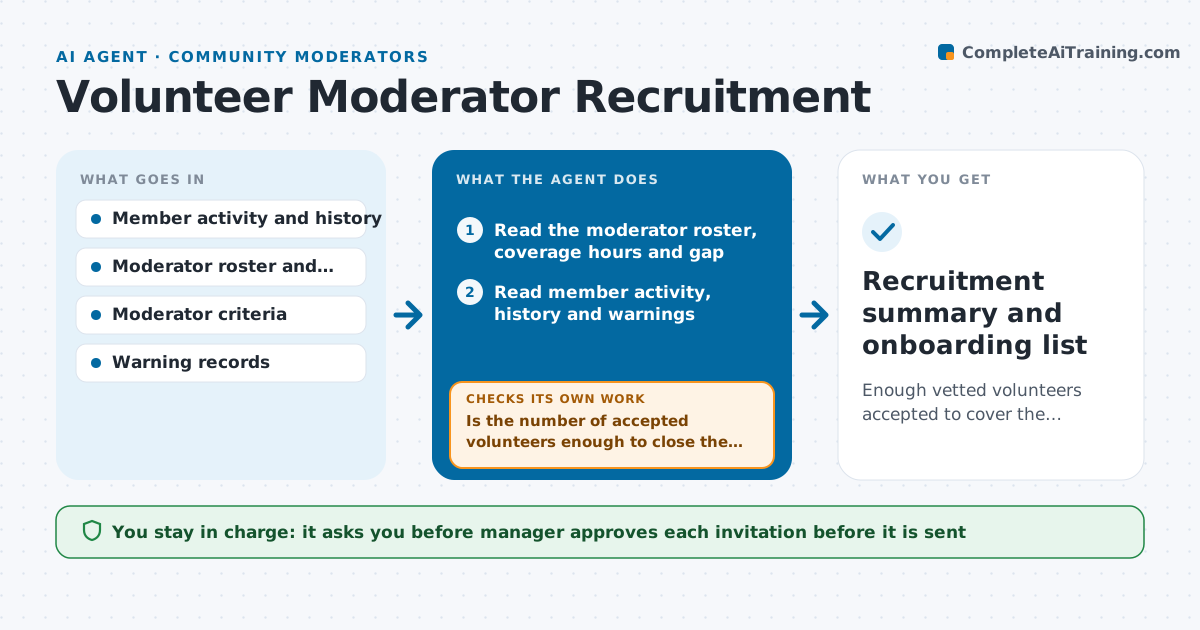
A community loses two moderators in a month, and recruiting means posting a call for volunteers and hoping. This agent reads member activity and moderation history, such as helpful reports, tone in disputes, time zones and tenure, and finds people who meet the community's standards. It checks each candidate against the criteria, including no recent warnings, a minimum tenure and coverage of the hours the team lacks. It drafts a personal invitation for each, tracks replies, drops those who decline, and goes back to the member list to fill the gap, repeating until the team has the number it needs. It also tracks the load of current moderators to show when to recruit next. The manager approves every invitation. Edge case: a very active member with a recent warning is skipped, and the reason is noted for the manager.
How it works
Follow the arrows from top to bottom. The orange dashed arrow is the loop: when a check fails, the agent goes back and tries again.
Read the steps as a list
- Coverage gap detected
- Read the moderator roster, coverage hours and gap
- Read member activity, history and warnings
- Filter members who meet the criteria and cover the missing hours
- Rank the candidates and draft a personal invitation for each
- Manager approves every invitationThe agent waits here for your OK.
- Track replies and log acceptances and declines
- Is the number of accepted volunteers enough to close the gap?If not: Remove those who declined and go to the next candidates on the list. Back to step 4.
- Check that accepted volunteers still meet the criteria
- Do the volunteers cover the missing hours after acceptance?If not: Search for candidates in the missing time zones. Back to step 3.
- Recruitment summary and onboarding list
How it decides
It ranks eligible members by helpfulness, tone, tenure and coverage of the missing hours, and moves to the next candidate when one declines.
- Require at least 6 months of membership and no warnings in the last 12 months
- Invite 3 candidates for each open place
- Do not invite the same person twice in 90 days
- Prioritize coverage of the least staffed hours
Make it yours
Every agent is a starting point. You choose these settings for your own situation.
- Eligibility criteria
- Candidates per open place (default 3)
- Coverage targets
- Cooling-off period
- Invitation tone
What keeps you in control
It always asks you first
- Manager approves each invitation before it is sent
Hard limits
- Never send an invitation without approval
- Never share private member data outside the management team
It stops when
- Done: The team's gaps are covered by accepted volunteers
- Stop: Not enough qualified members, so the agent suggests an open call approved by the manager
Set it up
We guide you through the set-up, step by step
Members get the full set-up guide for this agent. No technical skills needed: you copy, paste and upload.
- One set of instructions to paste into your AI, with the clicks for ChatGPT, Claude, Microsoft 365 Copilot, Gemini and Grok
- The agent then walks you through connecting your own data, one source at a time
- A downloadable copy with the flow chart, the rules and the full guide