AI agent for personal trainers
Waiver and Health Screening Renewal Agent
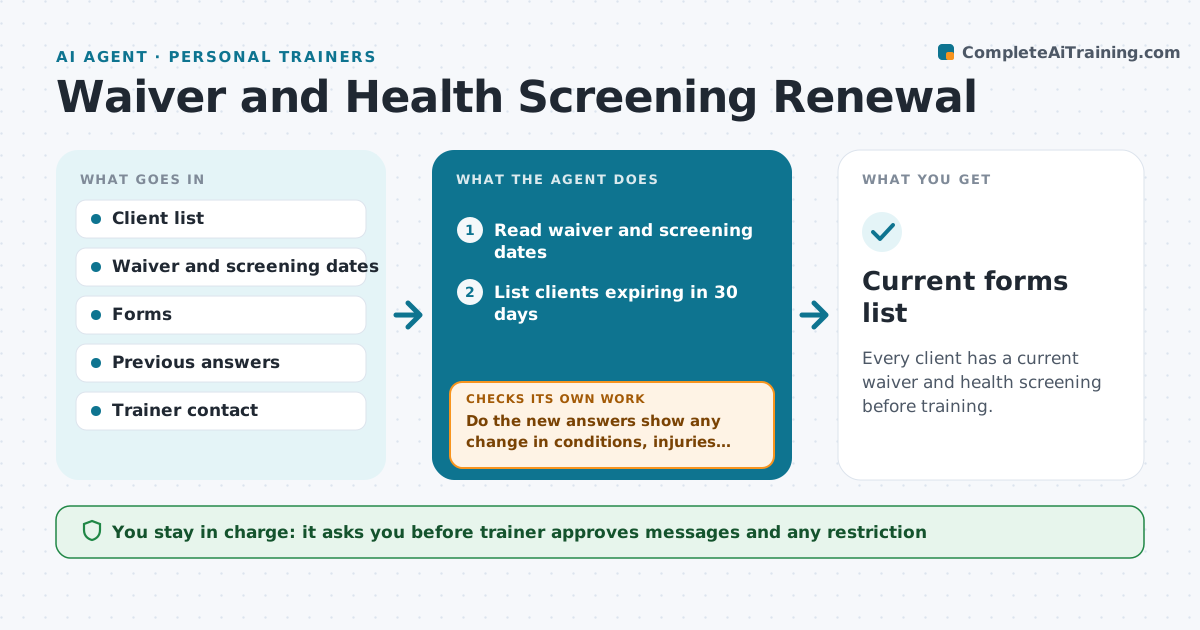
Every client has a current waiver and health screening before training.
What it does
Health forms and waivers expire quietly, and a trainer can train someone for a year on an old form. Every month the agent checks the dates on each client's waiver and health screening and finds those expiring in 30 days. It drafts a renewal request with the link to the form. After the client replies, it reads the answers and compares them with the old form, looking for new conditions, injuries or medicines. If anything has changed, it holds the renewal and asks the trainer to review before training continues. It tracks signatures and chases clients who have not signed. The trainer reviews flagged changes and approves any restriction. Edge case: a client who reports chest pain or fainting is told to see a doctor and the trainer is alerted at once.
How it works
Follow the arrows from top to bottom. The orange dashed arrow is the loop: when a check fails, the agent goes back and tries again.
Read the steps as a list
- Monthly run
- Read waiver and screening dates
- List clients expiring in 30 days
- Draft a renewal request with the form link
- Trainer approves the messageThe agent waits here for your OK.
- Send requests and track signatures
- Read the completed forms
- Do the new answers show any change in conditions, injuries or medicines?If not: Hold the renewal and ask the trainer to review before the next session. Back to step 3.
- Chase unsigned forms after 7 days
- Is every expiring form signed and clear?If not: Send a final reminder and flag the client to the trainer. Back to step 3.
- Current forms list
How it decides
It compares new answers with the previous form and holds any renewal that shows a change for trainer review.
- Expiry within 30 days triggers a request
- Any new condition holds the renewal
- Chest pain or fainting goes to the trainer at once
- Unsigned after 14 days blocks training
Make it yours
Every agent is a starting point. You choose these settings for your own situation.
- Expiry window
- Reminder days
- Questions on the form
- Which changes hold a renewal
- Message wording
What keeps you in control
It always asks you first
- Trainer approves messages and any restriction
- Trainer reviews every flagged health change
Hard limits
- Never decide that a client is fit to train
- Never send messages without approval
- Never share health forms
It stops when
- Done: all forms are current and clear
- Stop: a client reports a condition needing medical clearance
Set it up
We guide you through the set-up, step by step
Members get the full set-up guide for this agent. No technical skills needed: you copy, paste and upload.
- One set of instructions to paste into your AI, with the clicks for ChatGPT, Claude, Microsoft 365 Copilot, Gemini and Grok
- The agent then walks you through connecting your own data, one source at a time
- A downloadable copy with the flow chart, the rules and the full guide