AI agent for tax advisors
Wash Sale and Tax Lot Tracker Agent
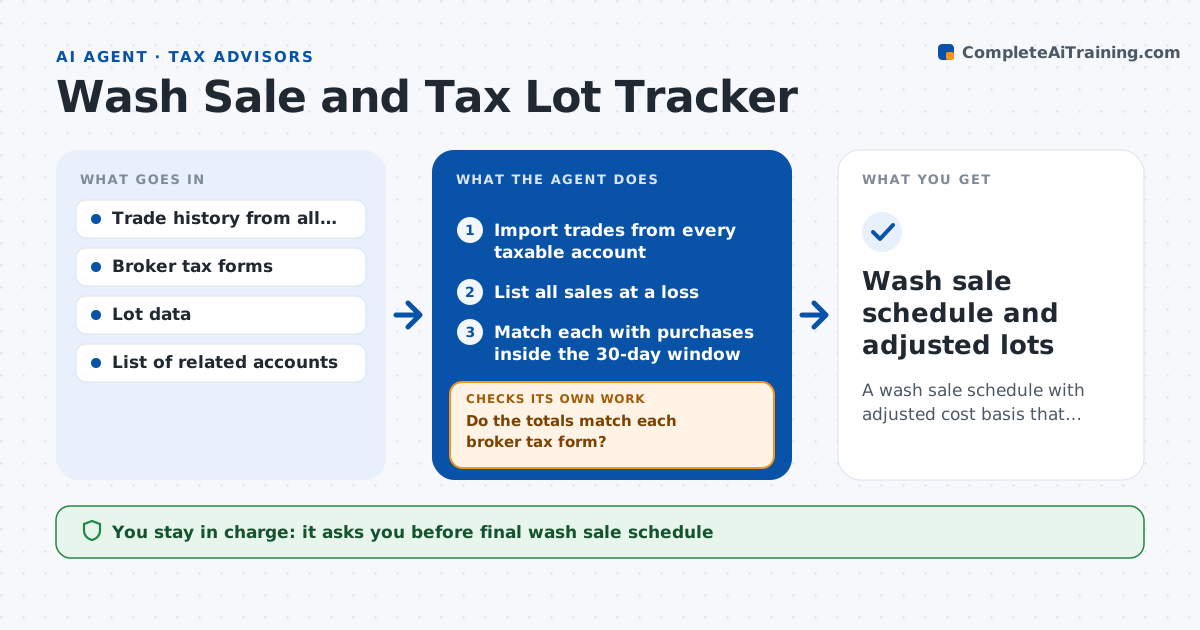
A wash sale schedule with adjusted cost basis that reconciles to broker tax forms
What it does
Wash sale rules reach across accounts, and brokers only see their own. This agent reads trade history from every taxable account the trader owns. It matches each sale at a loss with purchases of the same or substantially identical security within 30 days before or after. For every match, it disallows the loss and adds it to the cost basis of the replacement lot, then recalculates holding periods. It totals the results and checks them against the broker tax forms, investigating any difference such as a missed account or a split lot. It repeats the match until totals reconcile or the gap is explained. The trader or tax advisor approves the final schedule. Edge case: a repurchase inside an IRA is flagged for advisor review because the loss may be permanently disallowed.
How it works
Follow the arrows from top to bottom. The orange dashed arrow is the loop: when a check fails, the agent goes back and tries again.
Read the steps as a list
- Month ends or tax forms arrive
- Import trades from every taxable account
- List all sales at a loss
- Match each with purchases inside the 30-day window
- Disallow losses and adjust basis and holding period of replacement lots
- Do the totals match each broker tax form?If not: find missed accounts, split lots or partial matches and rematch. Back to step 3.
- Flag repurchases in IRAs and spouse accounts
- Is every lot's basis traceable to a trade?If not: fix the lot allocation and rerun the basis adjustment. Back to step 4.
- Trader or tax advisor approves the final scheduleThe agent waits here for your OK.
- Wash sale schedule and adjusted lots
How it decides
A sale at a loss is a wash sale when a matching purchase occurs within 30 days before or after. Partial matches are allocated by share count.
- Match purchases from 30 days before to 30 days after the sale
- Allocate partial matches by share count in first-in order
- Flag any purchase in a retirement account for advisor review
- Accept a difference to the broker form only with a written reason
Make it yours
Every agent is a starting point. You choose these settings for your own situation.
- Accounts to include
- Window length (default 30 days each side)
- Lot method (default first in, first out)
- Reconciliation tolerance (default $5)
What keeps you in control
It always asks you first
- Final wash sale schedule
Hard limits
- Does not file or change tax forms
- Does not give tax advice beyond the matching
It stops when
- Done: totals reconcile or the gap is explained and approved
- Stop: an account's trade history is missing
Set it up
We guide you through the set-up, step by step
Members get the full set-up guide for this agent. No technical skills needed: you copy, paste and upload.
- One set of instructions to paste into your AI, with the clicks for ChatGPT, Claude, Microsoft 365 Copilot, Gemini and Grok
- The agent then walks you through connecting your own data, one source at a time
- A downloadable copy with the flow chart, the rules and the full guide