AI agent for embedded systems engineers
Watchdog and Fault Recovery Test Agent
A hardware-verified record that the device recovers correctly from each defined fault
What it does
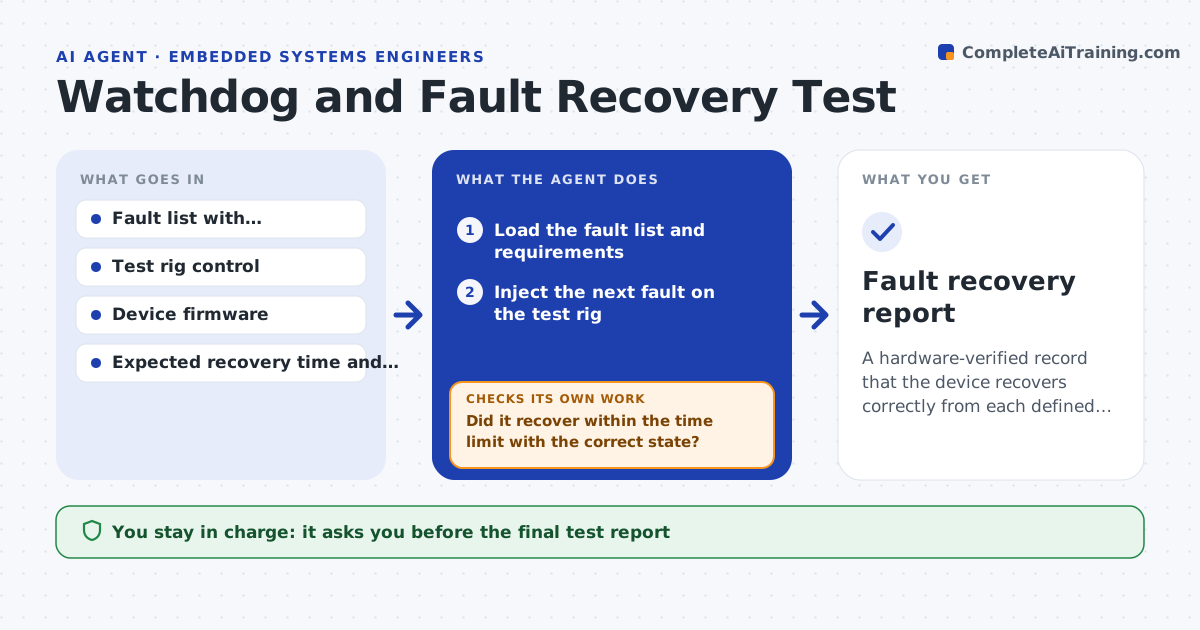
A watchdog that has never been triggered on real hardware is a hope, not a safeguard. This agent controls a test rig that can inject faults: power dips, brownouts, stalled tasks, corrupted memory and blocked communication. For each fault, it watches whether the device resets, how long it takes, and whether it comes back with its settings and state intact. It logs the result against the requirement. After a failure, it waits for the engineer's fix, retries the same fault, and then moves to the next one. It repeats each fault a set number of times to catch rare failures. The engineer approves the final test report. Edge case: a device that recovers but loses its last saved setting is recorded as a failure, not a pass.
How it works
Follow the arrows from top to bottom. The orange dashed arrow is the loop: when a check fails, the agent goes back and tries again.
Read the steps as a list
- Release candidate ready for fault testing
- Load the fault list and requirements
- Inject the next fault on the test rig
- Record whether and when the device resets and what state it restores
- Did it recover within the time limit with the correct state?If not: repeat the fault 10 times to measure how often it fails and log the evidence. Back to step 3.
- Record the pass or fail against the requirement
- Are all faults in the list tested?If not: move to the next fault and repeat. Back to step 3.
- List failures with logs and repeat counts
- Engineer approves the test reportThe agent waits here for your OK.
- Fault recovery report
How it decides
A fault passes only if the device resets within the time limit and restores the required state in every repeat.
- Repeat each fault at least 10 times
- Count a lost saved setting as a failure
- Fail any recovery slower than the stated limit
- Retest failed faults only after a new build is provided
Make it yours
Every agent is a starting point. You choose these settings for your own situation.
- Fault list and parameters
- Repeat count per fault (default 10)
- Recovery time limits
- Which state items to verify after recovery
What keeps you in control
It always asks you first
- The final test report
- Any change of requirement or time limit
Hard limits
- Operates only on the isolated test rig
- Never injects faults on devices in the field
It stops when
- Done: every fault tested with results recorded
- Stop: the rig cannot inject a fault safely
Set it up
We guide you through the set-up, step by step
Members get the full set-up guide for this agent. No technical skills needed: you copy, paste and upload.
- One set of instructions to paste into your AI, with the clicks for ChatGPT, Claude, Microsoft 365 Copilot, Gemini and Grok
- The agent then walks you through connecting your own data, one source at a time
- A downloadable copy with the flow chart, the rules and the full guide