AI agent for founders
Weekly Business Metrics Review Agent
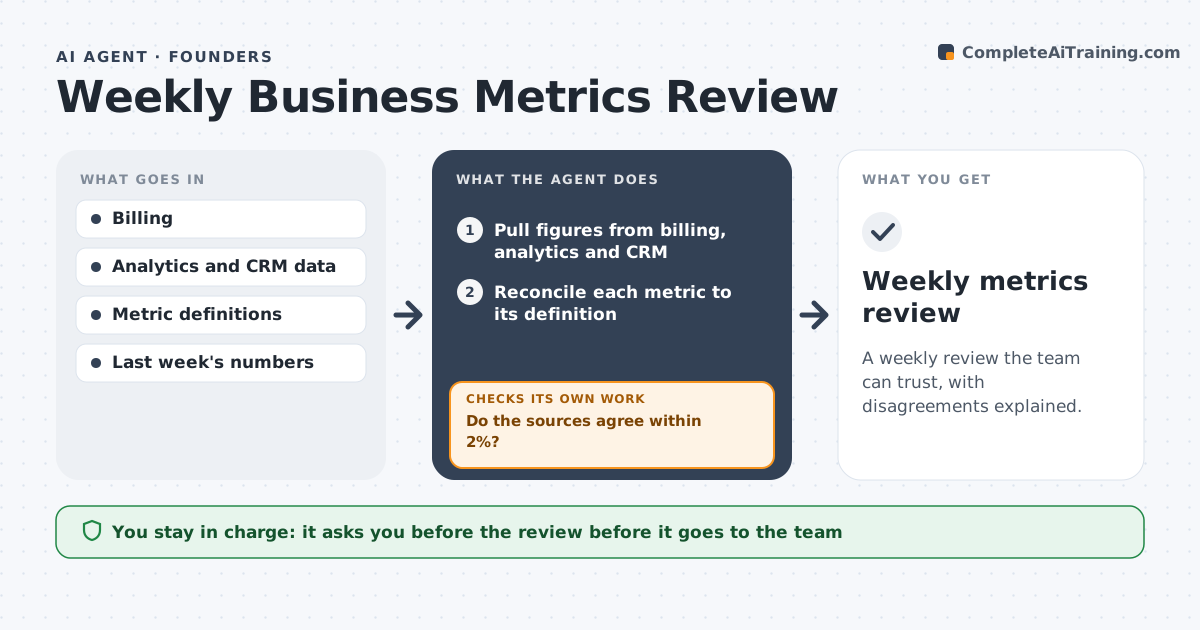
A weekly review the team can trust, with disagreements explained.
What it does
Billing says $41,000 in revenue, the analytics tool says 38,200 and the CRM shows 44,000, so the weekly meeting argues about numbers. This agent pulls figures from billing, analytics and CRM, reconciles them and flags numbers that disagree. It finds likely causes, such as refunds or timing, and writes the weekly review. It reruns after fixes. It keeps a record of why numbers differed in the past, such as timing or duplicates, so the same cause is spotted faster next week. Each review lists three things: what changed, why it changed and what to watch next. Edge case: a refund processed on Sunday appears in billing but not yet in the CRM, so the agent notes the timing. The founder approves what goes to the team.
How it works
Follow the arrows from top to bottom. The orange dashed arrow is the loop: when a check fails, the agent goes back and tries again.
Read the steps as a list
- Weekly review begins
- Pull figures from billing, analytics and CRM
- Reconcile each metric to its definition
- Do the sources agree within 2%?If not: find the cause such as timing, refunds or duplicates and adjust. Back to step 3.
- Rerun the figures after corrections
- Are remaining gaps explained?If not: list unexplained differences for the founder. Back to step 3.
- Compare with last week and flag changes
- Write the weekly review
- Founder approves what goes to the teamThe agent waits here for your OK.
- Weekly metrics review
How it decides
It uses billing as the source of truth for money and flags any metric that differs across tools by more than the set limit.
- Billing is the source for revenue.
- Flag differences over 2% between tools.
- Explain every change over 10%.
- State assumptions in a notes line.
Make it yours
Every agent is a starting point. You choose these settings for your own situation.
- Metrics included
- Tolerance (default 2%)
- Source of truth
- Review day
- Format
What keeps you in control
It always asks you first
- The review before it goes to the team
Hard limits
- Do not change source data.
- Do not share the review outside the team.
It stops when
- Done: numbers reconciled and the review approved
- Stop: a source is unavailable, so the agent notes the gap
Set it up
We guide you through the set-up, step by step
Members get the full set-up guide for this agent. No technical skills needed: you copy, paste and upload.
- One set of instructions to paste into your AI, with the clicks for ChatGPT, Claude, Microsoft 365 Copilot, Gemini and Grok
- The agent then walks you through connecting your own data, one source at a time
- A downloadable copy with the flow chart, the rules and the full guide