AI agent for sports coachs
Weekly Parent Update Agent
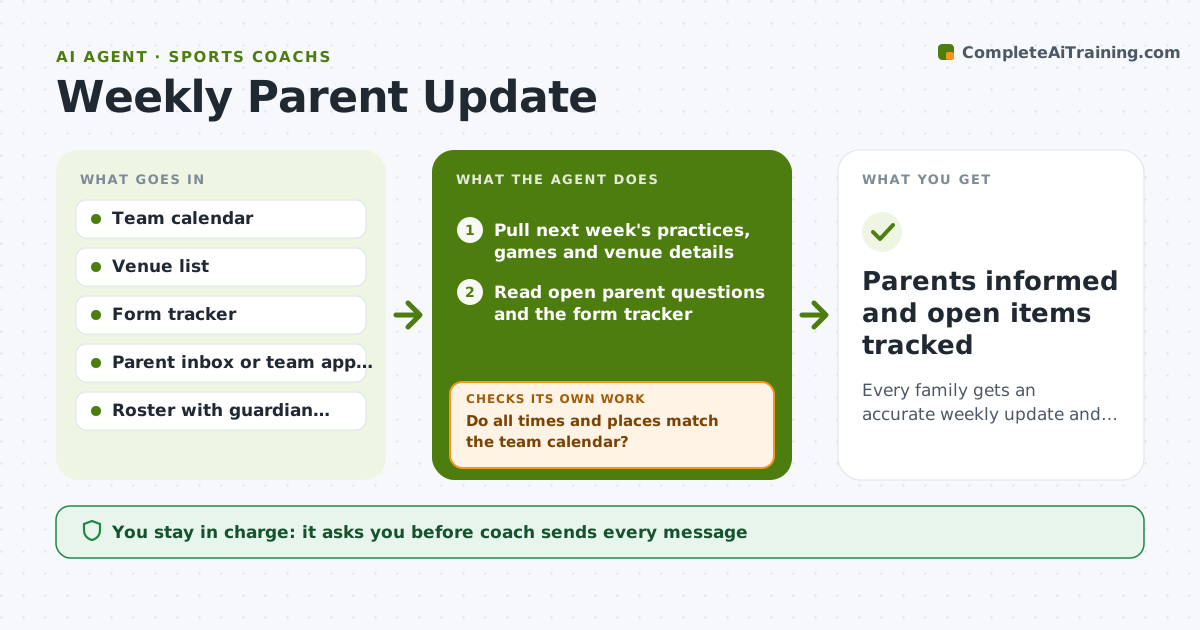
Every family gets an accurate weekly update and private reminders about their own open items
What it does
Parents want to know where to be, when, and what to bring, and they ask the same questions every week. This agent gathers the coming week's schedule, field or venue changes, open form requests and unanswered parent questions. It drafts one clear weekly update, then checks it against the team calendar so every time and location matches. If a date or venue does not match, it re-pulls the calendar and fixes the draft before going on. It also checks that every family with a missing form is named only in a private reminder, never in the group message. It decides what goes in the group note versus a private message: anything about one child goes private. The coach reviews and sends every message. Edge case: if a game is moved after the draft is approved, it prepares a short correction instead of resending the whole update.
How it works
Follow the arrows from top to bottom. The orange dashed arrow is the loop: when a check fails, the agent goes back and tries again.
Read the steps as a list
- Sunday run or calendar change
- Pull next week's practices, games and venue details
- Read open parent questions and the form tracker
- Draft the group update and private reminder drafts
- Do all times and places match the team calendar?If not: re-pull the calendar and correct the draft. Back to step 2.
- Is any single child or family named in the group message?If not: move that line into a private draft. Back to step 4.
- Coach reviews and sends group and private messagesThe agent waits here for your OK.
- Log what was sent and which questions were answered
- Parents informed and open items tracked
How it decides
Shared logistics go in the group update; anything about one child or family goes in a private draft; repeated questions become a short FAQ line.
- Anything about one child goes in a private message
- A question asked by 3 or more parents becomes a FAQ line in the update
- A change within 48 hours of an event triggers a short correction draft
- Missing forms older than 7 days get a second private reminder
Make it yours
Every agent is a starting point. You choose these settings for your own situation.
- Send day and time (default Sunday 4 pm)
- Channel for messages (default team app)
- Form reminder interval (default 7 days)
- Tone of updates (default friendly and brief)
What keeps you in control
It always asks you first
- Coach sends every message
- Coach approves any message about a player's role or playing time
Hard limits
- Never sends messages on its own
- Never mentions health, discipline or playing time in group messages
It stops when
- Done: update sent and log updated
- Stop: calendar has unresolved conflicts the coach must decide
Set it up
We guide you through the set-up, step by step
Members get the full set-up guide for this agent. No technical skills needed: you copy, paste and upload.
- One set of instructions to paste into your AI, with the clicks for ChatGPT, Claude, Microsoft 365 Copilot, Gemini and Grok
- The agent then walks you through connecting your own data, one source at a time
- A downloadable copy with the flow chart, the rules and the full guide