AI agent for music teachers
Weekly Practice Assignment Agent
Focused practice between lessons
What it does
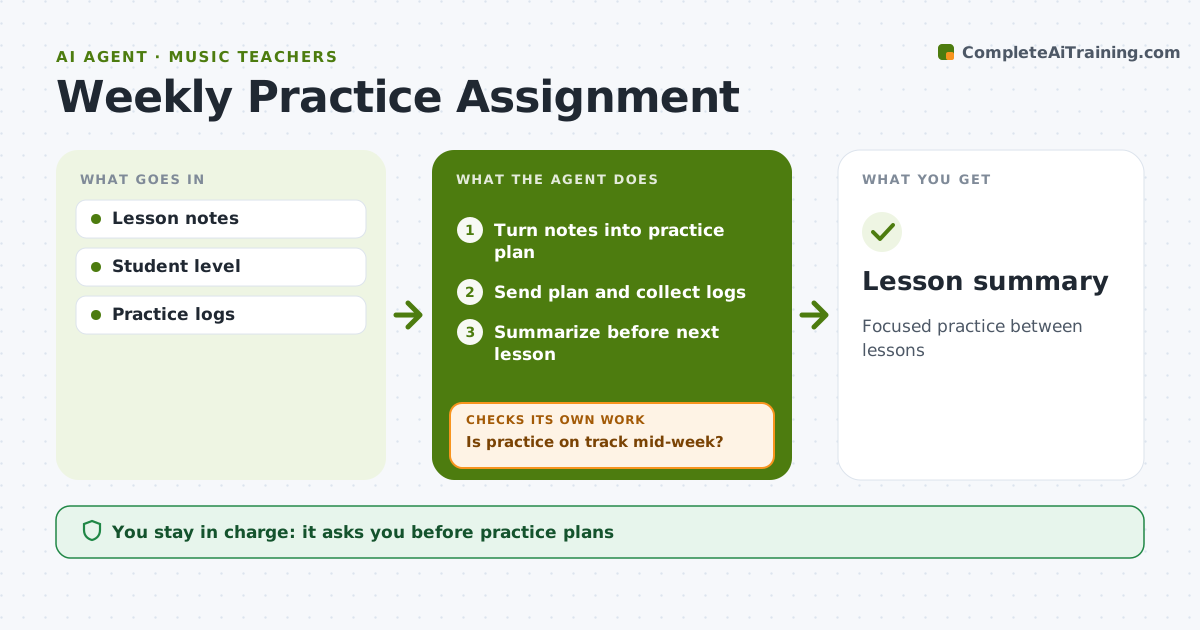
Between lessons, students need clear practice tasks and teachers rarely know what actually happened at home. After each lesson, this agent turns the teacher's notes into a short weekly practice plan with specific goals, like tempo targets or passages to isolate. The teacher approves the plan, then the agent sends it to the student or parent and collects daily practice logs or short recordings. Mid-week it checks progress against the plan. If logs show under half the planned minutes, or the student says a passage is too hard, it alerts the teacher and suggests a smaller step, such as slower tempo or hands separate. Before the next lesson it gives the teacher a summary of minutes, sticking points and recordings. The teacher decides every change to the plan. Edge case: for students under 12, messages go to the parent with simple instructions.
How it works
Follow the arrows from top to bottom. The orange dashed arrow is the loop: when a check fails, the agent goes back and tries again.
Read the steps as a list
- Lesson ends
- Turn notes into practice plan
- Teacher approves planThe agent waits here for your OK.
- Send plan and collect logs
- Is practice on track mid-week?If not: alert teacher and suggest an easier step. Back to step 4.
- Summarize before next lesson
- Lesson summary
How it decides
Logged minutes and self-ratings show whether the plan fits.
- Under half the planned minutes triggers a check-in
- Too-hard passages get smaller steps
- Parents receive messages for under-12s
Make it yours
Every agent is a starting point. You choose these settings for your own situation.
- Practice minutes target
- Log method
- Message timing
- Summary format
What keeps you in control
It always asks you first
- Practice plans
Hard limits
- Parent consent for minors
It stops when
- Done: next lesson
- Stop: student pauses lessons
Set it up
We guide you through the set-up, step by step
Members get the full set-up guide for this agent. No technical skills needed: you copy, paste and upload.
- One set of instructions to paste into your AI, with the clicks for ChatGPT, Claude, Microsoft 365 Copilot, Gemini and Grok
- The agent then walks you through connecting your own data, one source at a time
- A downloadable copy with the flow chart, the rules and the full guide