AI agent for online sellers
Weekly Profit and Fee Review Agent
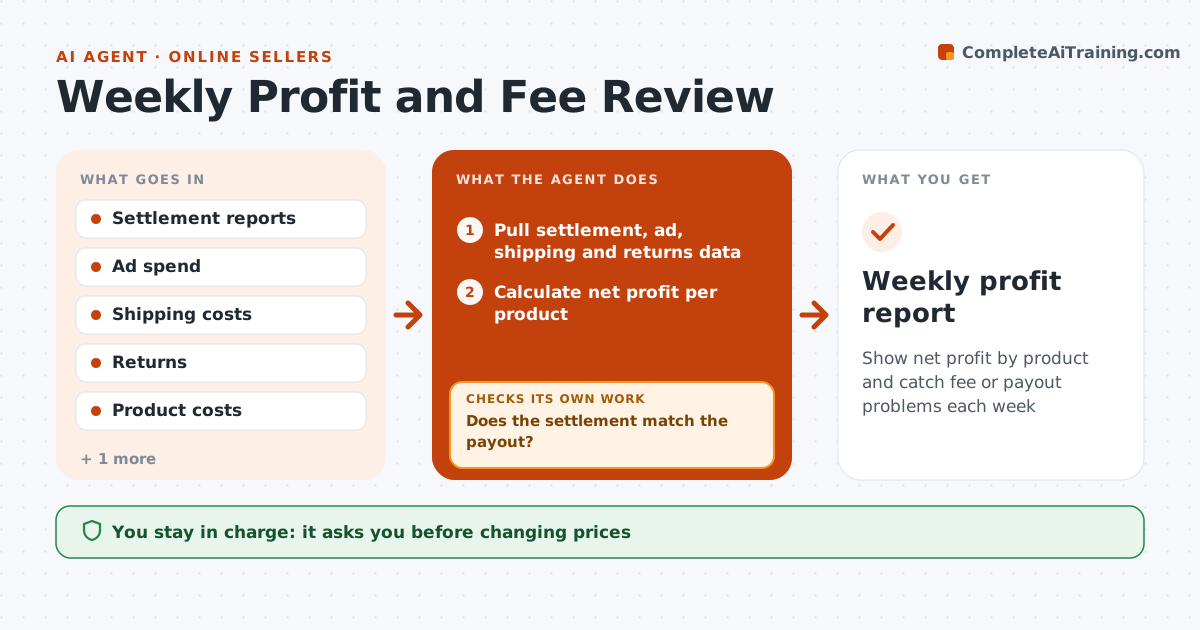
Show net profit by product and catch fee or payout problems each week
What it does
Sales totals look good, but fees, ads, shipping and returns can wipe out profit without the seller seeing it. Each week this agent pulls the marketplace settlement report, ad spend, shipping costs and returns, and calculates net profit per product: sales minus product cost, fees, ads, shipping and returns. It reconciles the settlement total with the bank payout. If they do not match, it finds the difference, such as a reserve hold, an adjustment or a fee change. New fee types are shown separately so they are not hidden. It then flags products below the 15% margin floor and suggests actions, such as pausing ads when ad cost exceeds profit or raising a price. The seller decides any price or ad change. Edge case: a new fee type in the settlement is shown on its own line.
How it works
Follow the arrows from top to bottom. The orange dashed arrow is the loop: when a check fails, the agent goes back and tries again.
Read the steps as a list
- Weekly settlement posted
- Pull settlement, ad, shipping and returns data
- Calculate net profit per product
- Reconcile settlement with bank payout
- Does the settlement match the payout?If not: find reserves, fee changes or adjustments that explain the gap. Back to step 4.
- Flag products below margin floor with suggested actions
- Seller approves any price or ad changeThe agent waits here for your OK.
- Weekly profit report
How it decides
Net profit equals sales minus product cost, fees, ads, shipping and returns. Margin below the floor is flagged.
- Margin floor 15% by default
- New fee types shown separately
- Suggest ad pause when ad cost exceeds profit
Make it yours
Every agent is a starting point. You choose these settings for your own situation.
- Margin floor
- Channels included
- Report day
- Cost data sources
What keeps you in control
It always asks you first
- Changing prices
- Changing ad budgets
Hard limits
- Never changes prices or ads itself
- Never moves money
It stops when
- Done: report delivered
- Stop: settlement report missing
Set it up
We guide you through the set-up, step by step
Members get the full set-up guide for this agent. No technical skills needed: you copy, paste and upload.
- One set of instructions to paste into your AI, with the clicks for ChatGPT, Claude, Microsoft 365 Copilot, Gemini and Grok
- The agent then walks you through connecting your own data, one source at a time
- A downloadable copy with the flow chart, the rules and the full guide