
AI agent for language teachers
Writing Error Pattern Agent
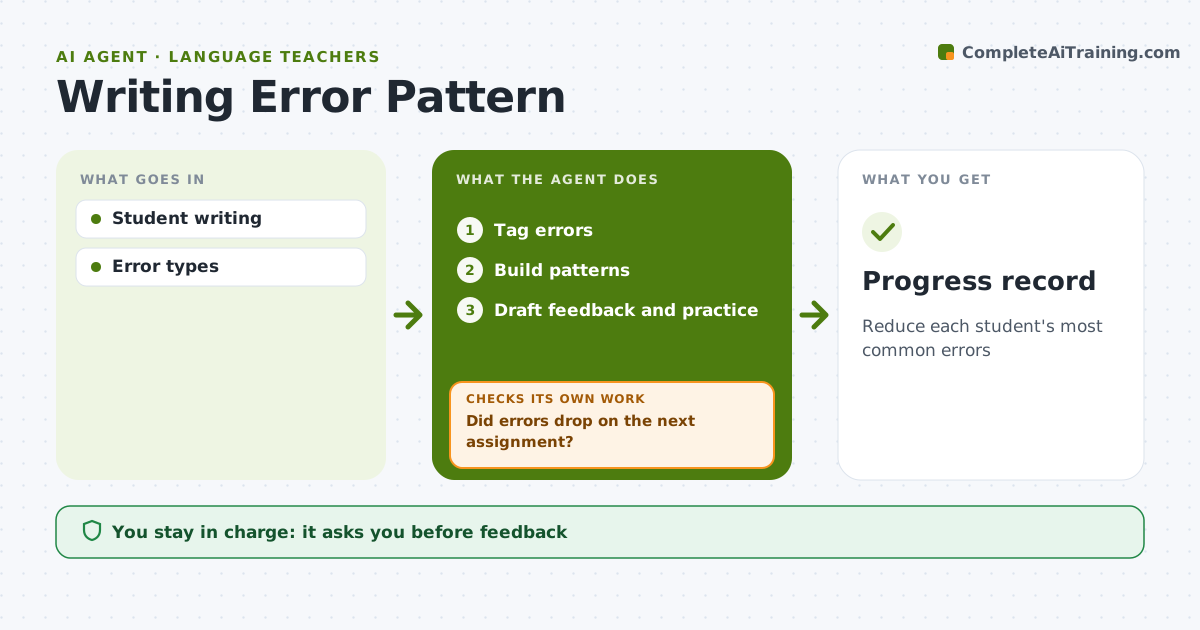
Reduce each student's most common errors
What it does
Language learners repeat the same errors, such as verb agreement, article use or word order, and correcting each one by hand does not show the pattern. This agent reads each student's writing, tags errors by type, and builds a pattern profile per student and per class. It drafts feedback that focuses on each student's top two error patterns instead of marking everything, and creates short targeted practice for them. The teacher approves feedback and grades. On the next writing assignment, it checks whether those errors dropped. If they did not, it changes the practice type, for example from gap fills to sentence rewriting. Edge case: forms that are regional variants rather than errors, such as British and American spellings, are not counted.
How it works
Follow the arrows from top to bottom. The orange dashed arrow is the loop: when a check fails, the agent goes back and tries again.
Read the steps as a list
- Assignment submitted
- Tag errors
- Build patterns
- Draft feedback and practice
- Teacher approves feedbackThe agent waits here for your OK.
- Did errors drop on the next assignment?If not: change practice type. Back to step 3.
- Progress record
How it decides
Top error types by frequency.
- Top two patterns only
- Variants not counted
- Practice short
Make it yours
Every agent is a starting point. You choose these settings for your own situation.
- Error types
- Feedback focus
- Practice format
- Language
What keeps you in control
It always asks you first
- Feedback
- Grades
Hard limits
- No grades by agent
It stops when
- Done: term
- Stop: student leaves
Set it up
We guide you through the set-up, step by step
Members get the full set-up guide for this agent. No technical skills needed: you copy, paste and upload.
- One set of instructions to paste into your AI, with the clicks for ChatGPT, Claude, Microsoft 365 Copilot, Gemini and Grok
- The agent then walks you through connecting your own data, one source at a time
- A downloadable copy with the flow chart, the rules and the full guide



