AI agent for fundraisers
Year-End Appeal Readiness Agent
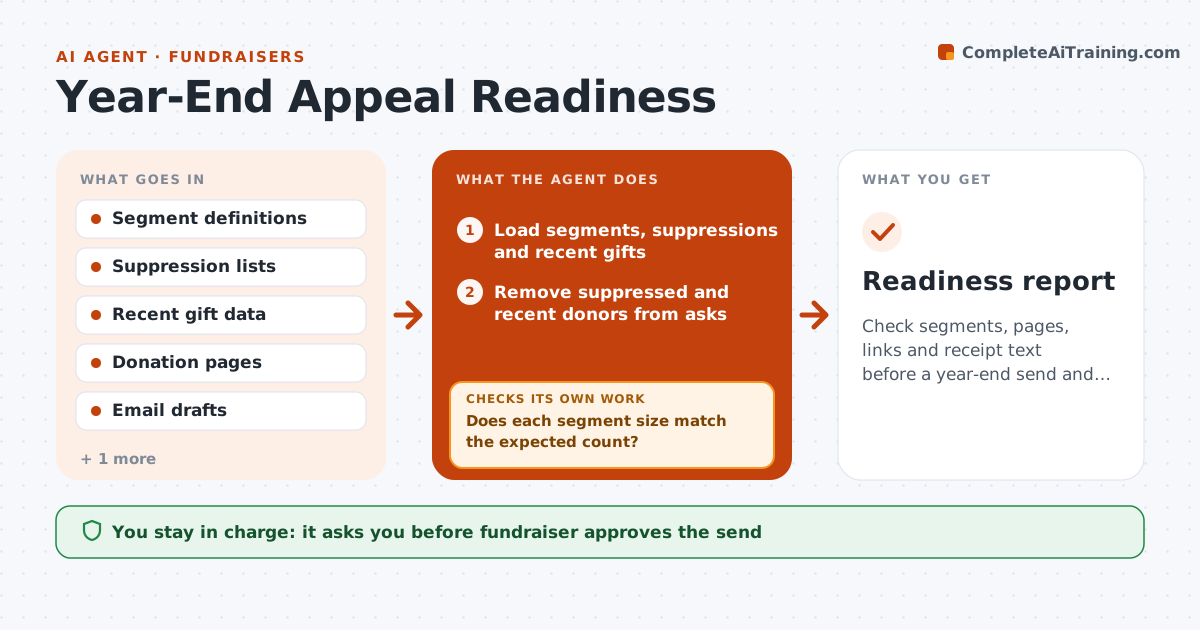
Check segments, pages, links and receipt text before a year-end send and recheck after fixes
What it does
Year-end sends go out with wrong segments or broken pages, and the cost is high. The agent checks each segment against suppression lists and recent gifts so donors who just gave are not asked again. It opens the donation pages and tests every link and form on desktop and mobile. It verifies the receipt wording, tax details and the right organization name. It gives the fundraiser a list of failures and reruns all checks after fixes. It also compares send counts with the expected audience size. The fundraiser approves the send. Edge case: a donor who gave yesterday is still in the ask segment, and the agent removes them and reruns counts.
How it works
Follow the arrows from top to bottom. The orange dashed arrow is the loop: when a check fails, the agent goes back and tries again.
Read the steps as a list
- Send is two weeks away
- Load segments, suppressions and recent gifts
- Remove suppressed and recent donors from asks
- Does each segment size match the expected count?If not: Investigate the difference and rebuild the segment. Back to step 3.
- Test every link and donation form on desktop and mobile
- Test a small payment and receipt in a test mode
- Do pages, forms and receipt text pass?If not: List failures for the owner and retest after the fix. Back to step 5.
- Verify tax and legal text in the receipt
- Fundraiser approves the sendThe agent waits here for your OK.
- Readiness report
How it decides
A send is ready only when segments, links, forms and receipt text pass every check.
- Exclude gifts in the last 14 days from the ask
- Fail the check if any link returns an error
- Use test mode only for payments
- Re-run all checks after any fix
Make it yours
Every agent is a starting point. You choose these settings for your own situation.
- Recent gift window (default 14 days)
- Segments
- Pages to test
- Receipt wording
What keeps you in control
It always asks you first
- Fundraiser approves the send
- Fundraiser approves the final segments
Hard limits
- Never send without approval
- Never use real payment cards in tests
It stops when
- Done: all checks pass and the send is approved
- Stop: the payment page fails and cannot be fixed before send
Set it up
We guide you through the set-up, step by step
Members get the full set-up guide for this agent. No technical skills needed: you copy, paste and upload.
- One set of instructions to paste into your AI, with the clicks for ChatGPT, Claude, Microsoft 365 Copilot, Gemini and Grok
- The agent then walks you through connecting your own data, one source at a time
- A downloadable copy with the flow chart, the rules and the full guide