AI agent for payroll administrators
Year-End W-2 Readiness Agent
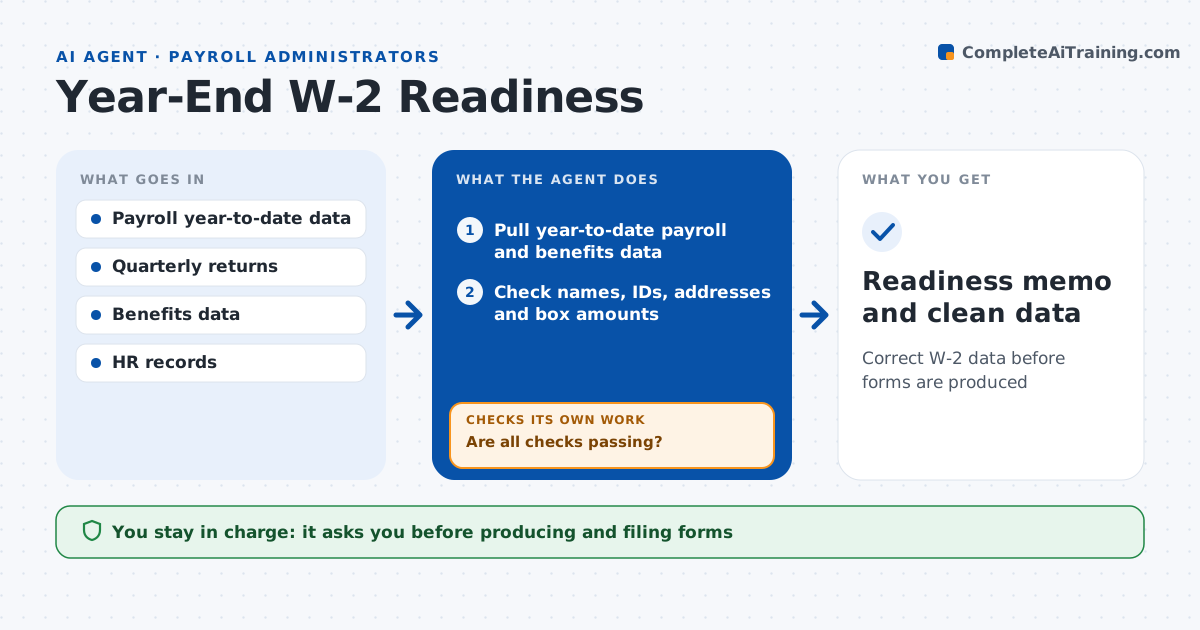
Correct W-2 data before forms are produced
What it does
W-2 errors mean corrected forms, unhappy employees and penalties, and most are caught too late in January. From November, this agent checks the data that will go on W-2 forms each week. It confirms employee names, addresses and tax ID formats, checks taxable fringe benefits and third-party sick pay were entered, verifies retirement and health amounts are in the right boxes, and ties year totals to the four quarterly returns. Every problem goes to an issue list with the suggested fix. It reruns the checks after each fix. In January it drafts the address confirmation notice and the final readiness memo. The administrator approves before forms are produced. Edge case: a former employee's address is a known returned-mail address, so the agent flags it for an update instead of printing it.
How it works
Follow the arrows from top to bottom. The orange dashed arrow is the loop: when a check fails, the agent goes back and tries again.
Read the steps as a list
- Weekly year-end check
- Pull year-to-date payroll and benefits data
- Check names, IDs, addresses and box amounts
- Tie year totals to quarterly returns
- Are all checks passing?If not: add issues to the fix list and rerun after fixes. Back to step 3.
- Administrator approves form productionThe agent waits here for your OK.
- Readiness memo and clean data
How it decides
It runs a fixed set of checks and treats any failed check as an open issue until fixed.
- Fringe benefits missing for listed employees: flag
- Year total differs from returns: investigate
- Returned mail address: request update
Make it yours
Every agent is a starting point. You choose these settings for your own situation.
- Checks to run
- Weekly run day
- Notice wording
- Who approves production
What keeps you in control
It always asks you first
- Producing and filing forms
- Sending notices to employees
Hard limits
- Never sends forms to employees
- Never edits pay history
It stops when
- Done: all checks pass
- Stop: deadline near with open issues, escalate
Set it up
We guide you through the set-up, step by step
Members get the full set-up guide for this agent. No technical skills needed: you copy, paste and upload.
- One set of instructions to paste into your AI, with the clicks for ChatGPT, Claude, Microsoft 365 Copilot, Gemini and Grok
- The agent then walks you through connecting your own data, one source at a time
- A downloadable copy with the flow chart, the rules and the full guide