AI agent for urban planners
Zoning Text Amendment Consistency Agent
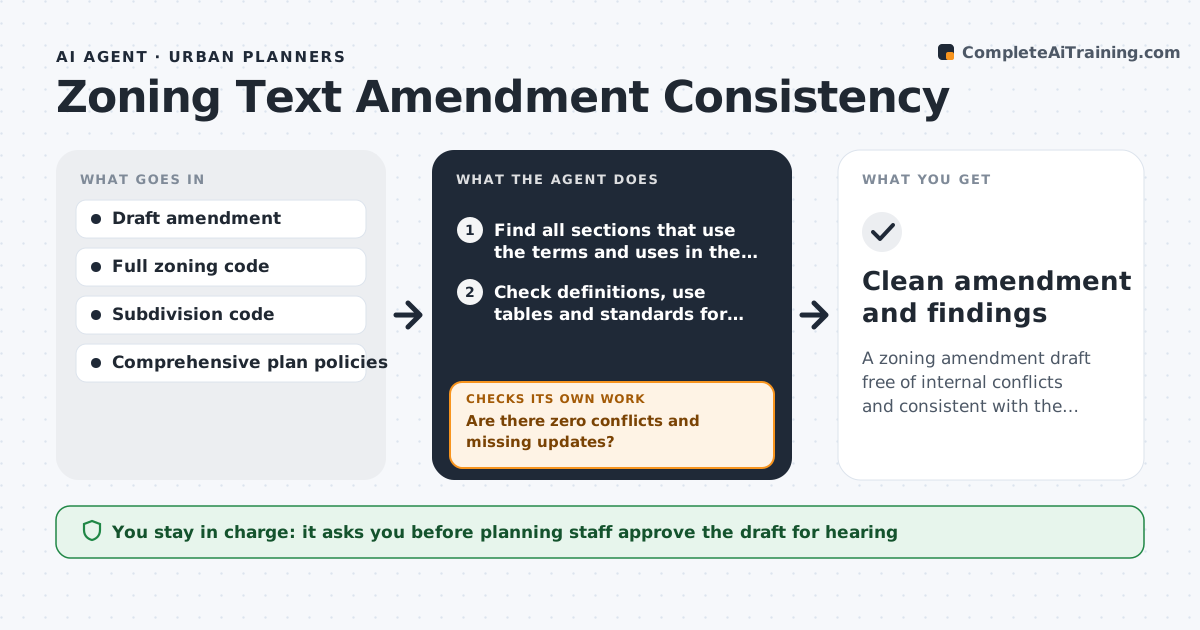
A zoning amendment draft free of internal conflicts and consistent with the comprehensive plan
What it does
When a city changes its zoning code, such as allowing accessory dwelling units, the new text must fit with definitions, use tables, parking rules and the comprehensive plan. Small gaps lead to permits nobody can issue. This agent reads the draft amendment and finds every section that uses its terms and uses. It checks definitions, use tables and standards for conflicts, and compares the amendment with comprehensive plan policies, listing those that support or oppose it. Any term defined two ways is an error. If any conflict or missing update remains, it sends the issue list to the planner and re-checks the edited draft. It then drafts consistency findings for the staff report. Staff and the planning commission decide the content. Edge case: a term defined differently in the subdivision code is flagged as a cross-code conflict.
How it works
Follow the arrows from top to bottom. The orange dashed arrow is the loop: when a check fails, the agent goes back and tries again.
Read the steps as a list
- Draft amendment saved
- Find all sections that use the terms and uses in the amendment
- Check definitions, use tables and standards for conflicts
- Compare the amendment with comprehensive plan policies
- Are there zero conflicts and missing updates?If not: send the issue list to the planner and re-check the edited draft. Back to step 2.
- Draft the consistency findings for the staff report
- Planning staff approve for commission hearingThe agent waits here for your OK.
- Clean amendment and findings
How it decides
Every term, use and standard in the amendment is traced to all places it appears. Any mismatch or untouched dependent section is reported.
- Any term defined two ways is an error
- Use tables must match new permissions
- Plan policies supporting or opposing are listed
Make it yours
Every agent is a starting point. You choose these settings for your own situation.
- Codes to include in the search
- Plan policies to test against
- Issue severity levels
- Output format for staff report
What keeps you in control
It always asks you first
- Planning staff approve the draft for hearing
- Commission and council decide adoption
Hard limits
- Does not decide policy
- Never publishes notices
It stops when
- Done: no open conflicts
- Stop: amendment scope not set
Set it up
We guide you through the set-up, step by step
Members get the full set-up guide for this agent. No technical skills needed: you copy, paste and upload.
- One set of instructions to paste into your AI, with the clicks for ChatGPT, Claude, Microsoft 365 Copilot, Gemini and Grok
- The agent then walks you through connecting your own data, one source at a time
- A downloadable copy with the flow chart, the rules and the full guide