About Aera Browser
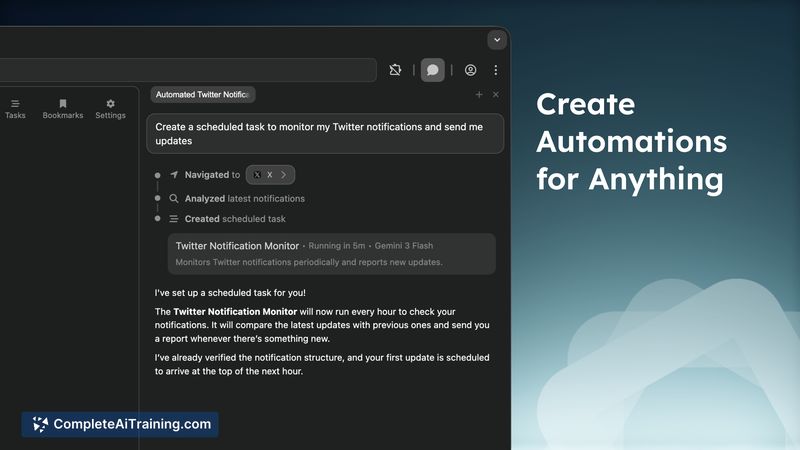
Aera Browser is a web browser built specifically to automate real browser-based workflows. It lets users create and schedule tasks that run in the background, preserving context, executing steps, and generating reports while keeping browsing data local to the device.
Review
Aera Browser focuses on making browser automation practical for everyday tasks by combining a built-in automation engine with integrations that let agent systems take direct action. It is currently in early access, offers a free tier, and positions privacy as a priority by keeping history local and using zero-data-retention practices for paid tiers.
Key Features
- Background workflow automation: create tasks, schedule runs, track context across executions, and produce completion reports and notifications.
- MCP integration: connect external agent tools so agents can execute browser actions rather than only providing suggestions.
- Local-first privacy: browsing and chat history remain local, inference is handled by model providers, and subscription plans use zero data retention.
- Human-like interaction engine: browser-level input emulation for clicking and typing to reduce automated detection and, on subscription tiers, the ability to solve many captchas visually.
- Chromium foundation: rebuilt on Chromium for deeper access to browser internals and improved compatibility compared with earlier builds.
Pricing and Value
Aera offers a free tier for getting started and testing basic automations. Paid subscriptions unlock higher-performance models, vision tools, and advanced automation capabilities such as broader captcha handling and tighter integrations with agent tools. The value proposition is strongest for users who need repeatable web tasks automated with reliable context tracking and who want to connect coding agents to real execution pipelines; casual single-session browsing users may gain less immediate benefit.
Pros
- Practical automation flows that run in the background and report results.
- Direct integration with agent tools so agents can take actions instead of only recommending them.
- Privacy-forward approach with local history and zero data retention for subscriptions.
- Engineered interactions that mimic human inputs, helping with sites that block simple programmatic automation.
- Built on Chromium for better compatibility and lower risk of being flagged compared with extension-based approaches.
Cons
- Early access status and solo development mean the product can still be rough around the edges and may encounter bugs or missing features.
- Advanced capabilities such as comprehensive captcha solving and high-performance model access require a subscription.
- Automating interactions with websites carries policy and reliability risks-some sites may still block or change behavior over time.
Overall, Aera Browser is best suited for users who want to automate repetitive browser tasks, connect agentic tools to real execution pipelines, or simplify deployment steps without exposing data to external servers. It is a good fit for early adopters, automation enthusiasts, and teams that prioritize privacy and task automation; users seeking a polished mainstream browser experience with full vendor support may want to wait for further maturation.
Open 'Aera Browser' Website
Your membership also unlocks: