
About APX Terminal
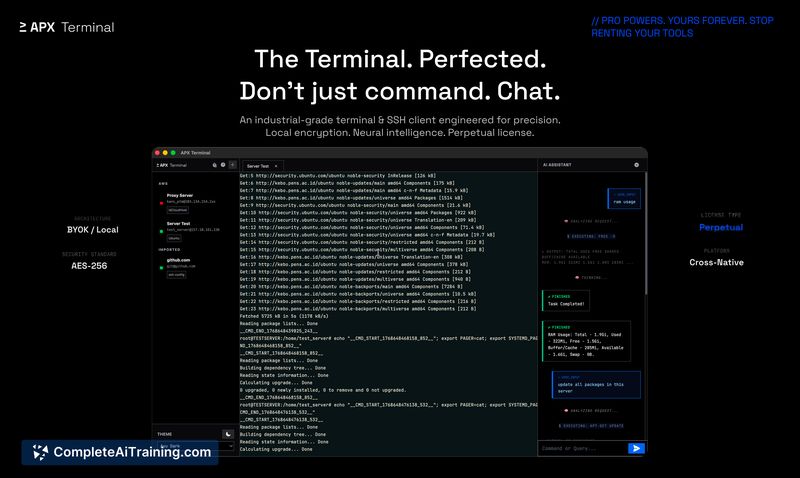
APX Terminal is an encrypted terminal and SSH client with a built-in AI assistant, available for macOS, Windows, and Linux. It combines traditional terminal workflows with natural-language controls and context-aware assistance to help diagnose errors and interact with both local and remote systems.
Review
APX Terminal aims to modernize the developer terminal by adding an AI layer that reads terminal output and suggests fixes or next steps. Its focus on privacy and local key storage, along with a unified interface for local shells and SSH sessions, makes it a compelling option for engineers who work across multiple machines and environments.
Key Features
- Context-aware AI assistant that reads the active terminal buffer and highlights likely causes and remedies for errors.
- Unified interface for local shells (Zsh/PowerShell) and remote SSH servers, reducing the need to switch tools.
- Model-agnostic architecture with a bring-your-own-keys approach so you can connect to preferred AI providers while keeping keys local.
- GPU-accelerated rendering and processing to handle large log streams and complex outputs smoothly.
- Local encryption of credentials using OS-level secure storage and a perpetual license option for purchase.
Pricing and Value
APX Terminal offers free options alongside paid plans, and it lists a perpetual license for buyers who prefer a one-time purchase. The product emphasizes privacy-first handling of API keys through local OS credential storage, which adds value for teams concerned about data exposure. For organizations that need offline or local control over API keys and want a single tool for local and remote workflows, the pricing model can be appealing, though exact costs should be compared to competing terminal and SSH solutions based on required features and scale.
Pros
- Context-aware assistance can speed up debugging by surfacing relevant fixes from live error output.
- Combines local and SSH workflows in one app, simplifying multi-host workstreams.
- Privacy-friendly BYOK approach and use of OS-level encryption for stored keys.
- Good performance handling large logs thanks to GPU-accelerated rendering.
- Perpetual license option for teams preferring one-time purchases over subscriptions.
Cons
- Initial setup requires configuring API keys and trusting third-party models, which can be a barrier for some users.
- As a newly launched tool, some integrations or enterprise features may still be maturing compared with longer-established terminal clients.
- Relying on external models (even with local keys) means offline functionality is limited unless local models are used.
Overall, APX Terminal is best suited for DevOps engineers, SREs, and senior developers who manage multiple servers and want faster, context-driven troubleshooting within a single interface. It performs particularly well for teams that prioritize privacy and prefer to retain control over their API keys while streamlining local and remote terminal workflows.
Open 'APX Terminal' Website
Your membership also unlocks:





















