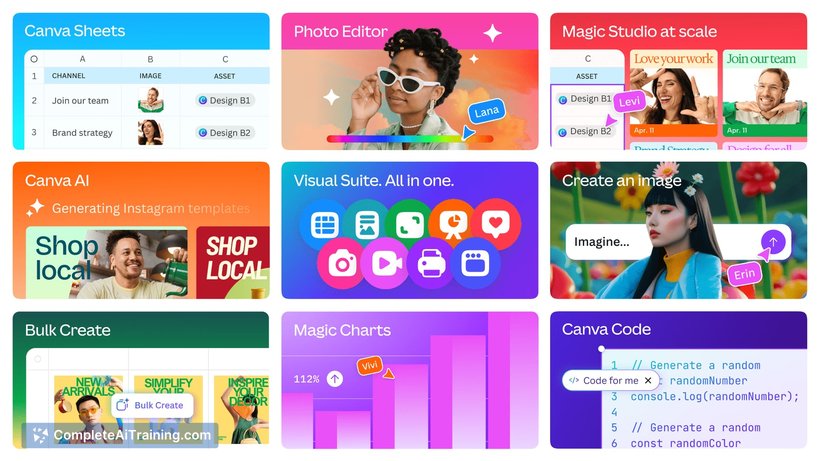
About Canva Visual Suite 2.0
Canva Visual Suite 2.0 is an all-in-one design platform that integrates a variety of creative tools into a single workspace. It enables users to create presentations, videos, whiteboards, and websites seamlessly without switching between multiple applications. This suite combines powerful AI-driven features with intuitive design capabilities to streamline the creative process.
Review
Canva Visual Suite 2.0 represents a significant evolution in design software by unifying diverse creative workflows into one platform. Its integration of AI tools and no-code solutions simplifies complex tasks, making it accessible for both beginners and professionals. This update positions the suite as a versatile and efficient choice for a wide range of design and interactive projects.
Key Features
- Unified workspace for creating presentations, videos, whiteboards, and websites without switching tools.
- AI-powered creative assistant that aids brainstorming, content generation, and design refinement.
- No-code interactive experience builder for creating tools like learning games, personalized plans, and calculators.
- Seamless integration of design and coding capabilities to enhance interactivity and engagement.
- Extensive template library and intuitive drag-and-drop interface for rapid project development.
Pricing and Value
The suite offers a free tier that provides access to many core features, making it accessible for casual users and small projects. For more advanced capabilities, including premium templates, enhanced AI tools, and additional collaboration options, paid subscription plans are available. The value proposition lies in consolidating multiple design and interactive tools into one platform, reducing the need for multiple software subscriptions and improving workflow efficiency.
Pros
- Comprehensive all-in-one platform that eliminates tool-hopping.
- AI features that significantly speed up creative ideation and production.
- User-friendly interface suitable for both beginners and experienced designers.
- Powerful no-code interactive content creation opens new possibilities without technical barriers.
- Strong community and continuous updates enhance usability and feature set.
Cons
- Advanced features may require a paid subscription, which could be a barrier for some users.
- Some users might experience a learning curve when exploring the full AI and coding capabilities.
- Performance can vary depending on project complexity and internet connection quality.
In conclusion, Canva Visual Suite 2.0 is ideally suited for marketers, educators, startups, and creative professionals seeking an integrated design and interactive content platform. Its AI enhancements and no-code tools make it especially valuable for those looking to accelerate their creative workflows without deep technical expertise. Whether working on quick presentations or complex interactive projects, this suite offers a compelling balance of power and accessibility.
Open 'Canva Visual Suite 2.0' Website
Your membership also unlocks: