
About CodeViz (YC S24)
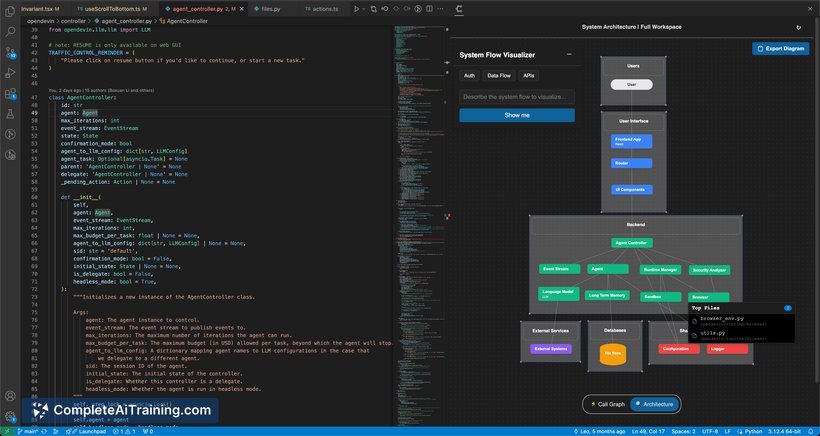
CodeViz (YC S24) is a Visual Studio Code extension that creates interactive visual maps of your codebase to simplify code comprehension and navigation. It offers on-demand diagrams ranging from system architecture to detailed function call graphs, helping developers quickly gain context without sifting through lines of code.
Review
CodeViz addresses a common challenge faced by developers: spending excessive time reading code to understand its structure and flow. By transforming source code into visual diagrams directly within the IDE, it streamlines the process of exploring complex or unfamiliar codebases. This tool is particularly useful for engineers onboarding to new projects or contributing to open-source repositories.
Key Features
- Interactive Call Graphs: Visualize upstream and downstream function calls with clickable nodes, allowing easy navigation through the call stack.
- AI-Powered Architecture Diagrams: Automatically generate C4-style nested diagrams that represent system architecture at container and component levels using AI analysis.
- On-Demand System Flow Visualizer: Request custom diagrams to understand data flow, file interactions, or specific parts of the codebase when needed.
- Seamless VS Code Integration: Works as an extension within the VS Code editor, making diagrams accessible without switching tools.
- Scalable for Any Project Size: Suitable for individual developers as well as large teams managing complex codebases.
Pricing and Value
CodeViz offers a free tier that includes basic visual mapping features, allowing users to generate and interact with call graphs and simple diagrams. For more advanced capabilities, such as detailed AI-generated architecture diagrams, there is a paid subscription tier. This pricing model provides flexibility for users to try the tool at no cost and upgrade if their workflow demands richer visualizations. Overall, the value proposition lies in significantly reducing the time spent understanding code structures, which can improve productivity during development and onboarding.
Pros
- Enhances code comprehension by providing clear, interactive visualizations within the IDE.
- AI-generated architecture diagrams help reveal system-level design automatically.
- On-demand diagrams offer flexibility to explore specific code flows or file interactions.
- Easy to install and use as a VS Code extension, integrating smoothly with existing workflows.
- Supports a wide range of project sizes, from small personal projects to enterprise codebases.
Cons
- Advanced features require a paid subscription, which might not fit all budgets.
- Effectiveness depends on the complexity and language support of the codebase; some niche languages or frameworks may have limited visualization quality.
- New users may experience a learning curve to fully leverage interactive diagrams and AI features.
CodeViz is an excellent choice for developers and teams who frequently engage with large or unfamiliar codebases and want to reduce the cognitive load of reading code. It is particularly beneficial for onboarding new engineers and contributors who need to quickly understand project structure. Those looking for a convenient way to visualize code interactions directly within VS Code will find this tool valuable.
Open 'CodeViz (YC S24)' Website
Your membership also unlocks:






















