About Design in Figma using Cursor Agent + MCP
Design in Figma using Cursor Agent + MCP connects an AI assistant to Figma via the Model Context Protocol (MCP), enabling natural-language control of Figma files. It supports creating and updating frames, layers, and components with bidirectional sync between code and Figma designs.
Review
Design in Figma using Cursor Agent + MCP focuses on automating repetitive design tasks and improving collaboration between design and development. Setup options include local or cloud deployment, and the tool communicates via WebSocket for real-time updates and progress tracking.
Key Features
- Natural-language control: read and modify Figma designs programmatically using plain language commands.
- Real-time bidirectional sync: updates propagate between code and Figma with WebSocket-based communication.
- Bulk and batch operations: update text across many elements, apply component overrides, and manage annotations at scale.
- Design manipulation: create frames, rectangles, text, clone/move/resize nodes, adjust layouts, colors, and export images (PNG, JPG, SVG, PDF).
- Flexible deployment and openness: deploy to cloud in minutes or run locally, deploy on a free hosting tier, MIT-licensed open source, and 40+ MCP tools for wide Figma API coverage.
Pricing and Value
The core offering is free to deploy, with documented options to host on a free cloud tier. Being open source under an MIT license increases transparency and lowers adoption cost. For teams that spend time on repetitive updates, the tool can save hours of manual work and reduce inconsistencies between design and implementation.
Pros
- Speeds up repetitive design tasks like bulk text updates and component propagation.
- Maintains alignment between code and design with bidirectional syncing and live updates.
- Open source and flexible deployment-cloud or local-suits different workflows and security needs.
- Supports a wide range of Figma operations, including exports and layout edits.
Cons
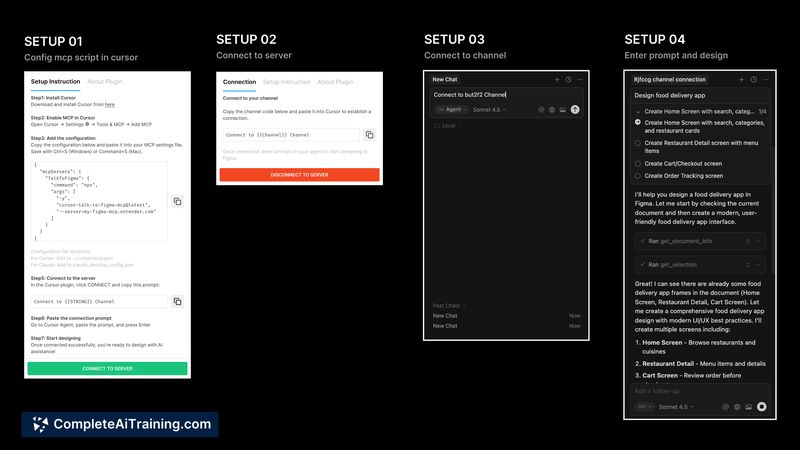
- Initial setup requires deploying a WebSocket server and installing multiple components, which can be technical for non-developers.
- Without careful scope or permission controls, automated commands can produce unintended changes across files or pages.
- Effective use depends on learning good natural-language prompts and establishing guardrails for team workflows.
Design in Figma using Cursor Agent + MCP is best for design teams, developers maintaining design systems, and product teams that need to automate frequent updates. It fits users comfortable with a small deployment and who want tighter synchronization between code and Figma assets.
Open 'Design in Figma using Cursor Agent + MCP' Website
Your membership also unlocks: