About DVC Extension for VS Code
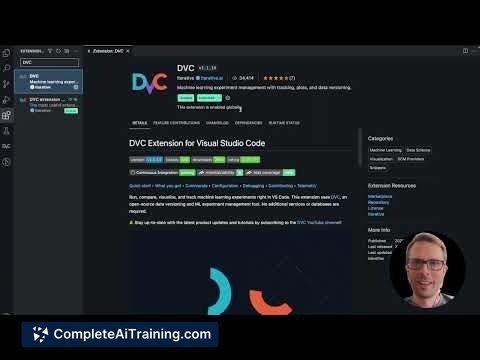
The DVC Extension for VS Code is a tool that integrates Data Version Control (DVC) functionality directly into the Visual Studio Code environment. It allows developers and data scientists to manage machine learning projects with version control features seamlessly embedded within their code editor. This extension streamlines workflows by combining data, code, and experiments management in one place.
Review
The DVC Extension for VS Code offers a convenient way to manage data science and machine learning projects without leaving the familiar interface of VS Code. It supports tracking datasets, models, and experiments while providing visualization and command execution features. This integration simplifies the process of versioning large files and collaborating across teams.
Key Features
- Integration with DVC commands directly accessible from VS Code’s command palette.
- Visualization of data pipelines and experiment results within the editor.
- Ability to track and compare multiple experiment runs easily.
- Support for Git integration to manage code and data changes together.
- Interactive UI components to stage, commit, and push DVC tracked files without leaving VS Code.
Pricing and Value
The DVC Extension for VS Code is available free of charge as an open-source tool. Its value lies in streamlining the management of machine learning workflows by integrating powerful data version control features into a widely used development environment. For teams and individual users working with data science projects, it offers significant efficiency gains without additional costs.
Pros
- Seamless integration with VS Code enhances developer productivity.
- Free and open-source, making it accessible to a wide range of users.
- Provides clear visualization of experiments and pipelines.
- Supports collaboration by coordinating data and code versioning.
- Reduces context switching by handling DVC operations within the editor.
Cons
- Requires familiarity with both DVC and VS Code to fully utilize its features.
- Limited to users who already use VS Code as their primary editor.
- Some advanced DVC features might still require command line usage outside the extension.
This extension is well suited for data scientists, machine learning engineers, and developers who want to integrate data version control seamlessly into their coding environment. It is most beneficial for those already using VS Code and looking to streamline their project management without switching tools frequently.
Open 'DVC Extension for VS Code' Website
Your membership also unlocks: