
About: Excalidraw
Excalidraw is an innovative online drawing and collaboration platform designed to empower users to create and share artwork seamlessly. This versatile tool enables real-time collaboration, allowing multiple users to work together on drawings simultaneously, making it ideal for brainstorming sessions, team projects, and educational purposes.
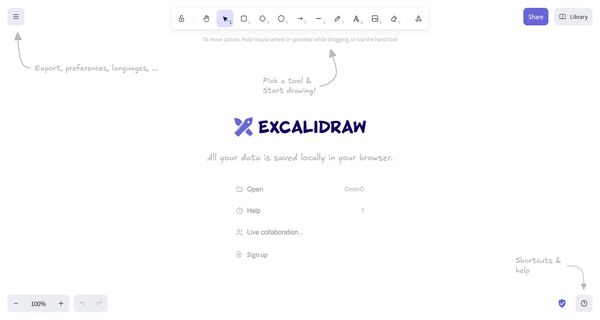
Excalidraw offers a diverse selection of shapes, customizable library items, and intuitive canvas actions, facilitating a smooth and efficient drawing experience. Users can navigate the workspace easily using mouse wheel or spacebar for canvas movement and take advantage of the Zen mode to minimize distractions, fostering creativity and focus.
The application is particularly valuable for graphic designers, educators, and remote teams seeking a straightforward yet effective way to visualize ideas. Its unique combination of collaboration features and user-friendly interface sets Excalidraw apart, making it an essential tool for anyone looking to enhance their artistic expression and teamwork capabilities. Exporting finished artwork in various formats further enhances its usability across different platforms and projects.

Review: Excalidraw
Introduction
Excalidraw is an online drawing and collaboration tool designed for users who want a simple and intuitive platform to create, share, and export artwork. Whether you are a creative professional, a team working on visual projects, or an educator looking for an engaging digital whiteboard, Excalidraw offers a straightforward interface that emphasizes ease-of-use and real-time interactivity. This review explores the tool’s core features and assesses its strengths and weaknesses to help you decide if it fits your creative or collaborative needs.
Key Features
Excalidraw provides several functionalities that make it a competitive option in the online drawing space. Some of the core features include:
- Online Drawing Canvas: A simple yet versatile drawing interface that enables users to create various types of artwork.
- Real-Time Collaboration: Allows multiple users to work on a drawing simultaneously, making it ideal for team projects and brainstorming sessions.
- Extensive Toolset: Offers a wide range of shapes, library items, and canvas actions that can be accessed through shortcuts, ensuring a smooth creative workflow.
- Flexible Canvas Navigation: Users can move around the canvas by using the mouse wheel, spacebar, or the dedicated hand tool, making it easy to navigate large or detailed compositions.
- Zen Mode: Provides a distraction-free interface for users who want to focus solely on their creative process without unnecessary clutter.
- Local Data Saving: All artwork is saved locally in your browser, ensuring data privacy and immediate access without requiring an online account.
Pros and Cons
- Pros:
- User-friendly and intuitive drawing interface.
- Efficient real-time collaboration, making group projects seamless.
- Flexible navigation options with multiple control methods.
- Zen mode helps users maintain focus on their creative work.
- Local saving of data contributes to enhanced privacy and quick load times.
- Cons:
- Lack of advanced cloud-based storage features may limit cross-device access.
- No mention of deep integration with third-party tools, which might be a drawback for users needing a more comprehensive workflow.
Final Verdict
Overall, Excalidraw is a robust and user-friendly tool that excels in providing a focused drawing and collaborative experience. It is highly suitable for creative teams, educators, and hobbyists who value simplicity, real-time interactivity, and data privacy. While it may not offer advanced cloud storage or extensive third-party integrations, its straightforward nature and ease of use make it an excellent choice for users primarily looking for a lightweight yet effective digital drawing solution.
Open 'Excalidraw' Website
Your membership also unlocks:




















