About Flixier Generate AI Video in Timeline
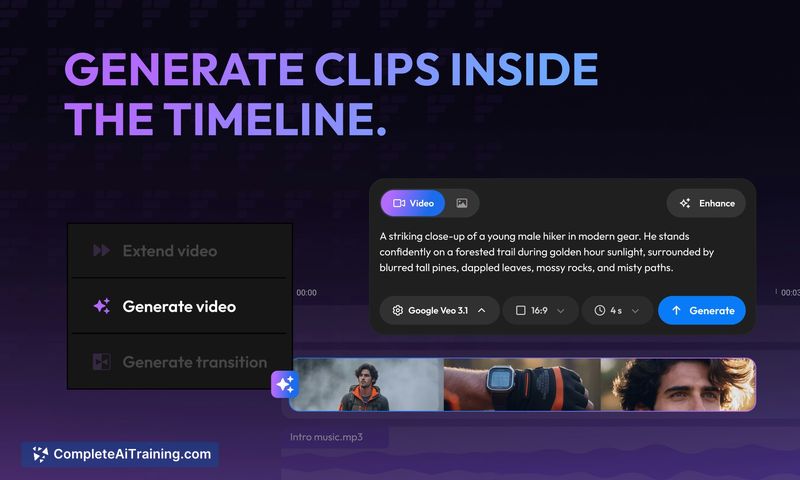
Flixier Generate AI Video in Timeline brings AI clip generation directly into a timeline-based editor, so you can create, extend, and connect clips without leaving your project. The tool runs in the browser and combines generation with editing, voice and caption tools, and export options.
Review
The core idea is straightforward: keep AI generation inside the editor so outputs can be shaped into finished videos without an export-and-reimport loop. In practice, this saves time for iterative workflows and makes experimentation less disruptive, though some limitations in the free tier and reliance on a stable internet connection are worth noting.
Key Features
- Generate, extend, and connect AI clips directly on a real editing timeline.
- Clip metadata retention: prompts, reference frames, and model versions stay attached for safe iteration.
- Trim, add voice, auto-subtitles, and other finishing tools without switching applications.
- Cloud-based editor with collaborative editing and fast rendering from the browser.
- Options for creating new versions of clips and future-facing compare workflows (planned improvements noted).
Pricing and Value
There is a free tier available, but it carries restrictions such as export limits and watermarks that may impact professional use. Paid plans lift many of those constraints and unlock higher export quotas, extended features, and better collaboration tools. For creators who value saving time by avoiding external toolchain steps, the paid plans can offer good value compared with maintaining separate generation and editing workflows; users on tight budgets or with intermittent internet access should weigh the free-tier restrictions carefully.
Pros
- Keeps AI generation and editing in a single workflow, reducing friction when iterating on clips.
- Browser-based collaboration and generally fast rendering speeds for many users.
- Metadata for generated clips is preserved, making safe re-generation and comparisons possible.
- Built-in features like auto-subtitles and text-to-speech streamline finishing steps.
- Good for quick social edits and testing multiple models without a separate export step.
Cons
- Free tier is limited (export time caps and watermarks), which can be restrictive for frequent creators.
- Dependence on a stable internet connection can be a drawback in low-bandwidth situations.
- Some users report occasional support or performance inconsistencies on complex projects.
Overall, this tool is best suited for social creators, small teams, and editors who want to experiment with AI-generated clips and finish videos in one place. If you frequently iterate on short-form content or collaborate in-browser, it can significantly speed up workflow; if you need offline editing or unrestricted free exports, look closely at plan limits before committing.
Open 'Flixier Generate AI Video in Timeline' Website
Your membership also unlocks: