About Grok by SpaceXAI for Word
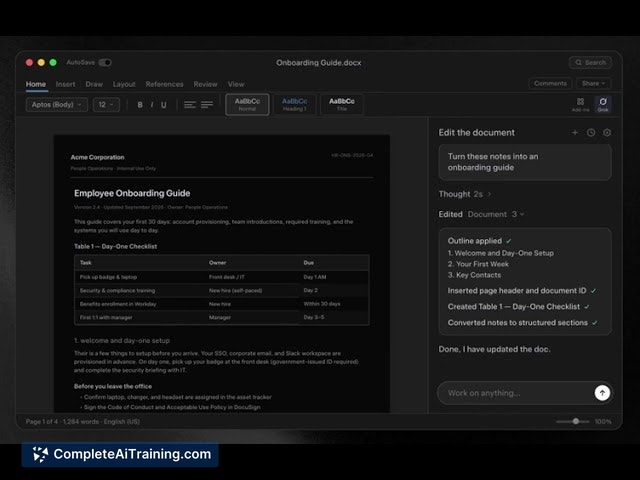
Grok by SpaceXAI for Word is a Microsoft 365 add-in that embeds an AI conversation agent directly inside a Word document sidebar. The tool can draft text, restructure content, and apply inline edits - it reads the document you point it at and writes changes straight into the file. It launched recently and works from a docked panel, keeping everything editable and undoable.
Review
Word documents often accumulate rough notes, inconsistent headings, and phrasing that shifts between authors. Grok addresses those friction points by letting users instruct an agent to fix grammar, reorganize structure, and normalize styling without leaving the editing window. The panel operates beside the document; you type what you want, and the agent acts on the file itself, not on a copy-pasted snippet.
Key Features
- Structure rough notes into formatted Word headings and lists, turning messy drafts into organized sections.
- Inline edits that fix grammar, simplify language, and tighten phrasing directly in the text, with changes appearing as editable revisions.
- Before-and-after view for every change, so you can inspect what was altered and why.
- Normalize heading case and align terminology across the whole file, applying consistent styling in one pass.
- Conversation-based agent sidebar that can search the web, generate outlines, create tables, expand ideas, or rewrite paragraphs on command.
Pricing and Value
The add-in is free to install from the Microsoft Marketplace; organizations can deploy it widely through admin tools. To use the agent, however, you need a SuperGrok subscription. xAI has not publicly detailed SuperGrok pricing tiers, whether a free trial exists, or what usage limits apply. Because the underlying cost is tied to this subscription, the total expense for a team depends on the SuperGrok plan.
Pros
- Edits land directly in the document, removing the back-and-forth of copying text to a separate tool.
- Every change is listed as a visible, undoable revision - you can accept or revert individual modifications.
- Before-and-after comparisons make it straightforward to assess what the agent changed in a paragraph.
- Heading case normalization and terminology alignment work across the entire file, not just the selected section.
- Installation is free and available right from the Word add-in store, with organization-wide deployment possible.
Cons
- Full use requires a SuperGrok subscription; organizations can't rely on the add-in without committing to an external AI service that hasn't yet published clear pricing.
- The agent's fact-checking behavior when pulling information from the web is unverified, which may concern teams that depend on accurate citations.
- Not well suited for users who work offline or operate under data residency rules that restrict cloud-connected AI agents from reading sensitive documents.
Teams that regularly turn rough meeting notes into structured reports inside Word, and already have or are willing to get a SuperGrok subscription, may find the direct in-document editing practical. The add-in fits typical drafting workflows for proposals, articles, and collaborative documents where consistency matters. Organizations with strict offline needs or unclear AI data handling policies will likely look for alternatives that function without an internet connection.
Open 'Grok by SpaceXAI for Word' Website
Your membership also unlocks: