About HighlightGPT
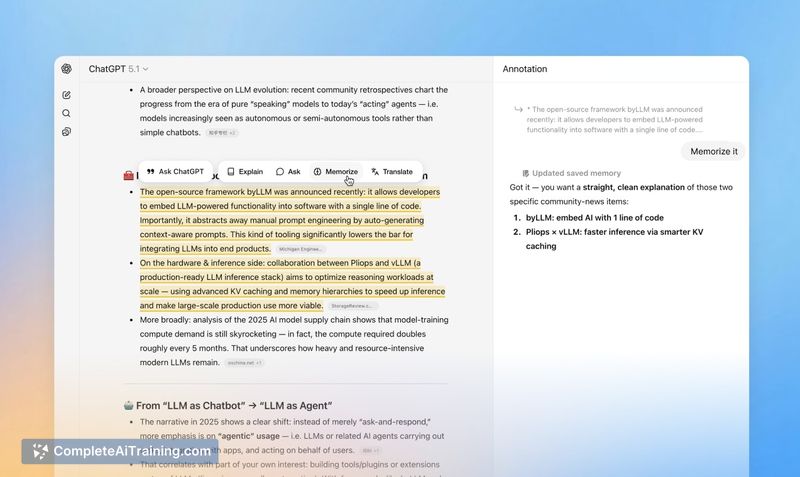
HighlightGPT is a Chrome extension that adds a side panel to ChatGPT, letting you highlight portions of a response and request explanations, translations, follow-up questions, or save short notes. It keeps follow-ups adjacent to the highlighted text so you can inspect or annotate specific parts without copying and pasting or scrolling away.
Review
HighlightGPT focuses on a narrow but practical usability gap: making it easier to interact with specific fragments of long ChatGPT conversations. The extension routes the regular ChatGPT-generated replies into a side panel, so you get contextual follow-ups without extra model calls or added token costs.
Key Features
- Highlight text inside ChatGPT and open a dedicated side panel for follow-ups and annotations.
- Actions for explain, ask, translate, or save short memos tied to highlighted passages.
- No separate model or API usage-responses in the side panel are produced by ChatGPT itself, so there's no extra token billing.
- Lightweight Chrome extension with quick access from the conversation interface.
Pricing and Value
HighlightGPT is offered for free as a Chrome extension. For users who frequently read and refine long ChatGPT outputs, it provides a small workflow improvement that can save time and reduce friction by keeping clarifications and edits visually close to the original text. Because it does not introduce additional API usage, the value comes from usability rather than new model capabilities.
Pros
- Keeps follow-ups and explanations adjacent to the highlighted text, preserving reading flow.
- Eliminates repetitive copy-paste or awkward scrolling to find context for follow-up questions.
- Free and lightweight with no added token costs since it uses the existing ChatGPT replies.
- Simple interface that feels like annotating or commenting on a response.
Cons
- Available only as a Chrome extension, so users on other browsers or platforms cannot use it.
- Because it integrates with the ChatGPT UI, updates to that UI may cause breakage or require the extension to be updated.
- Functionality is centered on workflow and presentation-there are no additional model features beyond what ChatGPT already provides.
Overall, HighlightGPT is a practical tool for people who spend time reading long ChatGPT conversations and need quick, inline clarifications or annotations. It is best suited for students, researchers, writers, and professionals who want a tidier way to probe parts of a response without losing context or incurring extra costs.
Open 'HighlightGPT' Website
Your membership also unlocks: