About Knowlify
Knowlify is an AI video studio that converts documents into animated explainer videos, focusing on high-retention, Kurzgesagt-style animations. It targets teams that need consistent, informative explainers faster than traditional production workflows.
Review
Knowlify streamlines the process of turning text-heavy content-like articles, reports, and PDFs-into polished animated videos with an emphasis on clarity and viewer retention. The platform combines a planner and voiceover models with a storyboard-first editor, enabling quick first drafts and iterative edits before final rendering.
Key Features
- Document-to-video conversion: upload text or PDFs and generate an animated explainer draft automatically.
- Custom planner and voiceover models trained on proprietary datasets to shape pacing, tone, and structure.
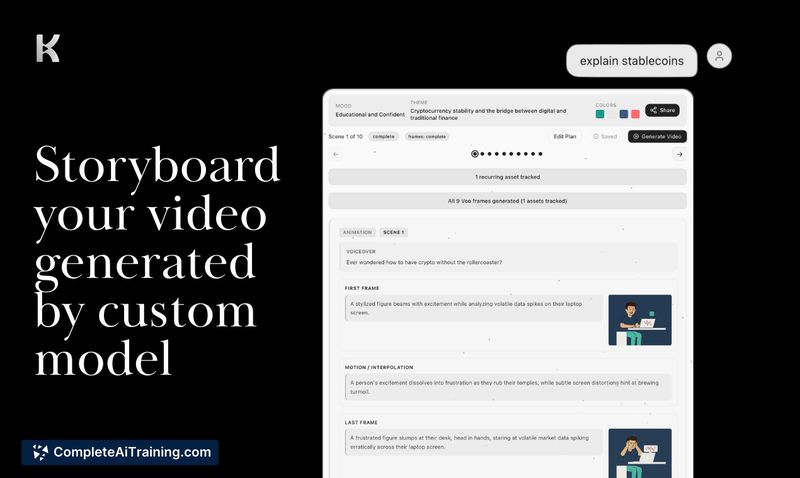
- Storyboard editor that lets you adjust scripts, visuals, and scene sequencing prior to final render.
- Support for up to five reference images and options to refine visuals and color schemes.
- Flexible output lengths (up to several minutes) with control over hooks, examples, takeaways, and CTAs.
Pricing and Value
Knowlify offers a credits-based model alongside monthly subscription tiers that bundle credits at a lower per-unit cost. There are free options to try the platform, and a dedicated pricing page provides current details: create.knowlify.com/p/pricing. The value proposition is speed and repeatability-producing explainer videos far quicker than hiring external studios-though compute-heavy video generation means costs can be meaningful for frequent, long-form projects.
Pros
- Converts dense written material into engaging animated explainers that emphasize learning retention.
- Fast first-pass generation (many simple videos can be produced in minutes) with an editable storyboard workflow.
- Good fit for B2B content teams and organizations that need to surface information trapped in PDFs or reports.
- Multiple animation styles, including 3D and corporate looks, with controls for pacing and narrative structure.
- Allows steering of the AI output via prompts and storyboard edits, so creators retain narrative control.
Cons
- Performance depends on source material quality-image-heavy or poorly structured PDFs yield weaker results.
- PowerPoint support is not yet native (PDF uploads are the workaround), and some niche topics require strong source context for best output.
- Some users report occasional voiceover mismatches or content inaccuracies that need manual correction.
Overall, Knowlify is best suited for content managers, educators, and marketing teams that regularly convert written assets into short, educational videos. It works particularly well for organizations with lots of text-based material that need faster, more consistent video output than traditional studios can provide.
Open 'Knowlify' Website
Your membership also unlocks: