About Markdown Studio
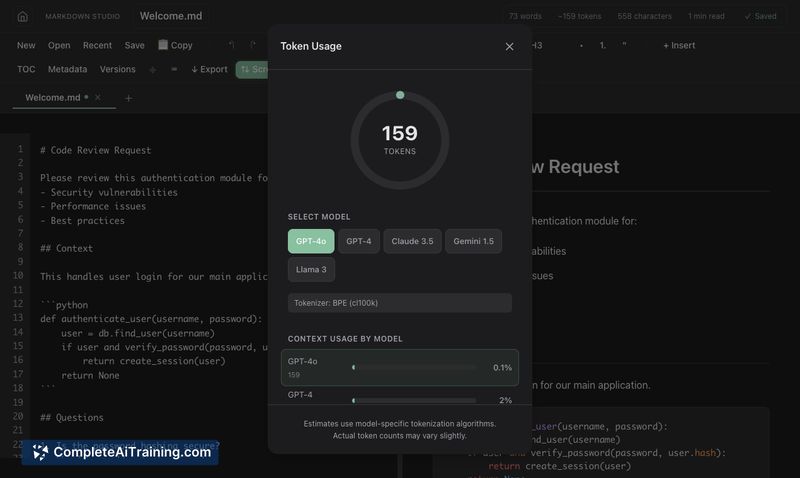
Markdown Studio is a free browser-based markdown editor built for AI workflow needs. It focuses on drafting prompts, preparing context for large language models, and keeping everything private by running entirely in the browser with no accounts or tracking.
Review
Markdown Studio offers a focused editing experience that helps users craft and refine text intended for LLM consumption. Its key strengths are real-time token awareness, built-in version history, and privacy-by-default operation, which together reduce friction for prompt authors and technical writers.
Key Features
- Real-time token counting across multiple model tokenizers so you can monitor context length as you type.
- Live preview that stays in sync with your cursor for quick visual checks of formatted output.
- Auto-save version history every 5 minutes, allowing quick retrieval of previous drafts without manual saves.
- Smart copy that strips or optimizes formatting for clean input into AI chat boxes, plus PDF/HTML export and multi-tab editing.
- Local-first privacy: no accounts, no tracking, and data remains in your browser.
Pricing and Value
Markdown Studio is free to use and does not require an account. Its value comes from features that address common friction points in prompt and context preparation-token feedback, automatic versioning, and privacy-making it a practical tool for people who write markdown for LLMs without paying for cloud-based editors.
Pros
- Live token counter that helps avoid exceeding model context limits.
- Automatic version history reduces risk of losing or overwriting good prompt iterations.
- Local-only operation with no tracking or sign-up required, which is good for sensitive content.
- Convenient export and smart copy options for moving content into chat interfaces or documentation.
- Lightweight and easy to pick up for users familiar with markdown.
Cons
- No built-in cloud sync or collaborative editing, so cross-device workflows require manual transfer.
- Limited integrations with external toolchains or project management platforms compared with more feature-rich editors.
- Advanced editing features (WYSIWYG blocks, plugin ecosystem) are minimal by design.
Overall, Markdown Studio is best suited for prompt engineers, developers, and writers who need a private, low-friction editor for preparing text for LLMs. It works well as a local drafting space for sensitive prompts and quick iterations, though teams that require real-time collaboration or cloud-backed syncing may find it limited.
Open 'Markdown Studio' Website
Your membership also unlocks: