
About MD+HTML Reader
MD+HTML Reader is a macOS workspace built for reviewing AI‑generated Markdown and HTML files. It opens a local project folder, filters down to Markdown and HTML documents, and renders them in a read‑only preview environment. The tool is designed for the step after an AI coding tool produces output and before you commit, prompt again, or hand off work.
Review
AI coding assistants can create a surprising amount of documentation-plans, specs, checklists, diagrams-often scattered across project directories. MD+HTML Reader tries to give that review step its own focused space, separate from editors and browsers. The current build, shipping this week, is macOS‑only, with the maker indicating Linux and Windows versions will be explored if demand exists.
Key Features
- Opens a local project folder and filters the file tree to show only Markdown and HTML files, ignoring source code, build artifacts, and other non‑document assets.
- Renders Markdown (including Mermaid diagrams) and HTML in a read‑only pane; editing is disabled to prevent accidental changes during review.
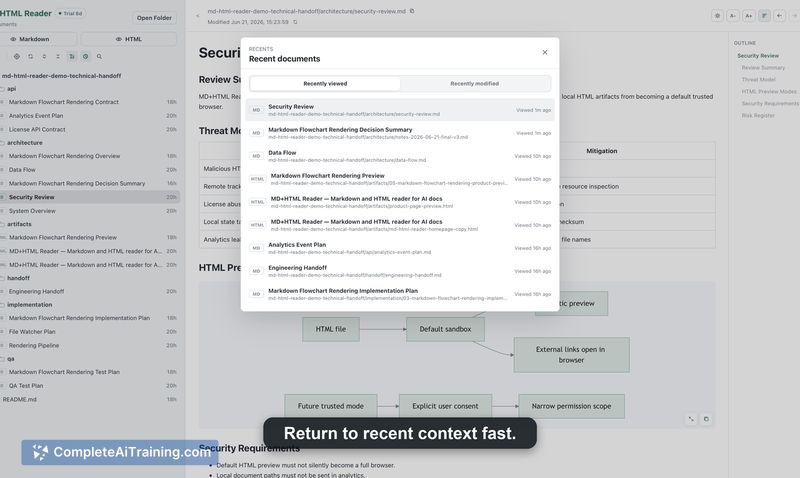
- Keeps a list of recently viewed documents and another of recently modified documents, letting you jump back to files that have changed or that you last looked at.
- Supports document‑title browsing, so when filenames are unclear, you can navigate by the title extracted from the rendered content.
- Includes keyboard shortcuts for quick positioning, outline preview, and collapsing or expanding sections of larger documents.
Pricing and Value
The launch includes a 70% discount, but the regular base price and the long‑term pricing model have not been publicly posted. The product page lists "Free Options" as a tag; however, what that includes (trial, limited free tier, or other) is not detailed. Until the maker publishes a pricing page, the exact cost structure remains undefined.
Pros
- Narrows the view to only Markdown and HTML, cutting out the noise of unrelated files that typically clutter a project folder.
- Read‑only mode prevents reflex editing, so the review step stays a review step rather than an accidental editing session.
- Mermaid diagram rendering and local HTML preview allow you to see static generated artifacts (like reports or slide decks) directly inside the workspace.
- Recently changed and recently viewed lists help you retrace your steps across multiple related documents without re‑digging through folders.
Cons
- HTML previews run in a sandboxed WebView with a no‑referrer policy, but scripts may still execute and remote assets may be fetched; a "Strict Preview" mode that blocks scripts and remote loads is only planned for a future update.
- Limited to macOS. The maker has noted interest in supporting Linux and Windows, but no builds for those platforms exist yet.
- Not well suited for users who want to edit documents directly-MD+HTML Reader is intentionally read‑only and doesn't replace a code editor or a markdown editor that supports live editing.
MD+HTML Reader fits nicely into workflows where AI tools leave behind multiple Markdown plans, API notes, and generated HTML pages that need a final human check before they reach a commit or a teammate. For developers and technical writers who already work with local project folders and want a quieter, distraction‑reduced review step, the app fills a specific gap. If your day‑to‑day work involves editing markdown or you rely on Windows or Linux, it may not be the right fit until more platforms and stricter HTML safety options ship.
Open 'MD+HTML Reader' Website
Your membership also unlocks:




















