About MiniAi
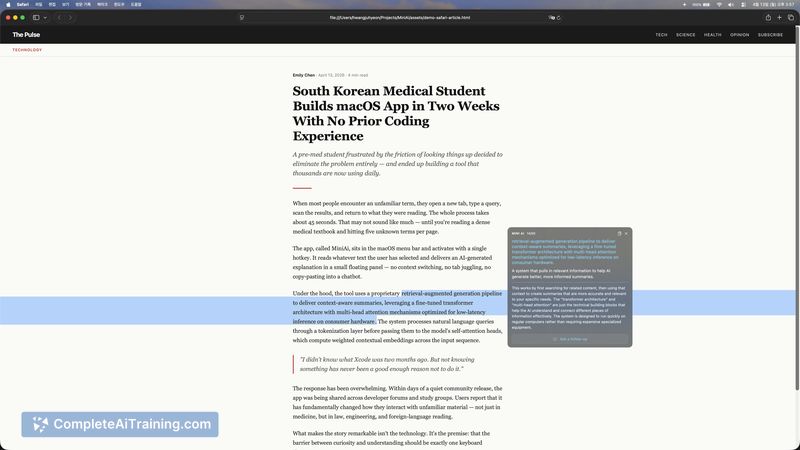
MiniAi is a lightweight macOS utility that sits in the menu bar and provides quick AI explanations for any selected text. Select text, press ⌥Space, and a floating panel returns a concise explanation without forcing you to switch apps.
Review
MiniAi aims to reduce interruptions while reading documents, emails, code snippets, or PDFs by surfacing brief AI-generated clarifications inline. The tool is an early-stage, maker-built app that favors a focused, minimal UX over extensive feature polish.
Key Features
- Menu-bar hotkey workflow: select text and press ⌥Space to get an explanation in a floating panel.
- Context-aware input: the app reads the selected text plus roughly two sentences before and after to improve responses.
- On-demand operation: it only reads text when you explicitly trigger it; no background monitoring or continuous recording.
- Cloud-backed AI responses sent over HTTPS; no local storage of the processed content after the response.
Pricing and Value
MiniAi is free to try at launch. Its value proposition lies in saving time and preserving focus by avoiding copy-paste or app switching when you need a quick explanation. For users who frequently read technical papers, long emails, or code, the time saved per interruption can add up, though users should watch for any future changes if paid tiers or usage limits are introduced.
Pros
- Great for maintaining reading flow-explanations appear without leaving the current app.
- Simple, fast hotkey-driven interaction that feels natural for short lookups.
- Privacy-minded defaults: only reads selected text and a small surrounding window when triggered.
- Free to try, making it low-risk to evaluate for personal workflows.
Cons
- Early-stage polish is limited compared to more mature macOS utilities; interface and UX may feel basic.
- Depends on a cloud AI model, so it requires internet access and relies on the provider for response quality and availability.
- Fewer customization and integration options at launch (hotkey and behavior settings may be minimal).
Overall, MiniAi is a practical tool for students, researchers, and professionals who want quick clarifications without breaking concentration. It suits individuals who value lightweight, on-demand assistance and are comfortable with a cloud-based AI workflow; those needing offline processing or enterprise-level controls should weigh the dependency on an external model and the app's early-stage feature set.
Open 'MiniAi' Website
Your membership also unlocks: