About Mirowl
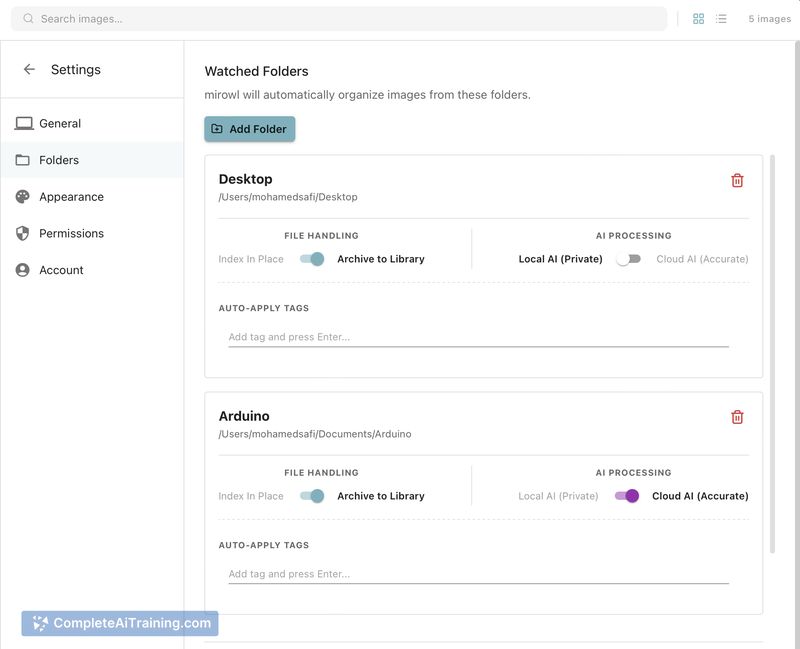
Mirowl is a local-first macOS app that indexes and searches screenshots and other image assets using on-device OCR. It runs in the menu bar, uses Rust/Tauri for a low footprint, and relies on native macOS Vision for higher OCR accuracy, with an optional cloud tier for visual scene analysis.
Review
Mirowl focuses on making screenshots and image collections searchable without sending data off your Mac by default. The app is lightweight, keeps a small background footprint, and aims to make text and asset discovery faster for people who accumulate many captures and design assets.
Key Features
- Local OCR using native macOS Vision for improved text extraction accuracy from screenshots and high-resolution captures.
- Menu-bar app with near-zero idle resource usage, built on a Rust/Tauri stack for efficiency.
- Incremental folder watching and sequential indexing to manage memory use when processing many images.
- Optional cloud vision on the Pro tier for scene-level analysis and descriptor-based searches beyond text.
- In-app renaming and tagging while preserving the original filenames on disk; planned auto-naming is on the roadmap.
Pricing and Value
Mirowl offers a free tier that performs local, on-device OCR for text-based search. A Pro tier adds optional cloud vision features for visual scene understanding and more descriptive search capabilities; at launch there is a promotional "50% OFF FOREVER" offer for the Pro plan. For users who want strong privacy and reliable local text search, the free tier delivers good value, while the Pro tier is aimed at those who need richer visual search and automatic metadata generation.
Pros
- High text-recognition accuracy by using macOS Vision, which is effective on Retina and high-res screenshots.
- Local-first approach preserves privacy: most workflows do not send data off the machine.
- Lightweight background operation with incremental indexing keeps memory and CPU impact low.
- Flexible indexing: you can point it at any folder, not just the desktop, and rename items inside the app.
- Pro tier adds scene analysis for searching by visual descriptors rather than only text.
Cons
- macOS-only at present, so teams using Windows or Linux cannot use it yet.
- Free tier focuses on OCR/text extraction; visual scene understanding requires the Pro/cloud option.
- Some convenience features, like automatic file renaming on disk, are planned but not available in the initial releases.
Mirowl is best suited for Mac users who accumulate many screenshots, designers and researchers who keep visual references, and anyone who prefers a privacy-first, low-resource utility for searching image assets. Try the free tier to assess local OCR performance, and consider the Pro tier if you need broader visual search capabilities or descriptor-based queries.
Open 'Mirowl' Website
Your membership also unlocks: