AI tool
mTarsier
mTarsier - free, open-source desktop app that auto-detects AI clients (Claude Desktop, Cursor, Windsurf, VS Code) and centralizes MCP server configs, marketplace installs, and one-click backups on macOS, Windows, Linux.

About mTarsier
mTarsier is an open-source desktop application for managing MCP servers and clients from a single interface. It centralizes scattered configuration files, auto-detects local AI clients, and provides tools for installing, syncing, and sharing MCP setups across machines.
Review
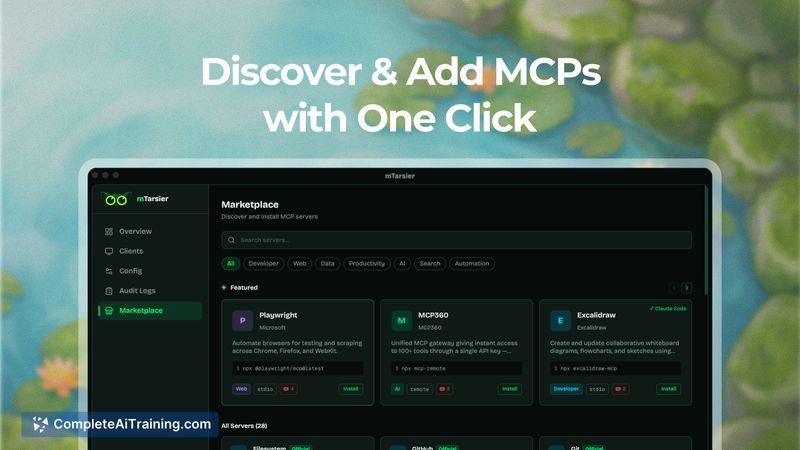

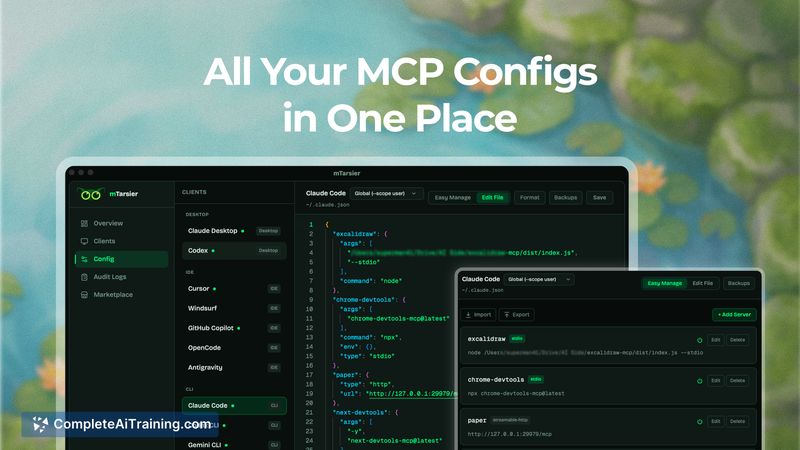

This review evaluates how well mTarsier simplifies MCP configuration and workflow management for developers and teams. Overall it addresses a common pain point by putting server configs, a marketplace, and sharing tools into one lightweight, cross-platform app.
Key Features
- Auto-detection of local AI clients so existing installations are discovered on first run.
- Visual dashboard that displays MCP servers, their status, and basic health indicators at a glance.
- Built-in marketplace to browse and install MCP packages without manual JSON edits.
- Multi-client sync and one-click install/enable to apply configurations across multiple clients.
- Export/import workflow format (.tsr) and an agent-facing CLI for automated or shared setups.
Pricing and Value
mTarsier is free and open-source, available for macOS, Windows, and Linux. For users who maintain multiple AI clients or manage team workflows, the time saved from avoiding manual config edits and the ability to export and share complete setups offer clear value. The trade-off is that advanced governance and hosted support are community-driven rather than provided as a commercial service.
Pros
- Consolidates scattered configuration files into a single, visual place, reducing manual errors.
- Easy installation and enablement of MCP packages via a marketplace eliminates repetitive JSON editing.
- Cross-platform support and an exportable .tsr format make team handoffs and backups straightforward.
- Open-source codebase and a lightweight native implementation keep the app transparent and low-overhead.
Cons
- Early-stage feature set leaves some governance and fine-grained permission controls for future releases.
- Marketplace trust, versioning, and compatibility controls require careful attention from users when installing public packages.
- Non-technical users may still need guidance for advanced auth or custom server configurations.
mTarsier is best suited for developers, integrators, and small teams who run multiple AI clients and want a single place to manage MCP configurations and share workflows. If you prefer a managed commercial product with enterprise support, this community-driven tool may require complementary processes for security and governance. For hands-on users who want a free, local manager that reduces configuration friction, it is a strong option.
Jobs mTarsier suits
We checked mTarsier against 500+ jobs; these get the most out of it.
Alternatives to mTarsier
Other tools that do the same main job. Our AI compared mTarsier with similar tools and kept the ones you could use instead.