
About NudgeFile
NudgeFile is a newly launched desktop tool that automatically organizes, renames, and manages files using on-device AI. It monitors folders, detects duplicates, and offers workflow automation while keeping your data local and private.
Review
NudgeFile focuses on cleaning up messy Downloads, Documents, Screenshots, and project folders by suggesting meaningful filenames and automating repetitive file tasks. The app emphasizes a privacy-first, local-AI approach and provides controls such as previews, approval-based actions, and reversible operations to keep users in control.
Key Features
- Local AI-powered filename suggestions and automated renaming
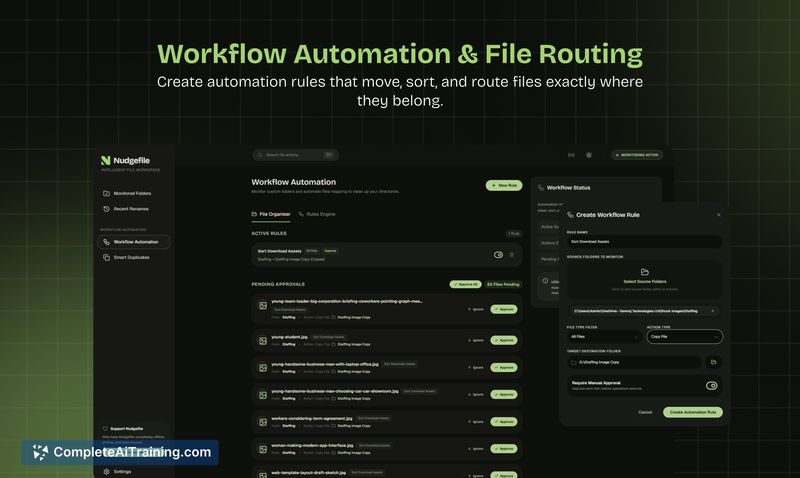
- Continuous folder monitoring and configurable workflow automation
- Duplicate detection and undo-safe operations with activity logs
- Approval/preview steps for AI suggestions and approval-based workflow actions
- Built for Windows with all processing happening on your device
Pricing and Value
NudgeFile is offered for free at launch. For users who prioritize privacy and want to reduce manual file management, the tool delivers clear value by automating routine tasks and preventing accidental data exposure to cloud services. As a newly released product, its free status makes it easy to try without commitment, though future paid tiers or enterprise features may appear as the product matures.
Pros
- Processes files locally, which helps keep sensitive data off external servers
- Approval and preview options give users control before changes are applied
- Undo-safe and logged operations reduce the risk of irreversible mistakes
- Good fit for users with recurring naming and organization needs across projects
- Simple to set up for common problem folders like Downloads and Screenshots
Cons
- Windows-only at launch, so macOS and Linux users are excluded for now
- As a new release, some features and edge-case behaviors (e.g., mixed personal/business folders) could use further refinement
- Users managing very large folders may want more visible dry-run/preview modes before full automation
Overall, NudgeFile is well suited for power users, developers, designers, and anyone who frequently deals with scattered project files and naming/version issues and prefers on-device processing. Try it on a few small folders first to tune rules and approvals, then expand usage once you're comfortable with the suggested automations.
Open 'NudgeFile' Website
Your membership also unlocks:

















