About Recap
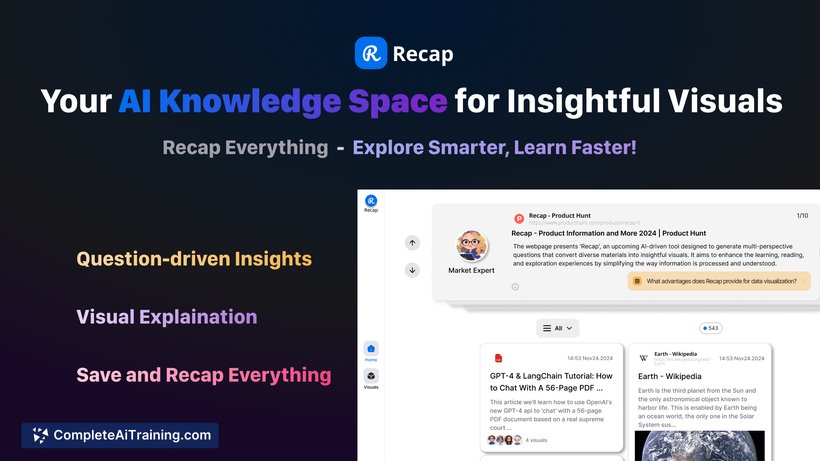
Recap is an AI-powered knowledge platform that helps users transform various content into clear and engaging visual formats. It simplifies learning by generating mind maps, timelines, and tables from diverse materials, making information easier to organize and understand.
Review
Recap offers a unique approach to managing and absorbing information by combining AI-driven insights with visual representation. It is well-suited for learners, professionals, and anyone looking to process complex content more efficiently. The tool supports integration with popular platforms like YouTube and web pages, enhancing its versatility.
Key Features
- AI-generated visualizations including mind maps, timelines, and tables to simplify complex topics.
- Multi-perspective, question-driven insights that encourage deeper exploration of content.
- Integration with YouTube for video summaries and timestamping.
- Chrome extension for instant summarization of articles and web pages.
- Easy saving and sharing of insights across devices and with others.
Pricing and Value
Recap offers a free option to get started, making it accessible for casual users and those wanting to explore its capabilities. For more advanced features, a Premium Plan is available with a subscription model. At launch, there is a notable 25% discount on the first year of the Premium Plan for certain users, providing good value for those who require enhanced functionality and extended usage.
Pros
- Transforms diverse content into easy-to-understand visual formats.
- Question-driven approach promotes critical thinking and detailed comprehension.
- Supports popular platforms like YouTube and web articles, expanding usability.
- User-friendly interface with straightforward saving and sharing options.
- Regular updates planned, including improved support for image-based PDFs.
Cons
- Currently limited in processing images within PDFs, with support expected in future versions.
- Some features require a Premium subscription to unlock full potential.
- May have a learning curve for users unfamiliar with AI-based visualization tools.
Overall, Recap is well-suited for students, educators, and professionals who handle large amounts of information across various formats. It is especially helpful for those who benefit from visual learning and want to quickly grasp key points from videos, articles, and documents. The combination of AI insights and visual tools makes it a practical choice for improving knowledge retention and organization.
Open 'Recap' Website
Your membership also unlocks: