About Sparkle
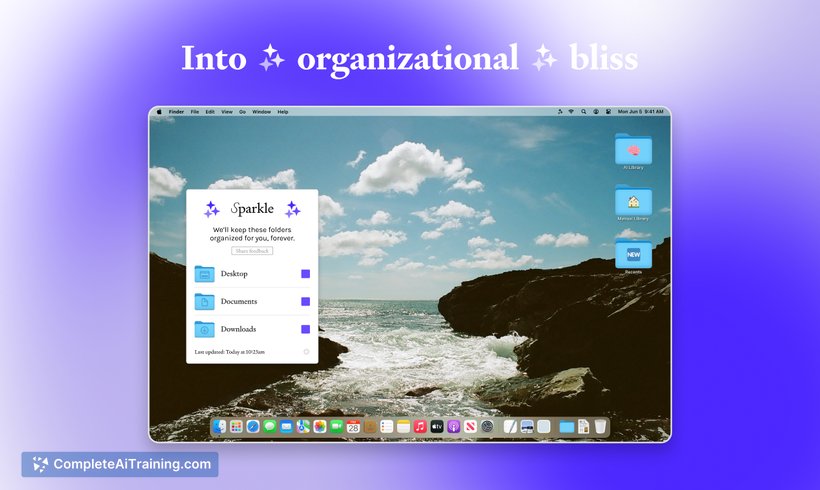
Sparkle is an AI-powered tool designed to automatically organize files on your computer, streamlining the management of your Downloads, Desktop, and Documents folders. By creating a unique folder hierarchy and visually enhancing folders with images, Sparkle helps users quickly locate and manage their files with ease.
Review
Sparkle offers a fresh approach to file organization by leveraging artificial intelligence to reduce the time and effort spent sorting files manually. It intelligently categorizes new and existing files into structured folders, making cluttered spaces more manageable and improving overall productivity. This tool is particularly useful for users who struggle to keep their digital workspace tidy.
Key Features
- Automatic organization of Downloads, Desktop, and Documents folders using AI-driven folder hierarchy.
- Creation of three main subfolders within each managed folder: Recents, AI Library, and Manual Library.
- New files are initially placed in the Recents folder and moved to the AI Library after three days for long-term storage.
- Manual Library allows users to exclude specific files from AI organization, preserving user control.
- Folders are enhanced with images for easier visual identification and faster file retrieval.
Pricing and Value
Sparkle offers free options, making it accessible for users looking to improve their file organization without additional cost. The value proposition lies in saving users time and reducing frustration associated with cluttered folders, ultimately enhancing workflow efficiency. While specific paid tiers or premium features are not detailed, the free offering already provides substantial benefits for individual users.
Pros
- Effortlessly organizes multiple key folders on your computer with minimal setup.
- Custom folder hierarchy intelligently adapts as files accumulate over time.
- Visual folder icons improve file discovery speed and overall usability.
- Allows manual control for files you don’t want AI to organize.
- Supports both new and existing files, ensuring a comprehensive clean-up.
Cons
- Limited customization options for the AI’s categorization logic, which may not fit all user preferences.
- Currently focused on specific folders; may not cover all file locations users want organized.
- Lack of explicit support for platforms beyond Mac (based on available information), which could limit usability for some users.
Overall, Sparkle is ideally suited for individuals or professionals who accumulate large volumes of files and want a hands-off, intelligent way to maintain order on their computers. It works best for users seeking simplicity and automation in file management, particularly those who use their Desktop, Downloads, and Documents folders heavily. While power users might desire more customization, Sparkle delivers a practical and effective solution for everyday organization challenges.
Open 'Sparkle' Website
Your membership also unlocks: