AI tool
Trama
Trama turns plain-language descriptions into Mac automations. Press Cmd+Option+X, type what you want to repeat in one of ten languages, and it builds the workflow, explains the steps, and runs it in the background on triggers like clipboard change...
About Trama
Trama is a macOS automation tool that launched this week. It lets you create native automations by describing them in plain language instead of building block-based flows. You press Cmd+Option+X, type what you want to automate, and Trama generates the workflow and runs it in the background.
Review

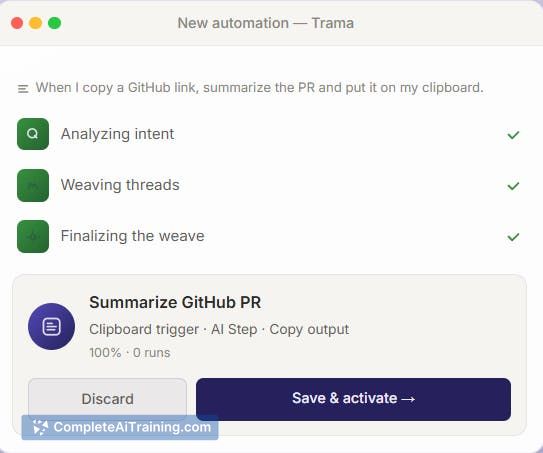
Trama targets people who find tools like Zapier or Shortcuts too programmer-oriented. The product removes the visual editor entirely and replaces it with a natural language prompt. It supports ten languages, including English, Portuguese, Spanish, and Japanese.
Key Features
- Plain-language automation creation triggered by Cmd+Option+X from anywhere on your Mac
- Native Mac reach through AppleScript, shell commands, OCR, and screen awareness
- Repetition detection that suggests automations based on your copy patterns, stored locally as types and salted fingerprints rather than raw text
- AI error explanation with one-tap fixes when a workflow breaks
- Provider choice for the underlying model: Claude, GPT, Gemini, Groq, or a local model via Ollama
Pricing and Value
Pricing is not yet defined. The product launched this week and is listed under Free Options on its launch page. There is no public pricing model or tier structure available at this time.
Pros
- Works in your own language, not just English, across ten supported languages
- Runs automations on multiple triggers: clipboard, schedule, screenshot, file change, or incoming email
- Privacy controls are explicit: the suggestion engine makes no network calls, and a Settings → Suggestions & Privacy page shows stored data with an erase button
- Can run entirely offline if you point it at a local model via Ollama
Cons
- No visual editor at all, so users who prefer seeing flow logic may find the plain-language approach limiting
- Workflows that process content, like summarizing an email, send that content to the AI provider you selected unless you use a local model
- Not well suited for teams requiring centralized management or approval workflows, since this is a single-user Mac tool with no collaboration features mentioned
Trama fits individuals who repeat tasks on their Mac and prefer describing those tasks in words rather than assembling logic blocks. It also suits privacy-conscious users, since the local Ollama option keeps data on the machine. Teams needing shared automation libraries or admin controls will not find what they need here.
Alternatives to Trama
Other tools that do the same main job. Our AI compared Trama with similar tools and kept the ones you could use instead.