AI tool
Vox
Vox provides a voice-driven interface for GitHub Copilot. You speak commands and hear responses, with live captions and barge-in interruptions. It is for developers who need hands-free coding assistance.

About Vox
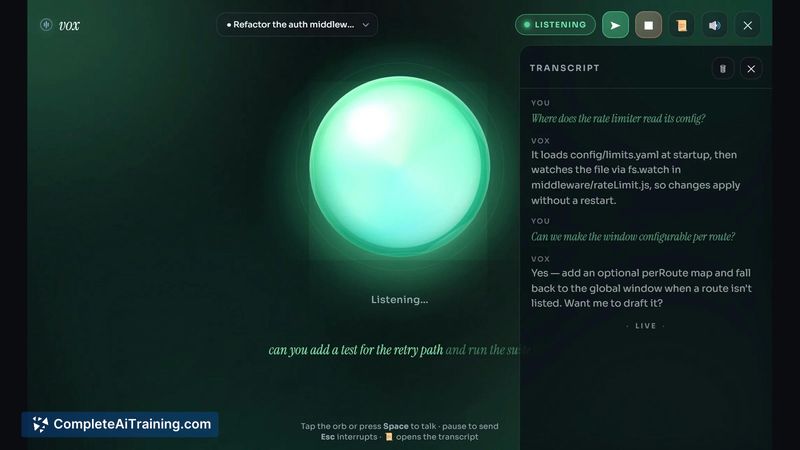
Vox is a GitHub Copilot CLI extension that adds a voice layer to Copilot sessions. Run /vox and a reactive listening orb opens in its own window - you speak your turn, the agent replies with synthesized speech, and a live transcript tracks the exchange. Built in pure JavaScript with no build step, it uses the browser's Web Speech APIs via Chromium in app mode and installs in one command on Windows, macOS, and Linux under the MIT license.
Review
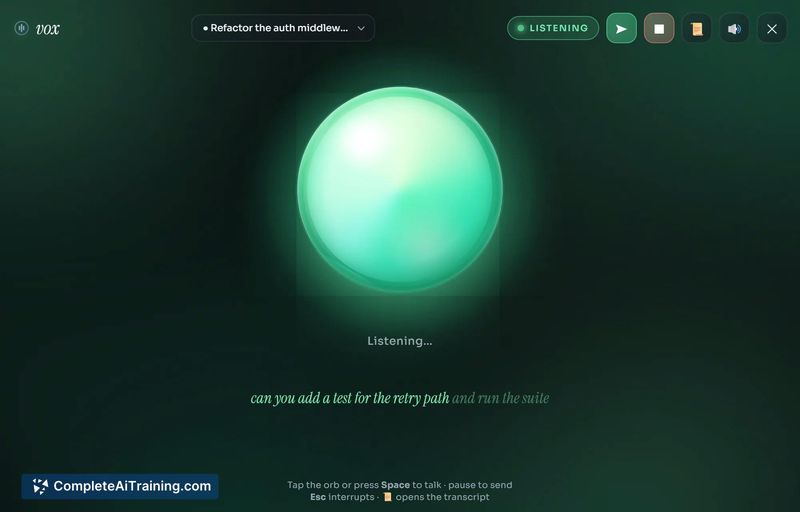




Vox tackles a specific friction point for heavy Copilot users: the need to stay at the keyboard. By adding a voice layer that supports multi-turn conversation, interruption, and mixed voice/keyboard input, it lets developers talk through coding sessions when typing isn't practical. The orb stays open in the background, so switching between voice and keyboard happens per-turn without restarting anything.
Key Features
- Reactive voice orb:
/voxlaunches a dedicated window that listens for voice input and reads agent replies aloud using the browser's built-in speech services. - Barge-in and correction: Tapping the orb or pressing Esc calls
bargeCancel(), which aborts the in-flight request and stops TTS immediately - letting you cut in, restate a constraint, and keep the session alive. - Live captions and in-memory transcript: The full session is captioned on screen and stored in memory. Nothing gets written to disk, and the transcript clears when the orb closes.
- Typed fallback: You can type a turn instead of speaking, and the reply is still read aloud. This helps with file paths, variable names, and syntax that speech recognition handles poorly.
- Turn rewriting in voice mode: Vox rewrites spoken turns to instruct the agent to reply in 1-3 short sentences with no code blocks, so code changes come back as plain-language descriptions rather than spoken diffs.
Pricing and Value
Vox is free and open source (MIT). It ships with no API keys and makes no cloud calls of its own. Speech recognition and TTS run through the browser's native Web Speech API - Chrome routes to Google's servers, Edge to Microsoft's. No separate subscription or usage-based cost exists, though the speech services require network connectivity and can introduce their own latency.
Pros
- Installs in a single command without a build step or Electron - it launches Chromium in app mode to access the speech APIs directly.
- Full multi-turn sessions are supported; the orb stays open and you can go back and forth with the agent as many times as needed.
- Interruption is wired into the core turn loop, not layered on top - barge-in stops audio and the in-flight API request instantly.
- Mixed voice and typed input works per-turn, so precise syntax can be typed while conversational intent is spoken.
- Session transcript and captions remain in memory only, disappearing when the orb closes.
Cons
- All voice recognition and TTS route through external servers (Google or Microsoft), so an active network connection is required and audio leaves the machine.
- Voice-mode turn rewriting strips code blocks from spoken replies; users who want literal diffs read aloud must use typed input for those turns.
- Vox is not well suited for developers working in air-gapped environments or where audio data cannot leave the device for compliance or privacy reasons.
Vox fits developers who use GitHub Copilot regularly and want a hands-free option for coding sessions, quick corrections, or moments when stepping away from the keyboard helps maintain flow. The mixed voice-and-type design makes it practical for real-world use where some input needs precision and other parts benefit from spoken conversation. Anyone who requires fully offline voice processing or cannot send audio off-device will need to wait for the local recognition option the maintainer has flagged for a future version.
Jobs Vox suits
We checked Vox against 500+ jobs; these get the most out of it.
Alternatives to Vox
Other tools that do the same main job. Our AI compared Vox with similar tools and kept the ones you could use instead.