
Build 5 Production AI Agents for Insurance Claims (Video Course)
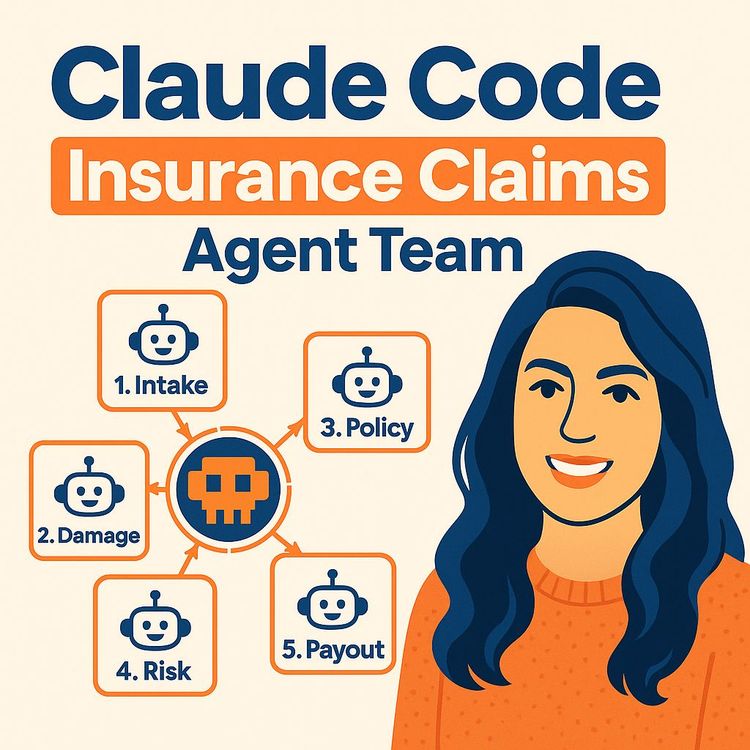
Build five AI agents that process insurance claims from intake to payout. Photo analysis, policy checks, risk flags, payout math , with audit trails and tests that catch silent failures. Patterns transfer to any document-heavy process.
Related Certification: Certification in Building Production AI Agents for Insurance Claims
Also includes Access to All:
What You Will Learn
- Design and implement five agents (intake, damage evidence, policy, risk, payout)
- Define and maintain a validated claim state schema as the single source of truth
- Ground decisions with curated data: images, repair estimates, policies, and histories
- Build routing and state-machine logic (LangGraph) for auto-approve, review, and reject
- Implement audit trails and a Gradio dashboard for transparent human-in-the-loop review
- Create evaluation suites and apply BMAD planning plus context-management best practices
Study Guide
# Claude Code: 5 Production AI Agents for Insurance Claims ## A Complete Learning Guide to Building Intelligent Claims Processing Systems --- ## Introduction: Why This Course Matters The insurance industry sits on a mountain of paperwork. Every day, claims adjusters wade through customer statements, damage photos, repair estimates, policy documents, and historical records. They make judgment calls that affect real people's lives and real money. And honestly? The process is slow, inconsistent, and expensive. Here's the thing though. The claims process is also incredibly structured. There's a clear beginning (someone files a claim), a middle (evidence gets collected and evaluated), and an end (a payout decision gets made). That structure makes it perfect for AI automation. This course walks you through building a production-ready system with five specialized AI agents that handle insurance claims from start to finish. You'll learn how to build an intake agent that validates incoming claims, a damage evidence agent that analyzes photos, a policy agent that interprets coverage, a risk agent that flags suspicious patterns, and a payout agent that calculates final amounts. But this isn't just about insurance. The patterns you'll learn here apply to any complex business process that involves documents, decisions, and the need for accountability. Loan processing. Warranty claims. Healthcare prior authorizations. The architecture and methodology transfer directly. By the end of this course, you'll understand how to design multi-agent systems that actually work in production. Not demos. Not prototypes. Real systems with audit trails, evaluation suites, and human oversight built in. You'll know how to ground your agents in real data instead of letting them hallucinate answers. You'll understand how to catch silent failures before they cost your company money. Let's get into it. --- ## Section 1: The Big Picture , What We're Building Before we dive into code and architecture, let me paint you a picture of what this system actually does. Imagine a customer gets into a minor fender bender. They take photos of the damage with their phone, write up a brief statement about what happened, and submit a claim through their insurance app. In a traditional system, that claim sits in a queue. A human adjuster eventually picks it up, looks at the photos, reads the statement, pulls up the policy, checks the customer's history, and makes a decision. That process takes days. Maybe weeks if there's a backlog. In our AI-powered system, here's what happens instead: The intake agent receives the claim and immediately validates it. Are all the required fields filled in? Do we have photos? Is the customer statement readable? If something's missing, the system flags it right away. Next, the damage evidence agent analyzes those photos. It identifies the type of damage , collision, glass breakage, vandalism. It assesses severity. It compares what it sees in the images against what the customer wrote in their statement. If the customer says "minor scrape" but the photos show a crumpled bumper, the system notices. The policy agent then pulls up the customer's insurance policy. It checks coverage limits, deductibles, and exclusions. Does this policy even cover the type of damage claimed? The risk agent evaluates the bigger picture. Has this customer filed three claims in the past six months? Is there a pattern that suggests fraud? Was the claim filed unusually late? Finally, the payout agent calculates the numbers. After applying the coverage ratio and subtracting the deductible, what's the actual payout? And should this claim be auto-approved, sent to a human for review, or rejected outright? All of this happens in seconds. Every decision gets logged. Every piece of evidence gets referenced. If a human needs to review the claim, they get a complete dashboard showing exactly why the system made its recommendation. That's what we're building. Let's break down how to build it. --- ## Section 2: The Architecture , Five Specialists Working Together ### Why Five Separate Agents? You might be wondering: why not just build one big AI that does everything? It's a fair question. A single powerful language model could theoretically read a claim, look at images, check a policy, and output a decision. But here's the problem: that approach creates a black box. When something goes wrong, you can't tell which step failed. When a regulator asks why a claim was denied, you can't provide a clear answer. When you need to update your risk assessment logic, you have to retrain everything. By splitting the work into five specialized agents, you get several benefits: **Each agent has a clear job.** The intake agent doesn't need to know about payout calculations. The policy agent doesn't need to analyze images. This separation mirrors how human organizations actually work. **Each agent can be tested independently.** You can verify the policy agent handles exclusions correctly without running the entire pipeline. **Each agent can be updated independently.** If your company changes its risk assessment criteria, you only modify the risk agent. **The audit trail becomes meaningful.** When every decision is attributed to a specific agent step, you can trace exactly how a claim reached its outcome. Let me give you a concrete example of why this matters. During the development of this system, the evaluation suite caught a critical bug in the risk agent. It was displaying a completed checklist for late-reporting checks without actually performing the analysis. The agent looked like it was working. The checkboxes were checked. But the underlying logic was never executed. If this had been a single monolithic AI, that bug would have been nearly impossible to find. The system would have produced plausible-looking risk assessments with no way to verify the analysis actually happened. With separate agents and a proper evaluation suite, the defect was caught and corrected before deployment. ### The Claim State: The Backbone of Everything Here's a concept that separates production systems from prototypes: the claim state. The claim state is a structured data object that flows through every stage of the pipeline. It contains all the information about a claim , the initial submission, image observations, policy details, risk assessments, payout calculations, and audit events. Every agent reads from this shared state and writes updates back to it. The intake agent populates the initial claim data. The damage evidence agent adds its observations. The policy agent records coverage determinations. And so on. Why is this so important? Because it creates a single source of truth. Every agent works from the same data. Every decision can be traced back to specific evidence. And the entire workflow can be replayed or audited at any time. Think of the claim state as a patient's medical chart in a hospital. Different specialists examine the patient, but they all record their findings in the same chart. The cardiologist doesn't need to re-ask the questions the neurologist already asked. And any doctor can review the complete history to understand how a diagnosis was reached. In technical terms, the claim state includes: - The original claim submission data - Image observations from the vision model - Policy details including coverage and exclusions - Risk assessment scores and analysis - Payout calculations and recommendations - A complete audit trail of every action taken The state is defined using structured schemas with validation. This ensures agents can't pass malformed data to each other. If the damage evidence agent tries to write a string where a number is expected, the validation layer catches it immediately. ### The Tech Stack Let me walk you through the technologies used to build this system: **Claude Code** serves as the AI coding assistant. It generates the code, scaffolds the project structure, writes tests, and helps refactor when things change. Think of it as the builder. **LangGraph** handles the orchestration. It models the workflow as a state machine where nodes represent agents and edges define transitions. Conditional edges enable dynamic routing based on the claim state. **Pydantic AI** provides structured data validation. It ensures that data entering and leaving agents conforms to defined schemas. This prevents the "unstructured text between agents" problem that plagues many agent systems. **Gradio** powers the user interface. It provides a web-based dashboard where claim adjusters can review decisions, inspect audit trails, and run evaluations. **JSON and Markdown files** serve as the data layer. Claims, policies, image observations, and audit logs are all stored as structured files. This makes the system transparent and debuggable. The separation between the builder (Claude Code) and the runtime (LangGraph, Pydantic, Gradio) is deliberate. You can change your build tool without affecting the production system. You can upgrade your orchestration framework without rewriting your agents. --- ## Section 3: Planning Before Building , The Discipline of Specifications Here's a mistake I see constantly in AI development: people open up a code editor and start prompting the AI to "build me a claims system." The result is always a mess. The AI generates plausible-looking code that doesn't actually match the business requirements. Edge cases get missed. The architecture is inconsistent. The solution is structured planning before any code is written. ### The BMAD Planning Methodology BMAD is a planning approach that transforms vague project ideas into formal specification documents. It works through an interview-driven process where the AI asks targeted questions to understand the project's goals, constraints, and requirements. The planning process produces several key documents: **The Brief Document** captures the high-level purpose and scope. It answers questions like: What are we building? Who is it for? What problem does it solve? **The Product Requirements Document (PRD)** details the functional requirements. It specifies features, user interactions, and acceptance criteria. For our claims system, this includes things like "the system must route claims with missing evidence to human review" and "the system must calculate payouts after applying coverage ratios and deductibles." **The Synthetic Claims Document** specifies how to generate test data. It defines the types of claims to create, the mismatch scenarios to include, and the expected outcomes for each case. **The Build Specification** consolidates everything into an implementation-ready plan. It covers the system layers, image-story mismatch scenarios, high-risk and high-payout cases, agent roles, routing conditions, evaluation cases, acceptance criteria, and explicitly out-of-scope items. ### The Fast Path Approach You don't always need a lengthy interview process. The BMAD methodology includes a "fast path" that answers five targeted questions to generate the full planning tree. This enables rapid iteration while maintaining specification completeness. Those five questions typically cover: 1. What data do you have or need to generate? 2. What are the key decision points in your workflow? 3. What are the edge cases and failure modes? 4. What does success look like in measurable terms? 5. What's explicitly out of scope? By answering these questions upfront, you create a contract between the architect and the AI coding assistant. The AI knows exactly what to build. You know exactly what you're going to get. ### Why This Matters Let me give you a concrete example of what happens without proper planning. Imagine you ask an AI to build a claims processing system without specifying the routing rules. The AI might decide that all claims with repair estimates over a certain amount should be auto-approved. But your business requirement is that high-payout claims need human review. The AI's decision is reasonable but wrong for your use case. With a proper build specification, the routing conditions are explicitly defined. The AI knows that payouts above a threshold require human review. It knows that image-claim mismatches trigger escalation. It knows that excluded damage types result in rejection. The planning phase is where you catch these issues. It's much cheaper to fix a specification document than to debug a production system. --- ## Section 4: Data Grounding , The Foundation of Trustworthy AI ### Why Grounding Is Non-Negotiable Here's a fundamental truth about AI agents: they will confidently make things up. Large language models are trained on vast amounts of text, and they're really good at generating plausible-sounding responses. But they don't inherently know the specifics of your business, your policies, or your claims. If you ask an AI agent to evaluate a claim without giving it access to the actual policy document, it will invent policy rules. It will guess at coverage limits. It will hallucinate exclusions that don't exist. This is completely unacceptable in insurance. Every decision must be grounded in actual evidence , the specific policy contract, the actual damage images, the real repair estimates. The principle is simple: claims must be grounded. No invented policy rules. ### Building the Data Package The data construction process is the most important part of the entire project. It typically consumes seventy to eighty percent of the total effort. That's not inefficiency , that's the reality that the quality of your system is bounded by the quality of your data. Let me walk you through each component: **Image Observations** The system uses real car damage images. These come from publicly available datasets like those on Kaggle. For each image, a vision model generates structured observations. These observations include: - The type of damage visible (scrapes, paint transfer, dents, structural damage) - The severity level (low, medium, high) - A confidence score for each observation - Whether the image clearly shows the relevant damage or is ambiguous Here's an example of what an image observation might look like: "Rear bumper shows visible scrapes and paint transfer. Damage type is clear but does not provide information about impact severity." This level of detail is logged for every image. The system knows not just what damage exists, but how confident it is in its assessment. **Synthetic Claim Stories** Based on the image observations, the development team generates realistic customer claim statements. This is where the dataset gets interesting. The team intentionally creates a distribution of scenarios: - Twelve claims where the story matches the image evidence - Four claims with slight mismatches between story and images - Two claims with strong mismatches Why include mismatches? Because that's where the system needs to be tested most rigorously. A claim that says "parking damage" but shows collision damage is a red flag. The system needs to catch these inconsistencies. **Repair Estimates** For each claim, the team generates a realistic repair estimate with line items for parts, labor, and paint materials. Each estimate gets a plausibility rating , is this a reasonable cost for the described damage, or is it inflated? The total estimated cost becomes the baseline for payout calculations. If the estimate is implausibly high, that's a risk indicator. **Insurance Policies** The system works with three policy types: A basic policy with standard coverage and a higher deductible. A premium policy with comprehensive coverage and a lower deductible. And an exclusion policy that contains specific exclusions , things like intentional damage or certain damage types. Each policy specifies coverage ratios, deductibles, exclusions, and conditions that require manual approval. **Claim History and Customer Data** The dataset includes synthetic customer profiles with past claim histories. These histories include risk indicators like frequency of claims, gaps in coverage, and patterns that might suggest fraud. **Expected Outcomes** For each test claim, the team defines the ground-truth expected outcome. Twelve claims are expected to auto-approve. Eight are expected to route to human review. Others are expected to be rejected or flagged. These expected outcomes become the basis for the evaluation suite. The system's actual decisions are compared against these ground truths. ### The Data Audit Before any agent is built, the full dataset gets audited. This is a critical quality control step. The audit verifies that all claims reference valid image observations. It checks that coverage amounts are consistent across policies. It confirms that repair estimates align with damage severity. The audit catches real problems. In one case, a claim referenced image IDs that didn't align with the actual images. This was corrected directly in the dataset before any code was written. Treat data quality as a first-class engineering concern. The time you invest here is repaid many times over in reduced debugging later. ### The Garbage In, Garbage Out Principle If you're already tired of data work and want to jump into coding, you're not built for AI engineering. The data is the system. The code is just a thin layer that processes it. Here's a quote that captures this perfectly: "Your main work has always been to understand business and data and analyze it and get the output that business wants from you. The code is just a small fraction of the work." This is especially true now that AI coding assistants handle code generation. The human role shifts to data curation, architecture design, and domain expertise. --- ## Section 5: The Five Agents in Detail Now let's get into the meat of the system. Each agent has a specific role, specific tools, and specific outputs. Let me walk you through each one. ### The Intake Agent The intake agent is the front door of the system. It receives the raw claim submission and prepares it for processing. Its responsibilities include: **Loading and normalizing data.** The raw claim input , customer statement, images, basic claim information , gets converted into the structured claim state format. This ensures all downstream agents work with consistent data. **Validating completeness.** The agent checks that all required fields are present. Is there a customer statement? Are there damage images? Has a repair estimate been submitted? If something's missing, the agent flags it. **Logging audit events.** The agent records the receipt of the claim, what was provided, and what's missing. This creates the starting point for the audit trail. Let me give you a concrete example. A claim arrives with a customer statement and damage images. The intake agent normalizes this into the standard JSON structure. It notices that the repair estimate hasn't been submitted yet. It sets a flag indicating incomplete data. This triggers a routing rule that sends the claim to human review , you can't make a payout decision without knowing the repair costs. ### The Damage Evidence Agent This is the perceptual hub of the system. It uses vision-capable language models to analyze vehicle damage images and cross-reference them against the customer's statement and the repair estimate. Its key responsibilities: **Observing and categorizing damage.** The agent identifies damage types , collision, glass damage, vandalism. For each observation, it assigns a severity level and a confidence score. **Generating severity assessments.** Not all damage is equal. A scratch is different from a structural dent. The agent evaluates severity to inform the payout calculation. **Detecting mismatches.** This is where the agent earns its keep. It compares what's visible in the images against what the customer described in their statement. It also checks whether the repair estimate line items align with the visible damage. **Flagging inconsistencies.** When the image evidence and claim story disagree, the agent raises an alert. A claim that states "minor scrape" but shows significant structural damage is a red flag that warrants human review. The agent produces several key outputs: - Expected damages: the categories of damage detected - A damage evidence score quantifying alignment between images, story, and estimates - Natural language reasoning explaining the assessment - Confidence ratings for each image observation Here's a real example of an image observation: "The rear bumper shows visible scrapes and paint transfer. Damage type is clear but does not provide information about impact severity." This level of detail matters. The system knows what it sees, but it also knows what it doesn't know. ### The Policy Agent The policy agent interprets the applicable insurance policy and determines coverage. Its responsibilities: **Parsing policy documents.** The agent extracts coverage limits, exclusions, deductibles, and special conditions from the policy text. **Evaluating exclusion clauses.** Does the claimed damage fall under any exclusion? Intentional damage? Racing incidents? Wear and tear? If so, the claim may be rejected. **Determining coverage.** What percentage of the repair cost does the policy cover? This is the coverage ratio. **Applying deductibles.** What's the policyholder's deductible? This gets subtracted from the payout. **Scoring confidence.** Every policy interpretation gets a confidence score and reasoning. The policy agent handles edge cases explicitly. If the policy document is unavailable, it sets a flag requiring human review. It never invents policy rules. Let me give you an example. A customer files a claim for vandalism damage. The policy agent reads the policy document and discovers that vandalism is covered. It also finds a clause requiring a police report for vandalism claims. The agent flags this requirement, and the claim routes to human review until the police report is provided. ### The Risk Agent The risk agent evaluates the broader context of the claim. It's the fraud detector, the pattern finder, the red flag raiser. Its responsibilities: **Reviewing claim history.** Has this customer filed many claims recently? Is there a pattern of claims around the same time each year? These patterns might indicate fraud. **Assessing customer data.** The agent evaluates customer profile information for risk indicators. Things like gaps in coverage, frequent policy changes, or discrepancies in reported information. **Detecting inconsistencies.** The agent scores the alignment between all claim elements. A claim with mismatched dates, conflicting statements, or unusual details gets a higher risk score. **Classifying risk.** The agent outputs a risk score and assigns a risk level , low, medium, or high. Here's a critical lesson from production testing: the risk agent was found to be silently skipping late-reporting checks. It displayed a checklist item as complete without actually performing the analysis. This was only caught through the evaluation suite. The lesson is clear , never trust that an agent is doing its job just because it looks like it is. Verify through evaluation. ### The Payout Agent The payout agent is the final decision-maker in the automated pipeline. Its responsibilities: **Calculating total estimated cost.** Based on the repair estimate. **Applying the coverage ratio.** The covered percentage of the repair cost. **Subtracting the deductible.** The policyholder's out-of-pocket amount. **Determining the decision.** The agent outputs one of several verdicts: auto-approve, human review, or reject. **Generating the recommendation.** This includes the gross payout, the net-after-deductible amount, and the reasoning behind the decision. Let me walk through a concrete calculation. A repair estimate comes in at $5,000. The policy has a coverage ratio of 80% and a deductible of $500. The gross payout is $4,000 (80% of $5,000). The net payout after the deductible is $3,500. If this payout exceeds the threshold for automatic approval, it routes to human review. If the claim is low-risk and fully covered, it auto-approves. If the damage type is excluded by the policy, it's rejected. --- ## Section 6: Routing Logic and the State Machine ### How Claims Flow Through the System The five agents don't just run sequentially and output a result. A routing layer evaluates the claim state after each stage and determines the next action. The complete workflow looks like this: Start → Intake Agent → Damage Evidence Agent → Policy Agent → Risk Agent → Payout Agent → Router → End But the router doesn't always send claims through the full pipeline. It evaluates conditions and makes decisions. ### The Routing Rules Here are the key routing conditions: **Missing evidence routes to human review.** If the claim lacks images, repair estimates, or other critical data, the system can't make a grounded decision. It escalates to a human. **Image-claim mismatches route to human review.** When the damage evidence agent detects significant inconsistencies between the photos and the customer's story, that's a potential fraud indicator. A human needs to evaluate. **Uncovered damage types route to rejection.** If the policy explicitly excludes the claimed damage type, there's no coverage. The claim is rejected. **High-risk profiles route to human review.** Claims with elevated risk scores , based on claim history, customer data, or inconsistency detection , require expert scrutiny. **Low-risk, covered claims auto-approve.** Routine claims with solid evidence and clear coverage can be processed automatically. **High-payout cases route to human review.** Large payouts require approval regardless of other factors. ### Implementation with LangGraph LangGraph models this workflow as a state machine. The implementation includes: **Ten check functions** that evaluate different routing conditions. Each function examines the claim state and returns a boolean or a routing decision. **Router nodes** that direct flow to the appropriate next stage based on the check function results. **Conditional edges** that enable dynamic path selection. The graph doesn't have a fixed path , it branches based on the claim state. **Terminal states** for rejected, human-review, and auto-approved outcomes. Let me give you a concrete example of how this works. A claim enters the system. The intake agent processes it and finds that the customer statement references an accident date that's three weeks ago. The risk agent later evaluates this and flags the late reporting , a potential red flag. The routing logic sees the high-risk score and sends the claim to human review instead of auto-approving it. Here's another example. A claim has complete data, matching images and story, a covered damage type, and a low-risk profile. The routing logic evaluates all check functions and determines that no escalation conditions are met. The claim auto-approves. The entire process takes seconds. ### Human-in-the-Loop as a Feature Some people view human review as a failure of automation. That's the wrong way to think about it. Human-in-the-loop is a core design principle that builds trust and handles the long tail of edge cases. The system is designed to escalate when: - Evidence is incomplete or ambiguous - There are signs of potential fraud - The financial amount is significant - The policy interpretation is uncertain When a claim routes to human review, the system provides the human expert with everything they need: - The complete claim state - The audit trail showing every agent decision and its evidence - Confidence scores and uncertainty warnings - The specific reasons for escalation The human can then approve the claim, adjust the payout, request additional evidence, or reject it. This workflow ensures that automation handles the routine cases while humans focus on the exceptions. --- ## Section 7: The Audit Trail , Transparency by Design ### Why Every Decision Gets Logged In regulated industries, decisions must be explainable. When a customer asks why their claim was denied, you need to provide a clear answer. When a regulator audits your processes, you need to demonstrate compliance. When something goes wrong, you need to trace the failure. The audit trail makes all of this possible. ### What Gets Captured Every agent logs structured audit events. The information captured includes: - The exact steps executed per claim - The decisions made at each stage - The evidence referenced for each decision - Confidence scores for visual observations - Warnings for uncertain or ambiguous inputs - The final recommendation with supporting rationale Let me give you an example. When the damage evidence agent analyzes an image, it logs an event like: "Analyzed image 0042. Detected rear bumper scrape. Severity: medium. Confidence: 0.85. Observation matches customer statement." When the policy agent makes a coverage determination, it logs: "Applied policy POL-2023-001. Coverage ratio: 80%. Deductible: $500. Vandalism damage is covered. No exclusions apply." ### How the Audit Trail Is Used Claim adjusters use the audit trail to review decisions and understand reasoning. If a claim was escalated to human review, the adjuster can see exactly why. They can check the evidence the agents referenced and verify the logic. Regulators can inspect the complete decision path for any claim. They can verify that automated decisions followed the documented rules. Developers can replay claims through the system to debug issues. If a claim produced an unexpected outcome, they can trace which agent made which decision and where things went wrong. The audit trail transforms the AI system from a black box into a transparent, accountable tool. --- ## Section 8: The Evaluation Framework , Catching Silent Failures ### The 72 Evaluation Cases The production system includes a rigorous evaluation suite with seventy-two separate test cases distributed across five functional domains: **Fifteen routing evaluations** test whether claims are routed to the correct outcome , auto-approve, human review, or rejection , under various conditions. **Ten policy evaluations** test coverage determination accuracy. Does the policy agent correctly interpret coverage, exclusions, and deductibles? **Eighteen risk evaluations** test risk score and level accuracy. Are high-risk claims flagged as high risk? **Fourteen payout evaluations** test payout calculation correctness. Is the financial computation accurate after applying coverage ratios and deductibles? **Fifteen image-claim match evaluations** test whether the evidence agent correctly detects visual evidence and narrative consistency. ### How Evaluations Work Each evaluation compares the system's actual output against the expected outcome defined in the data package. For example, a routing evaluation might set up a claim with missing evidence. The expected outcome is human review. The evaluation runs the system and checks whether the router sent the claim to human review. A policy evaluation might set up a claim with a damage type that's excluded by the policy. The expected outcome is rejection. The evaluation verifies the policy agent identifies the exclusion and routes accordingly. ### The Silent Failure That Almost Got Through During development, the evaluation suite caught a critical defect. The risk agent was displaying a complete late-reporting checklist without actually performing the analysis. The agent appeared to function correctly , checklist boxes were checked, confidence scores were reported , but the underlying analysis was never executed. This is the most dangerous type of failure: a logic error that runs without visible symptoms. The system produces plausible-looking output that's actually wrong. Without the evaluation suite, this bug would have shipped to production. The risk agent would have silently failed to flag late-reporting claims, potentially allowing fraudulent claims to slip through. This is why evaluation is non-negotiable. You can't trust an AI agent to do its job just because it looks like it's doing its job. You need systematic comparison against ground truth. ### Continuous Evaluation Evaluation isn't a one-time activity. Production teams should: - Re-run the full evaluation suite after any change to agents, policies, or data - Schedule periodic evaluations , say, every three months , to detect performance drift - Add new evaluation cases as new edge cases are discovered - Track evaluation results over time to monitor system health The system supports on-demand evaluation execution through the dashboard. This makes it easy to verify system performance whenever needed. --- ## Section 9: Managing Context Windows in AI-Assisted Development ### The Context Rot Problem When you're using AI coding assistants to build complex systems, the context window is a finite and critical resource. The context window is the amount of information the model can consider at once. And here's the problem: as the context window fills with accumulated content, model performance degrades significantly. This phenomenon is called context rot. When the window becomes bloated, even relevant information gets lost in the noise. The model's ability to extract what it needs and produce high-quality output drops. In one session building this claims system, the context window reached eighty-three percent utilization. Continuing at that level would have risked degraded performance. ### Practical Mitigation Strategies **Strategy 1: Structured file storage.** Store all durable information in JSON and Markdown files. Since data persists in files, the session context can be aggressively cleaned without losing work. The model reads from files as needed, rather than holding everything in memory. **Strategy 2: Session restarts.** When context utilization gets high, start a new session. The new session loads only the necessary files , specifications, JSON data, current code , and continues. This clean-context approach maintains output quality throughout the project. **Strategy 3: Parallel work streams.** For independent tasks, run multiple sessions simultaneously. Use git worktrees to create feature branches for parallel development. For example, build the policy agent in one session while building the risk agent in another. Each session uses fresh tokens and avoids cumulative context bloat. **Strategy 4: Subagents.** Delegate independent sub-tasks to subagents that operate with fresh context windows. This is especially useful for bounded, well-specified subtasks. **Strategy 5: Dependency-aware sequencing.** Keep dependent steps within the same session while parallelizing independent ones. If the policy agent needs the output of the damage evidence agent, those should be in the same session. If two agents are completely independent, they can be built in parallel. ### Context Management Principles Here's a simple way to think about it: - Data lives in files, not in context - Dependent tasks stay in one session - Independent tasks use parallel sessions - Restart before degradation, not after Monitor context utilization and restart at around eighty percent. This discipline keeps the AI coding assistant performing at its best. --- ## Section 10: The User Dashboard ### Designing for Human Oversight The completed system includes a Gradio web application with four primary tabs. This dashboard is designed for claim adjusters and supervisors to review decisions, understand reasoning, and make final determinations on escalated cases. ### Tab 1: Claim Demo This tab displays everything about a claim in one place: - The damaged vehicle image - The customer statement - The vision damage observation - The repair estimate - The policy summary A "Run Agent Team" button executes the full pipeline. The results panel shows the final recommendation , pay, reject, or escalate to human review , along with the payout amount, coverage ratio, and deductible applied. ### Tab 2: Agent Timeline This tab visualizes the execution sequence of each agent. You can see the intake agent's validation results, the damage evidence agent's observations, the policy agent's coverage determination, the risk agent's assessment, and the payout agent's calculation. Each stage shows its output. For example, the policy stage might display: "Estimated coverage: 80%. Coverage cap applied. Gross payout: $4,000. Net after deductible: $3,500." This timeline makes it easy to understand how a claim reached its outcome at a glance. ### Tab 3: Audit Trail This tab presents the complete decision log with evidence references. Every step, every decision, every piece of evidence is documented. For example, the audit trail might show: "Damage Evidence Agent: Analyzed image 0042. Detected rear bumper scrape. Severity: medium. Confidence: 0.85. Observation matches customer statement." A human expert can review this log to verify decisions and check the evidence. If something looks wrong, they can intervene. ### Tab 4: Evaluations This tab allows on-demand evaluation execution. You can run the full seventy-two-case suite and see results across all categories , routing, policy, risk, payout, and image-claim match. This makes it easy to verify system performance whenever needed, whether after a code change or as part of scheduled monitoring. --- ## Section 11: Packaging as a Reusable Skill ### The Reusability Imperative Once you've built a production-grade claims system, the build process itself becomes a valuable asset. The entire workflow , planning prompts, data generation instructions, agent definitions, routing logic, evaluation harness, and UI configuration , can be packaged into a reusable skill. ### What a Skill Includes A well-designed skill captures: **Purpose**: What the skill does and when to use it. **Build stages**: The sequential process , specifications, data, agents, graph, evaluations, dashboard. **Non-negotiable rules**: The architectural constraints , structured data between agents, audit logging, human approval routing, no invented policy rules. **Output format**: The expected deliverables and their structures. ### Invoking the Skill Once installed, the skill is available to the AI coding assistant as a slash command. For example, invoking `/insurance-claim` would: 1. Load the full build specification 2. Begin a structured interview process , what data do you have? What images? What policy types? 3. Generate the data package specifications 4. Build the agents, graph, evaluations, and dashboard following the proven recipe This transforms a multi-day custom build into a repeatable, one-command process for future insurance clients. ### The Broader Lesson The code is a small fraction of the work. With AI-assisted coding, the bulk of professional effort shifts to understanding the business domain, constructing quality data, defining clear specifications, and validating outcomes. The reusable skill captures all of that expertise. It encodes the hard-won lessons about data grounding, routing logic, evaluation, and context management into a repeatable process. --- ## Section 12: Key Lessons and Best Practices Let me distill everything we've covered into the most important takeaways. ### Data Grounding Is Non-Negotiable Claims must be evaluated against concrete evidence , images, statements, estimates, and policy text , rather than abstract model judgment. The quality of the grounding data determines the quality of the system. Garbage in, garbage out. ### The State Is the Backbone A well-structured claim state that flows through all agents creates consistency, enables debugging, and provides the substrate for audit trails. Investing in state design pays dividends throughout the lifecycle. ### Plan Before Building Using structured planning tools , specifications, PRDs, build specs , before generating code dramatically improves alignment between business requirements and system behavior. Think like an architect rather than a line-writer. ### Evaluation Catches Silent Failures The single most dangerous failure mode is a logic error that runs without visible symptoms , the risk agent silently skipping late-reporting detection. Evaluation suites that compare expected vs. actual outcomes are the primary defense. ### Context Management Is Operational Discipline Context windows degrade when bloated. Separating tasks across sessions, persisting data to structured files, and using subagents for parallel work keeps models performing at their best. ### Human-in-the-Loop Is a Feature Routing risky cases, mismatched evidence, or high-payout claims to human experts is a core design principle that builds trust and handles the long tail of edge cases. ### Production Agents Require Extended Tooling Each agent needs approximately ten tools to cover domain-specific edge cases and risk categories. The complexity is intentional , it reflects production reality rather than prototype simplicity. ### The Code Is a Small Fraction of the Work With AI-assisted coding, the bulk of professional effort shifts to understanding the business domain, constructing quality data, defining clear specifications, and validating outcomes. --- ## Conclusion: From Prototype to Production Building a production AI agent system for insurance claims is about more than writing code. It's about designing a system that's grounded in evidence, structured for accountability, and built for real-world constraints. The five-agent architecture , intake, damage evidence, policy, risk, and payout , provides a comprehensive template for automating complex, document-intensive business processes while maintaining human oversight where it matters most. The key lessons apply far beyond insurance. Whether you're building systems for loan processing, healthcare prior authorization, warranty claims, or any other document-heavy workflow, the same principles hold: Ground every decision in evidence. Plan before building. Evaluate relentlessly. Manage context deliberately. Engineer the human-review checkpoints as carefully as the automated paths. The result is a system that's not only intelligent but also transparent, auditable, and trustworthy. Those qualities determine whether AI automation delivers genuine operational value or merely demonstrates technical capability. As you apply these lessons to your own projects, remember that the professional emphasis shifts from writing code to designing systems, constructing quality data, and validating outcomes systematically. The code is just a small fraction of the work. Now go build something that matters.Frequently Asked Questions
Architecture Fundamentals
What is the overall architecture of this AI agent system for insurance claims?
The system uses a layered architecture built around a claim state object that flows through all agents. The core components are:
Claude Code as the builder,it plans, scaffolds, writes, tests, and refactors the code.
LangGraph as the orchestration framework,it manages the state machine and routing between agents.
Pydantic AI as the runtime validation layer.
Gradio for the end-user dashboard interface.
The workflow progresses from data preparation (grounding) through five specialized agents, a routing layer, and finally to evaluation and UI packaging. Each agent reads from and writes to a shared claim state, ensuring that all decisions are grounded in structured data rather than unstructured text.
What are the five agents in the claims team and what does each do?
The five agents function as a pipeline, each with a distinct responsibility:
Intake Agent , Loads and normalizes incoming claim data, validates the claim, and updates the claim state with an audit event. It flags missing fields and incomplete submissions.
Damage Evidence Agent , Compares repair images against the customer's story and repair estimates. It produces an alignment score, identifies expected damage categories (collision, glass, vandalism), and flags image mismatches or observation uncertainties.
Policy Agent , Loads the relevant insurance policy, parses coverage details and exclusion clauses, and determines whether the claim is covered. It computes a coverage ratio and identifies any coverage caps.
Risk Agent , Assesses risk based on claim history, customer data, and behavioral signals. It assigns a risk score and risk level (low, medium, high) and identifies silent risk factors that might otherwise be missed.
Payout Agent , Calculates the final payout recommendation using coverage percentage, policy caps, deductibles, and risk adjustments. It determines whether the claim should be auto-approved, rejected, or routed for human review.
What is the "claim state" and why is it so important?
The claim state is the single shared data structure that every agent reads from and writes to. It contains:
Claim inputs (customer statement, claim ID), image observations (from vision analysis), damage evidence scores, policy coverage information, risk assessments, payout recommendations, audit trail entries, and confidence scores for each agent's output.
The claim state is the real backbone of the system. Because no unstructured text is passed between agents, the state ensures consistency, traceability, and testability. Every decision made by any agent can be traced back to specific fields in the state, which makes the entire system auditable.
Can this five-agent architecture be adapted to other industries beyond insurance?
Yes, and the pattern transfers surprisingly well. The five-agent structure maps to any document-intensive workflow that requires sequential evaluation and risk-gated decisions. Consider loan processing: intake maps to application validation, damage evidence maps to collateral appraisal, policy maps to lending criteria, risk maps to credit assessment, and payout maps to loan approval. The same applies to warranty claims, medical prior authorization, or procurement approvals.
The key insight is that the architecture separates concerns into validation, evidence, rules, risk, and decision. Those five functions exist in nearly every high-stakes business process. What changes is the domain-specific data and the routing rules. The claim state pattern,structured data flowing through specialized agents,remains the same regardless of industry.
What technical prerequisites do I need to build this system?
You need working knowledge of Python, basic familiarity with JSON data structures, and a general understanding of how large language models work. You don't need to be a machine learning engineer,the heavy lifting is done by Claude Code generating the codebase, but you need enough Python to read and debug what gets generated.
Domain knowledge matters more than coding skill. Understanding how insurance claims work,what a deductible is, how coverage ratios function, what exclusion clauses look like,is what enables you to define the data package and expected outcomes. The code is generated; the domain expertise is yours. You'll also benefit from familiarity with Git for version control and basic command-line operations.
Data and Grounding
Certification
About the Certification
Get certified in building production AI agents that handle insurance claims end-to-end,intake, photo analysis, policy checks, risk flags, and payout calculations,with robust testing, audit trails, and reusable workflows for documents.
Official Certification
Upon successful completion of the "Certification in Building Production AI Agents for Insurance Claims", you will receive a verifiable digital certificate. This certificate demonstrates your expertise in the subject matter covered in this course.
Benefits of Certification
- Enhance your professional credibility and stand out in the job market.
- Validate your skills and knowledge in cutting-edge AI technologies.
- Unlock new career opportunities in the rapidly growing AI field.
- Share your achievement on your resume, LinkedIn, and other professional platforms.
How to complete your certification successfully?
To earn your certification, you’ll need to complete all video lessons, study the guide carefully, and review the FAQ. After that, you’ll be prepared to pass the certification requirements.
Other AI Video Courses

Video Course: What is Generative AI and how does it work?

Video Course: How to Use ChatGPT from Beginner to Professional

Video Course: How to Use Google Gemini for Google Workspace to Boost Productivity

Video Course: How to Use Claude 3.7 AI - Tips for Beginners!

Video Course: ChatGPT for Data Analytics: Full Course - from Beginners to Professional

Video Course: Generating Images and photos With ChatGPT?

Video Course: Generating Images & Photo's with MidJourney

Video Course: Generating Design's with Microsoft Designer and AI

Video Course: Generating Design's with Canva.com and AI
Join 20,000+ Professionals, Using AI to transform their Careers
Join professionals who didn’t just adapt, they thrived. You can too, with AI training designed for your job.







