
Build AI Agents That Actually Work: Full Guide (Video Course)
Stop treating AI like a chat toy. This course shows you how to turn models into reliable agents that manage real tasks, plug into your tools, remember your preferences, and quietly build a digital workforce that gets better every week.
Related Certification: Certification in Building Production-Ready AI Agents
Also includes Access to All:
What You Will Learn
- Differentiate chat models from autonomous AI agents
- Design and implement the Observe-Think-Act agent loop
- Create persistent context and memory using agents.md and memory.md
- Connect agents to external tools via the Model Context Protocol
- Build reusable skills and scale agents into an AI Operating System
Study Guide
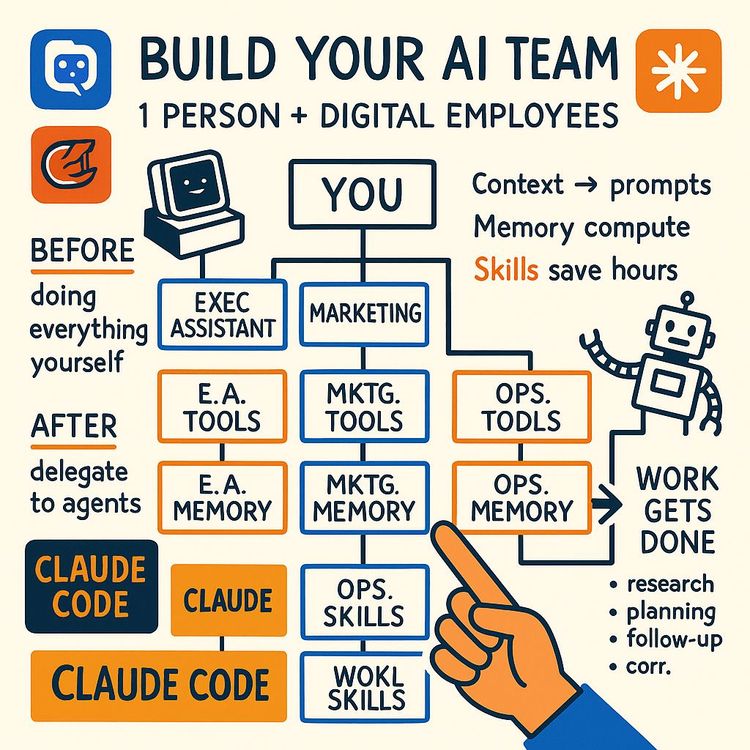
# Building AI Agents That Actually Work (Full Course) ## Introduction: The Shift From Chatting to Doing Here's something that's been bothering me about how most people use AI. They treat it like a really smart search engine. Type in a question, get an answer, copy-paste it somewhere, and move on. That's not what this technology is for anymore. Not even close. The most important shift happening in AI right now isn't about better models or more impressive demos. It's about moving from talking to AI to actually delegating work to it. We're watching the transition from chat models to something fundamentally different: AI agents. And if you understand how to build and direct these agents, you're not just keeping up with the curve. You're building the infrastructure for how work will get done from here on out. Let me paint a picture of what I mean. You know how a chat model works, right? You ask it something, it responds. You ask another thing, it responds again. It's a ping-pong match. You're the one keeping score, you're the one deciding what happens next, and you're the one doing all the actual work after the conversation ends. The AI is just a talking head. It gives you advice, but it never picks up the tools and does the job. An agent is different. An agent is like hiring a contractor instead of asking for advice on how to remodel your kitchen. You give it a goal. You say "make my kitchen nicer" and it figures out the steps. It measures the space. It picks materials. It hires subcontractors. It deals with problems that come up. And at the end, it hands you the keys to a finished kitchen. This isn't a small difference. This is the difference between having a calculator and having an accountant. Between having a spell-checker and having an editor. Between having a gym membership and having a personal trainer who plans your workouts, tracks your progress, and adjusts your routine based on how your body responds. In this course, we're going to break down exactly how agents work, what makes them effective, and how you can build your own. Not in some abstract, theoretical way, but in a practical, step-by-step way that you can apply starting today. We'll cover the core loop that powers every agent, the four components that make them functional, how to give them memory and context, how to connect them to your actual tools, and how to package your processes into reusable skills that compound over time. By the end of this, you won't just understand what AI agents are. You'll know how to build your own AI workforce. One that handles your repetitive tasks, manages your workflows, and gets better at everything it does the more you use it. Let's get into it. ## Section 1: Understanding the Fundamental Shift ### What Makes an Agent Different From a Chat Model I want you to think about the last time you used ChatGPT or Claude or any other AI chatbot. You probably typed something like "write me a cold email for my product" and got back a decent draft. Then you had to edit it, maybe ask for revisions, copy it into your email client, find the right recipient, and hit send. You did all the work. The AI just gave you raw material. That's the question-to-answer paradigm. It's useful, sure. But it's also limited. You're still the one executing everything. The AI is just a really articulate rubber duck that you bounce ideas off of. Now imagine this instead. You tell your computer "I need to send a cold email to the marketing director at Acme Corp about our new analytics tool. Find her email, write something personalized based on their recent blog posts, send it, and add a follow-up reminder for three days from now if she doesn't reply." And then your computer does all of that. It researches the company. It reads their blog. It finds the contact. It writes the email in your voice. It sends it. It sets the reminder. And it reports back to you with everything it did. That's the goal-to-result paradigm. That's an agent. The difference isn't subtle. It's the difference between asking someone for directions and handing them the keys to your car. It's the difference between reading a recipe and having dinner on the table. It's the difference between watching a tutorial and having the job done. This shift matters because it changes what you can delegate. When AI was just a chat model, you could delegate thinking tasks. Brainstorming, drafting, summarizing. But you still had to do everything that required actually touching the digital world. Now, with agents, you can delegate doing tasks. The agent doesn't just suggest what to do. It does it. ### Why This Matters for Your Work and Business Here's where this gets practical. Most of us spend our days bouncing between tools. Email, calendar, documents, project management software, messaging apps, spreadsheets. Every time we switch contexts, we lose a little bit of mental energy. Every time we copy-paste information from one app to another, we waste time. Every time we do the same repetitive process for the hundredth time, we're burning hours that could go to actual thinking and creating. Agents change this entirely. Instead of you being the one who moves information between tools, the agent becomes the central hub. It sits in one place, connected to all your tools, and you just tell it what outcome you want. It handles the context switching. It does the copy-pasting. It remembers the processes you've taught it. Think about what this means for a small business owner. Instead of hiring an operations person to manage the day-to-day logistics, you could build an agent that handles scheduling, follows up with clients, manages your inbox, and keeps your project boards updated. Instead of hiring a marketing assistant to compile competitor research, you could create an agent that monitors the market, analyzes ad campaigns, and sends you weekly reports. This isn't about replacing employees with AI. It's about removing the drudgery so you and your team can focus on the work that actually requires human judgment, creativity, and relationships. It's about building what I call an AI Operating System, a personalized layer of AI workers that handles the repetitive stuff so you can do the meaningful stuff. The people who figure this out early are going to have a massive advantage. Not because they're smarter or harder working, but because they've built systems that multiply their output. They've stopped being the bottleneck in their own productivity. ## Section 2: The Core Agent Loop ### Breaking Down Observe, Think, Act At the heart of every AI agent, there's a simple loop. It sounds almost too simple when you first hear it, but it's the engine that drives all autonomous AI work. It's called the Observe, Think, Act loop, and once you understand it, you'll understand how agents do anything. Here's how it works. When you give an agent a goal, it doesn't just produce an answer and stop. Instead, it enters a continuous cycle. First, it observes. It looks at the current state of things. What's the task? What information does it have? What files are available? What has it learned from previous steps? This observation phase is about gathering context and understanding where it is in relation to the goal. Then it thinks. Based on what it's observed, the agent decides what to do next. This is the reasoning phase. It's where the agent plans, considers options, and determines the logical next step. The thinking might be simple, like "I need to search the web for more information," or complex, like "I need to analyze this dataset, identify trends, and then decide which marketing channels to recommend." Finally, it acts. The agent executes the step it decided on. This could mean writing code, searching the web, sending an email, creating a file, or calling an external tool. The action produces new information or changes the state of things. And then the loop repeats. The agent observes the results of its action. It thinks about what that means for the next step. It acts again. This continues, cycle after cycle, until the agent determines that the original goal has been achieved. This is fundamentally different from how chat models work. A chat model does one pass. It reads your prompt, generates a response, and stops. An agent keeps going. It doesn't stop until the job is done. It can go through dozens, hundreds, even thousands of iterations to complete a complex task. ### A Real-World Example: Building a Website Let me walk you through what this looks like in practice. Imagine you tell an agent to build a minimalist portfolio website for a fictional person named Greg Eisenberg. You don't give it any other instructions. You just say "build the site." The agent enters its loop. In the first iteration, it observes. It looks at your request and realizes it has no information about Greg Eisenberg. Who is this person? What does he do? What should the site say about him? The agent thinks about this and decides the logical first step is to research. It acts by using its web search tool to look up Greg Eisenberg. Now the second iteration begins. The agent observes the search results. It now knows that Greg Eisenberg is, let's say, a photographer. It thinks about what this means for the website. A photographer needs a gallery, an about section, a contact page. The agent decides to create a plan. It acts by drafting a website structure as a text file. Third iteration. The agent observes its plan. It thinks about what comes next. It needs to turn this plan into actual code. It acts by writing the HTML and CSS files for the site. Fourth iteration. The agent observes the files it created. It thinks about how to test them. It acts by opening a local server to preview the site. Fifth iteration. The agent observes the preview. It thinks about whether the site looks right. It takes a screenshot to verify. If something looks off, it goes back and fixes the code. If everything looks good, it determines the goal is complete. Sixth iteration. The agent observes that everything is working. It thinks about how to present the final result. It acts by summarizing what it built and showing you the preview. This whole process happened without you doing anything except giving the initial goal. The agent broke down the task, figured out the steps, executed them, checked its own work, and delivered a finished product. That's the power of the loop. ### Why the Loop Matters The loop matters because it's what makes agents autonomous. Without it, you'd have to guide the AI through every single step. You'd be back to the question-to-answer paradigm, except with more steps. The loop is what allows the agent to work independently, to handle unexpected situations, and to break down complex goals into manageable actions. It also matters because it's the same loop regardless of what the agent is doing. Whether your agent is researching competitors, writing code, managing your calendar, or analyzing financial data, it's always observing, thinking, and acting. Once you internalize this pattern, you can understand what any agent is doing at any given moment. You'll also start to see where things can go wrong. If the agent doesn't have enough context to observe properly, it'll make bad decisions. If the thinking phase is rushed, it'll take suboptimal actions. If the action phase fails, the agent needs to be able to observe that failure and adjust. The loop is elegant in its simplicity, but it requires all three phases to work well. ## Section 3: The Four Components of an AI Agent ### The Brain, The Engine, The Hands, and The Knowledge Every AI agent, no matter how simple or complex, is built from four core components. Understanding these components is like understanding the anatomy of a car. You don't need to be a mechanic to drive, but knowing what the engine does and what the wheels are for makes you a better driver. The first component is the LLM, the Large Language Model. This is the brain of the agent. It's the underlying AI model that provides reasoning, language understanding, and decision-making capabilities. Think of models like GPT-4, Claude 3 Opus, or any of the other frontier models. The LLM is what allows the agent to understand your goal, think through problems, and communicate its results. The second component is the loop. We just covered this in detail, but it's worth emphasizing in the context of the four components. The loop is the engine of the agent. It's the Observe, Think, Act cycle that keeps the agent moving toward its goal. Without the loop, you just have a chat model with extra steps. The loop is what makes the agent autonomous. The third component is tools. These are the hands of the agent. Tools are connections to external applications and services that allow the agent to interact with the digital world. Gmail for email, Google Calendar for scheduling, Notion for project management, Stripe for payments, web search for research. Without tools, the agent can only produce text. With tools, the agent can actually do things. The fourth component is context. This is the knowledge of the agent. Context is all the information the agent has access to: your instructions, your business details, your preferences, any files or documents, and the memory of past interactions. Context is what makes the agent personalized and effective. Without good context, the agent is working blind. ### The Agent Harness: Where It All Comes Together These four components don't just float around on their own. They need a platform to bring them together. This platform is called an agent harness. It's the application or environment that facilitates the agent loop and integrates the LLM, the tools, and the context. You've probably heard of some of these platforms. Claude Code, Co-work, Codex, Anti-gravity, OpenClaw. These are all agent harnesses. They come in different flavors with different features, but they all operate on the same fundamental principles. They all provide a way for the LLM to loop, a way to connect tools, and a way to provide context. Here's an analogy that I find helpful. Learning to build agents is like learning to drive a car. The fundamental principles are the same regardless of the vehicle. You steer, you brake, you accelerate. Whether you're driving a Toyota or a Range Rover, the core mechanics are identical. Once you learn to drive, you can get into any car and figure it out. Agent harnesses are the same way. Each one has its own quirks and features. Co-work might have a nicer interface. Claude Code might have better integration with your codebase. OpenClaw might be more powerful for complex workflows. But if you understand the core concepts, you can use any of them. When you're starting out, don't get too hung up on choosing the perfect harness. Pick one that's beginner-friendly and works with local files. Co-work is a great place to start. Claude Code is also good. The important thing is to start building and learning the concepts. You can always switch harnesses later. ## Section 4: Onboarding Your Agent Through Context Engineering ### Moving From Prompt Engineering to Context Engineering There's been a lot of talk about prompt engineering. How to write the perfect prompt to get the best response from an AI. People share formulas and frameworks for crafting prompts that squeeze the most out of the model. And while that's not useless, it's becoming less relevant as we move to agents. Here's why. When you're working with a chat model, the prompt is everything. It's the only way you have to communicate with the model, so you need to pack as much information into it as possible. But when you're working with an agent, the prompt is just the starting point. The agent has access to a persistent context that goes far beyond any single prompt. This is the shift from prompt engineering to context engineering. Instead of trying to cram all your instructions into a single request, you build a rich, persistent knowledge base that the agent draws from every time it works. The prompt becomes simple. The context does the heavy lifting. Think about it like this. If you hired a new assistant, you wouldn't explain everything they need to know in your first request. You'd give them an onboarding document. You'd tell them about your company, your preferences, your communication style, your current projects. Then, when you asked them to do something, they'd have the background knowledge to do it well. Context engineering is exactly that. You're onboarding your agent like a new employee. You're giving it the knowledge it needs to work effectively, so you don't have to explain everything every time. ### The `agents.md` File: Your Agent's Permanent Instructions The primary tool for context engineering is a special markdown file. Depending on the harness you're using, it might be called `agents.md`, `claude.md`, or `gemini.md`. But the concept is the same. This file acts as a permanent set of custom instructions that is automatically loaded into the agent's context at the start of every session. When you create an agent, you create a folder for it. Inside that folder, you create this markdown file. And inside the file, you write down everything the agent needs to know to work effectively. What goes in this file? First, the role and persona. You define what the agent is. "You are my executive assistant." "You are the head of marketing for my SaaS company." "You are my personal research analyst." Giving the agent a clear identity helps it understand how to approach tasks. Second, core information about you and your business. What do you do? Who are your customers? What are your products or services? What are your goals? The more the agent knows about your world, the better it can make decisions that align with your interests. Third, working preferences. How do you want the agent to communicate? Formal or casual? Detailed or concise? What formatting do you prefer? Are there any rules it should follow? This is where you set the guardrails and the style guidelines. Once you've created this file, the agent will load it automatically at the start of every session. You don't have to remind it. You don't have to repeat yourself. You just say "write me a cold email" and the agent already knows your company, your voice, your target audience, and your preferences. It can produce a high-quality result without you explaining anything. This is a massive shift in how you interact with AI. Instead of writing long, detailed prompts every time, you can make simple requests and trust that the agent has the context to handle them well. ### A Practical Example: Setting Up an Executive Assistant Agent Let me walk you through what this looks like in practice. Say you want to create an executive assistant agent. You start by creating a folder on your computer called "Executive Assistant." Inside that folder, you create a file called `agents.md`. In that file, you write something like this: "You are my executive assistant. Your role is to manage my schedule, handle my email, and keep me organized. I run a digital marketing agency with ten clients. My typical work hours are 9am to 6pm. I prefer communication that is concise and action-oriented. When writing emails on my behalf, use a professional but friendly tone. Always include a clear subject line and a call to action. I prefer to review any emails before they are sent. For scheduling, always check my calendar for conflicts before proposing a time. I have a standing meeting every Monday at 10am with my team." That's it. That's your context file. Now, when you tell the agent "schedule a meeting with Sarah next week," it knows to check your calendar, avoid your standing Monday meeting, find a time that works, and draft a professional email to Sarah. It doesn't need you to explain any of that. The beauty of this system is that it compounds. As you work with the agent, you'll discover things you want to add. Maybe you realize the agent should always cc your assistant on certain emails. Add it to the file. Maybe you want all meeting summaries saved to a specific folder. Add it to the file. The context grows, and the agent gets better and better. ## Section 5: Building a Self-Improving Memory System ### The Problem With Fresh Starts Here's a frustration you've probably experienced. You correct an AI, it acknowledges the correction, and then the next time you talk to it, it makes the same mistake again. You tell it "never sign off emails with 'Cheers'" and it says "Got it, I'll use 'Warm regards' instead." But the next day, it's back to "Cheers" like the conversation never happened. This happens because most AI systems don't have persistent memory. Each session starts fresh. The model doesn't remember what you told it yesterday or last week. It's like talking to someone with amnesia who forgets everything you say the moment the conversation ends. For a chat model, this is annoying but manageable. You just repeat your instructions. But for an agent, this is a serious problem. If your agent is going to manage your email, your calendar, and your projects, it needs to remember your preferences. It can't be starting from zero every time. ### Creating the Memory Loop The solution is to build a memory system for your agent. This is surprisingly simple to implement, and it turns your agent into a self-improving system that gets better with every interaction. Here's how it works. You create a second file in your agent's folder called `memory.md`. This file will serve as the agent's long-term memory. It starts out mostly empty, with just a few headings to organize the information. Then, you update your `agents.md` file to include a rule about memory. Something like this: "Before starting any task, read the `memory.md` file to understand what you've learned over time. When I provide a correction or you learn something new and important, update the relevant section in `memory.md`. Keep this file current by replacing outdated information." That's it. That's the entire system. But let me explain why it works. When you give the agent a task, it reads `agents.md` for your core instructions. It also reads `memory.md` to see what it's learned. So if you previously corrected it about email sign-offs, it sees that correction in memory and applies it. When you correct the agent, it doesn't just acknowledge the correction. It takes an action. It edits the `memory.md` file to record what it learned. So the next time it starts a session, the learning is already there. This creates a compounding loop. Every interaction makes the agent better. Every correction is remembered. Every preference is saved. Over time, the agent becomes more and more aligned with your needs, without you having to repeat yourself. ### An Example of Memory in Action Let me show you what this looks like in practice. You're working with your executive assistant agent. You ask it to write a follow-up email to a client. It drafts something that ends with "Cheers, [Your Name]." You say: "Don't use 'Cheers' as a sign-off. Use 'Warm regards' instead." The agent acknowledges: "I'll use 'Warm regards' going forward." But here's the key difference. Instead of just saying that, it also acts. It opens the `memory.md` file and adds a line under a "Communication Preferences" section: "Sign off emails with 'Warm regards' instead of 'Cheers.'" The next day, you ask the agent to write another email. It reads `memory.md` as part of its process. It sees the preference you recorded. It writes the email with "Warm regards." No reminder needed. Now imagine this happening across dozens of preferences. Your favorite coffee shop for scheduling meetings. Your preferred meeting length. Your formatting preferences for reports. The way you like to structure your weekly reviews. Every time you correct the agent or share a preference, it saves it. Every session, the agent gets a little bit better. This is what I mean by a self-improving system. The agent isn't just doing tasks for you. It's learning how to do them better. And that learning compounds over time. ## Section 6: Connecting Your Agent to the World Through Tools ### Why Tools Are Essential An agent with just an LLM and a loop is like a brilliant brain with no hands. It can think, plan, and reason, but it can't actually do anything. It can't send an email. It can't update your calendar. It can't add a task to your project board. It can only produce text. For an agent to be truly useful, it needs to interact with the digital world. It needs to use the same tools you use. And that's where tools come in. Tools are connections to external applications and services. When you connect a tool to your agent, you're giving it the ability to perform actions in that application. Connect Gmail, and the agent can read, draft, and send emails. Connect Google Calendar, and the agent can check your schedule and create events. Connect Notion, and the agent can create and update pages in your workspace. This is what transforms an agent from a sophisticated chatbot into a digital worker. It's the difference between an AI that tells you what to do and an AI that does it. ### Understanding the Model Context Protocol Now, connecting an agent to external tools sounds like it could be complicated. Each application has its own API, its own authentication system, its own way of doing things. Writing custom integrations for every tool would be a nightmare. That's where the Model Context Protocol, or MCP, comes in. MCP is a standardized method for connecting AI models to external tools. It acts as a universal translator between the agent and the applications it needs to use. Think about it like this. The agent speaks English. Gmail speaks, let's say, French. Notion speaks Spanish. Stripe speaks Japanese. Without a translator, the agent would need to learn every language individually. But with MCP, there's a standardized way for the agent to communicate with any tool that supports the protocol. MCP essentially provides a common interface. The agent sends a request in a standard format. The MCP layer translates that request into whatever the specific tool needs. The tool processes the request and sends back a response. The MCP layer translates that response back to the agent. This is a huge deal because it means you don't need custom integrations for every tool. You just need tools that support MCP, and most modern applications do. In your agent harness, you'll find a "connectors" or "tools" section where you can authorize access to your applications. It's usually as simple as clicking a button and logging in. ### A Multi-Step Workflow Example Let me show you what this looks like in practice. Imagine you've just had a sales call with a prospect named Maltoshi. You're using an app called Granola to take meeting notes. After the call, you want to follow up. You tell your agent: "Review my meeting notes from my call with Maltoshi, draft a follow-up email with the proposal we discussed, create a Stripe payment link for the project, and set up a new project in Notion." Here's what happens. The agent enters its loop. It observes the task and the tools it has available. It thinks about the next step. It acts by accessing Granola through its MCP connection and retrieving the meeting notes. The loop continues. The agent observes the notes and understands the key points of the conversation. It thinks about how to structure the follow-up email. It acts by drafting the email in Gmail, using your preferred tone and formatting. Next iteration. The agent observes the drafted email. It thinks about the payment details. It acts by creating a Stripe payment link for the agreed-upon amount. Next iteration. The agent observes the payment link. It thinks about setting up the project. It acts by creating a new project in Notion with the relevant details from the meeting. Final iteration. The agent observes everything it's done. It thinks about whether anything is missing. It acts by presenting you with the drafted email, the payment link, and the Notion project, ready for your review. The entire workflow happened from a single command. You didn't have to switch between Granola, Gmail, Stripe, and Notion. You didn't have to copy-paste information from one app to another. The agent did all of it through its tool connections. ### Choosing Your First Tools When you're starting out, don't try to connect everything at once. Pick one or two tools that will make the biggest difference for your most common tasks. For most people, email and calendar are the best starting points. Gmail and Google Calendar cover a huge portion of daily work. Connect those first. Get comfortable with how the agent uses them. Then add more tools as you identify needs. Maybe you want the agent to manage your project boards in Notion. Maybe you want it to update your CRM. Maybe you want it to pull data from your analytics platform. The key is to start small and expand gradually. Each tool you connect multiplies what the agent can do, but it also adds complexity. Master the basics first. ## Section 7: Creating Skills for Repeatable Processes ### What Are Skills? You've taught your agent your preferences. You've connected it to your tools. It can do a lot of things now. But there's a problem. Every time you want the agent to do something complex, you have to explain the process. Even with good context, some tasks require detailed instructions. Let me give you an example. Say you want your agent to analyze a competitor's advertising campaign. This is a complex task. It involves finding the competitor's ads, looking at their messaging, analyzing their targeting, evaluating their creative, and producing a report with recommendations. The first time you ask the agent to do this, you might need to guide it through each step. "First, search for their ads on Facebook. Then, look at the copy they're using. Then, analyze the visual elements. Then, write up a report with this structure." But what if you want to do this every month? Do you want to explain the process every single time? No. You want to teach it once and then have the agent execute it automatically. That's where skills come in. A skill is a pre-packaged, reusable set of instructions for a specific, repeatable process. It's essentially a Standard Operating Procedure, or SOP, for your AI agent. ### How Skills Work A skill is typically stored as a folder containing a markdown file. The markdown file contains the step-by-step instructions for the process. It might also include reference documents, templates, or examples. Once a skill is created, you can invoke it with a simple command. You just say "use the competitor analysis skill" and the agent knows exactly what to do. It doesn't need you to explain the process. It just follows the instructions in the skill. This is incredibly powerful for several reasons. First, it ensures consistency. Every time the agent executes the skill, it follows the same steps. You get the same quality of output every time. Second, it saves time. You don't have to explain complex processes repeatedly. You just invoke the skill and let the agent work. Third, it captures knowledge. When you create a skill, you're documenting a process. Over time, you'll build a library of skills that represents your accumulated expertise. This library becomes a valuable intellectual asset. ### Creating Skills From Documentation There are two primary methods for creating skills. The first is from documentation. If you have existing documentation for a process, you can provide it to the agent and instruct it to create a skill based on that material. Let me give you an example. Say you have a transcript from a training course on writing viral hooks. You want to turn that into a skill. You tell the agent: "Use your skill creator skill and this course transcript on 'viral hooks' to build a 'viralHookWriter' skill." The agent reads the transcript, extracts the key principles and steps, and creates a skill folder with a markdown file containing the instructions. Now, whenever you want to write viral hooks, you just say "use the viralHookWriter skill" and the agent applies the techniques from the course. This is particularly useful for onboarding. Instead of having new employees read through long training documents, you can turn those documents into skills that your agents can execute. The knowledge is captured and applied automatically. ### Creating Skills by Demonstration The second method for creating skills is by demonstration. This is when you work through a process with the agent manually, and then instruct it to codify what you did. Let me walk you through an example. Say you want to create a skill for analyzing competitor ad campaigns. You start by working with the agent to do the analysis manually. You guide it through each step. "Search for their ads on Facebook." "Look at the copy they're using and note the key messages." "Analyze the visual elements and note the design style." "Look at their targeting and audience." "Write up a report with sections for messaging, creative, targeting, and recommendations." The agent follows your instructions and produces a report. You review it and provide feedback. "The recommendations section should be more specific. Include actionable suggestions for each competitor." The agent revises the report. Now you're happy with the output. You tell the agent: "Create a skill called 'competitorAnalysis' based on the entire process we just completed." The agent reviews the conversation, extracts the steps and your feedback, and creates a skill folder with a markdown file containing the complete process. Now, whenever you want to analyze a competitor, you just say "use the competitorAnalysis skill" and the agent executes the process you taught it. This method is powerful because it captures your specific approach. The skill isn't generic. It's tailored to how you think about competitor analysis, with your preferences and standards baked in. ### Building Your Skill Library As you work with agents, you'll identify more and more processes that can be turned into skills. Start with the tasks you do most frequently. The ones that are repetitive and time-consuming. The ones where you find yourself explaining the same thing over and over. Maybe it's preparing a morning brief. Maybe it's generating referral emails. Maybe it's doing market research. Maybe it's creating content calendars. Whatever it is, if you do it regularly and it follows a consistent process, it's a candidate for a skill. Each skill you create makes your agent more valuable. It's like adding a new employee to your team who already knows exactly how to do a specific job. And the beauty is that skills can be shared. If you build a great skill, you can give it to someone else. They can use it with their own agent. This creates a powerful ecosystem of shared knowledge. ## Section 8: Building Your AI Operating System ### Moving Beyond Single Agents So far, we've been talking about building individual agents. One agent for your email. One agent for your research. One agent for your content creation. But the real power comes when you start thinking bigger. Instead of having a single agent that tries to do everything, you can build a system of specialized agents. Each agent has its own context, its own memory, its own skills, and its own set of tools. Together, they form what I call an AI Operating System, or AIOS. Think of it like a company. You don't hire one person to do everything. You hire specialists. A head of marketing. A CFO. An executive assistant. Each person has their own area of expertise, their own tools, and their own way of working. They coordinate to achieve the company's goals. Your AIOS works the same way. You create an agent for each major function in your work or business. Each agent is an expert in its domain. They work together to handle your operations. ### Structuring Your AI Workforce Let me give you some examples of how you might structure your AIOS. You might have an Executive Assistant agent. This agent manages your calendar, handles your email, schedules meetings, and keeps you organized. Its context includes your schedule, your preferences, your contacts. Its tools include Gmail, Google Calendar, and maybe a note-taking app. Its skills include preparing meeting briefs and managing travel arrangements. You might have a Head of Marketing agent. This agent handles your marketing operations. It analyzes ad campaigns, researches competitors, creates content calendars, and drafts marketing copy. Its context includes your brand guidelines, your target audience, your marketing strategy. Its tools include social media platforms, analytics tools, and content management systems. Its skills include competitor analysis, ad copywriting, and content planning. You might have a CFO agent. This agent monitors your finances. It tracks expenses, prepares financial reports, analyzes cash flow, and makes recommendations. Its context includes your financial goals, your accounting methods, your budget. Its tools include accounting software, banking platforms, and spreadsheet tools. Its skills include financial reporting, budget analysis, and expense tracking. You might have a Research agent. This agent gathers information on any topic you need. It scours the web, summarizes articles, compiles reports, and keeps you informed. Its context includes your areas of interest, your research priorities, your preferred sources. Its tools include web search, news aggregators, and database access. Its skills include deep research, source evaluation, and report writing. Each agent is specialized. Each one has its own folder with its own `agents.md` and `memory.md` files. Each one has its own set of connected tools and its own library of skills. Together, they form a complete AI workforce. ### The Benefits of an AIOS Why bother structuring your agents this way? Why not just have one agent that can do everything? The first reason is focus. When an agent has a specific role, it can be much more effective. Its context is focused on its domain. Its memory is relevant to its tasks. Its skills are tailored to its responsibilities. It doesn't get distracted by out-of-scope information. The second reason is scalability. As your needs grow, you can add new agents. Need someone to handle customer support? Create a Customer Support agent. Need someone to manage your content? Create a Content Manager agent. Each new agent expands your capabilities without disrupting your existing setup. The third reason is clarity. When you want something done, you know exactly which agent to ask. Need a meeting scheduled? Go to your Executive Assistant. Need a marketing report? Go to your Head of Marketing. You don't have to explain your entire business context every time. Each agent already has the context it needs. The fourth reason is compounding value. Each agent learns and improves over time. Its memory grows. Its skills expand. Its effectiveness increases. As your AIOS matures, it becomes more and more valuable. You're not just building a tool. You're building an organizational asset. ### Starting Small and Scaling If this all sounds overwhelming, don't worry. You don't need to build your entire AIOS overnight. Start with one agent. The Executive Assistant is usually the best place to start because it handles tasks you do every day. Build out its context. Connect its tools. Create a few skills. Use it for a week. See how it works. Identify what needs improvement. Iterate. Once you're comfortable with one agent, add a second. Maybe the Head of Marketing. Set it up the same way. Build its context, connect its tools, create its skills. Before you know it, you'll have a team of AI agents handling your operations. And you'll wonder how you ever worked without them. ## Section 9: Practical Implementation Guide ### Choosing Your Starting Point Alright, let's get practical. You're convinced that agents are the future. You want to start building. Where do you begin? The first step is to choose an agent harness. This is the platform you'll use to create and manage your agents. For beginners, I recommend starting with something user-friendly that operates on local files. Co-work is an excellent choice. Claude Code is also good, especially if you're comfortable with command-line interfaces. Perplexity Computer is another option worth exploring. Don't overthink this choice. The concepts are the same across all harnesses. Pick one that looks intuitive to you and start exploring. You can always switch later if you find something you like better. ### Step-by-Step: Creating Your First Agent Once you've chosen a harness, here's your step-by-step guide to creating your first agent. We'll use the Executive Assistant as our example. Step one: Create a folder for your agent. On your computer, create a new folder called "Executive Assistant." This will be the agent's workspace. All of its files will live here. Step two: Create the context file. Inside the folder, create a markdown file called `agents.md`. Write down the agent's role, your information, and your preferences. Be as detailed as you can. This is the foundation of everything the agent does. Step three: Implement the memory system. Create a second file called `memory.md`. It can start with just a few headings. Then, in your `agents.md` file, add the instruction: "Before you act, consult `memory.md` for my preferences. If I give you a correction, update `memory.md`." Step four: Connect your tools. In your harness, navigate to the "Connectors" or "Tools" section. Authorize access to your core applications. Start with Gmail and Google Calendar. These two tools will cover a huge portion of your daily needs. Step five: Test your agent. Give it a simple task. "Summarize my emails from today." "Schedule a meeting with John next Tuesday." See how it performs. Identify areas where it could improve. Step six: Create your first skill. Identify a simple, repetitive task you do regularly. Maybe it's preparing a morning brief. Work with the agent to perform the task manually. Once you're happy with the result, instruct the agent: "Use the skill creator skill to save this process as 'morning_brief_skill'." Step seven: Automate and iterate. Use any scheduling features in your harness to run your skills automatically. Continue identifying repetitive processes and converting them into skills. Keep refining your context and memory files. The system will get better and better. ### Common Pitfalls to Avoid As you start building agents, there are a few common mistakes you'll want to avoid. The first is neglecting context. Some people skip the `agents.md` file and just start giving their agent tasks. This is like hiring an employee and not giving them any training. The agent will struggle because it doesn't have the background knowledge it needs. Invest time in building good context upfront. The second is expecting perfection immediately. Your agent will make mistakes. It will misunderstand instructions. It will produce outputs that aren't quite right. This is normal. The system is designed to improve over time. Don't get frustrated. Just provide corrections and let the memory system do its work. The third is trying to do too much at once. Don't try to build a full AIOS in your first week. Start with one agent and one or two tools. Master the basics. Then expand. The compounding effect will happen naturally over time. The fourth is ignoring security. When you connect tools to your agent, you're giving it access to sensitive information. Make sure you're comfortable with the access you're granting. Use the principle of least privilege. Only connect the tools the agent actually needs. Regularly review what access your agents have. ## Section 10: Advanced Considerations ### Security and Privacy Let's talk more about security because it's important. When you connect your agent to your email, calendar, and other tools, you're giving it the ability to read and modify your data. This is powerful, but it also creates risk. Here are some best practices to follow. First, only connect the tools your agent actually needs. If your agent doesn't need access to your financial accounts, don't connect them. Second, use the minimum necessary permissions. Many tools allow you to grant read-only access or limit what the agent can do. Third, regularly review what your agents have access to. Revoke access to tools you're no longer using. Fourth, be thoughtful about what you put in your context files. Your `agents.md` and `memory.md` files contain sensitive information about your business and preferences. Make sure these files are stored securely. If you're using a cloud-based harness, understand how your data is stored and protected. Finally, remember that agents can make mistakes. If your agent is sending emails on your behalf, set up a review process. Have it draft emails and wait for your approval before sending. This adds a safety layer that prevents embarrassing or harmful errors. ### Local vs. Cloud-Based LLMs Another consideration is whether to use local or cloud-based LLMs. Local models run on your own computer. Cloud models run on remote servers. There are trade-offs to both. Local models offer more privacy. Your data doesn't leave your machine. They also work offline. But they require powerful hardware and are often less capable than the best cloud models. The frontier models, like GPT-4 and Claude 3 Opus, are only available in the cloud. Cloud models are more powerful and accessible. You just need an internet connection. But your data is processed on remote servers. For most people, the benefits of cloud models outweigh the privacy concerns. Just be aware of what you're sharing. ### The Future of Agent Development We're still in the early days of agent development. The tools are improving rapidly. Harnesses are getting more sophisticated. Models are getting more capable. Skills are becoming more standardized. As these developments continue, agents will become more powerful and more accessible. Building an agent will become easier. The skills you build today will become more valuable. The context you create will become more refined. But the fundamental principles will remain the same. The Observe, Think, Act loop. The four components. The importance of context. The power of skills. If you master these principles now, you'll be well-positioned for whatever comes next. ## Conclusion: The Power of Delegation We've covered a lot of ground in this course. We started with the fundamental shift from chat models to agents. We broke down the Observe, Think, Act loop that powers all agent operations. We explored the four components that make up every agent. We learned about context engineering and how to onboard agents with the knowledge they need. We built self-improving memory systems. We connected agents to external tools through MCP. We created reusable skills for repeatable processes. And we explored how to structure everything into a complete AI Operating System. If there's one thing I want you to take away from all of this, it's the power of delegation. The people who get ahead in this new era aren't necessarily the ones who work the hardest. They're the ones who have built systems that multiply their output. They're the ones who have learned to delegate effectively. Agents are the ultimate delegation tool. They don't just answer questions. They do work. They don't just suggest actions. They take them. They don't just hold information. They use it to achieve goals. The shift from question-to-answer to goal-to-result is profound. It changes what's possible. It changes what you can accomplish. It changes what you can build. But it requires a shift in how you think. Instead of writing prompts, you're building context. Instead of asking questions, you're setting goals. Instead of having conversations, you're delegating work. This is a skill. And like any skill, it takes practice. Start small. Build one agent. Connect one tool. Create one skill. Learn from your mistakes. Iterate. Expand. The system you build will compound over time. Your agents will get better. Your processes will get smoother. Your productivity will multiply. You'll wonder how you ever worked without them. So here's my challenge to you. Don't just read this course and move on. Take action. Choose a harness. Create your first agent. Give it context. Connect a tool. Create a skill. The future of work is being built right now. And the people building it are the ones who understand agents. Be one of them.Frequently Asked Questions
Certification
About the Certification
Get certified in building AI agents that actually work. This credential proves you can wire models into your existing tools, retain user preferences, and automate real workflows,building a digital workforce that sharpens with every task.
Official Certification
Upon successful completion of the "Certification in Building Production-Ready AI Agents", you will receive a verifiable digital certificate. This certificate demonstrates your expertise in the subject matter covered in this course.
Benefits of Certification
- Enhance your professional credibility and stand out in the job market.
- Validate your skills and knowledge in cutting-edge AI technologies.
- Unlock new career opportunities in the rapidly growing AI field.
- Share your achievement on your resume, LinkedIn, and other professional platforms.
How to complete your certification successfully?
To earn your certification, you’ll need to complete all video lessons, study the guide carefully, and review the FAQ. After that, you’ll be prepared to pass the certification requirements.
Other AI Video Courses

Video Course: What is Generative AI and how does it work?

Video Course: How to Use ChatGPT from Beginner to Professional

Video Course: How to Use Google Gemini for Google Workspace to Boost Productivity

Video Course: How to Use Claude 3.7 AI - Tips for Beginners!

Video Course: ChatGPT for Data Analytics: Full Course - from Beginners to Professional

Video Course: Generating Images and photos With ChatGPT?

Video Course: Generating Images & Photo's with MidJourney

Video Course: Generating Design's with Microsoft Designer and AI

Video Course: Generating Design's with Canva.com and AI
Join 20,000+ Professionals, Using AI to transform their Careers
Join professionals who didn’t just adapt, they thrived. You can too, with AI training designed for your job.







