
How Senior Engineers Build with AI Agents: Splitwise Clone (Video Course)
See how senior engineers really ship with AI: you'll architect an agent-driven workflow, encode your own skills and guardrails, and build a production-grade Splitwise-style app in under a day, with code you'd actually trust in real life.
Related Certification: Certification in Building Full-Stack Apps with AI Agents
Also includes Access to All:
What You Will Learn
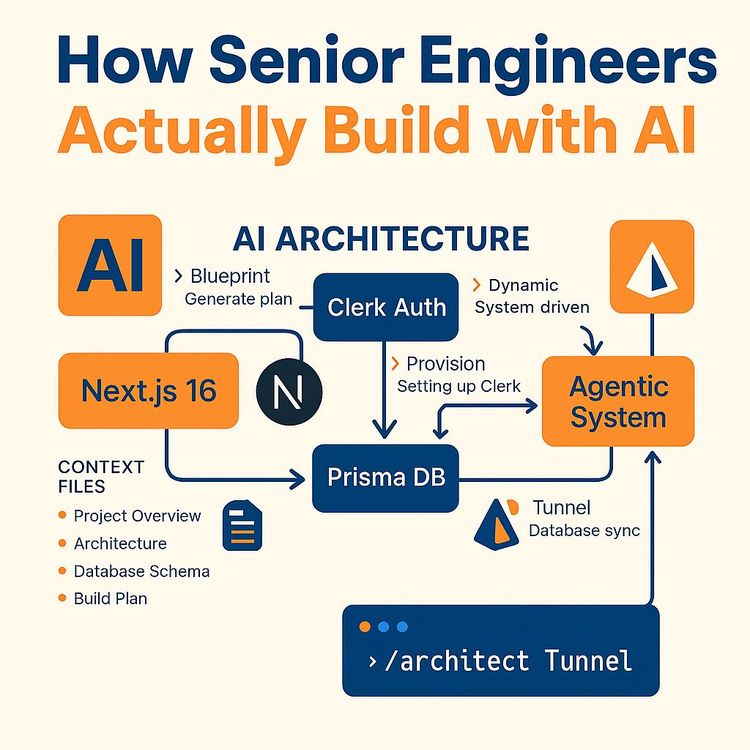
- Build a context folder: project overview, architecture, database schema, and build plan
- Author agents.md to define roles, boundaries, and reusable slash commands
- Create skill files (auto-triggering checklists and manual design specs) as markdown
- Use agent-native CLIs (Clerk, Prisma) to provision and manage infrastructure without manual steps
- Enforce architectural invariants: auth-first, money-as-cents, exact splits, and server-side validation
- Run a phased one-phase/one-commit workflow and implement agent-assisted features (debt algorithm, AI quick-add)
Study Guide
Here is a comprehensive learning guide structured as a video course, covering every point from the Project Briefing and Study Guide. ---Introduction: The New Engineering Playbook
Here's a thought that might keep you up at night: the ability to write code is no longer a scarce skill. An AI can generate thousands of lines of functional code in seconds. It can spin up a full-stack application, complete with authentication and a database, while you finish your coffee. So, what's left for you? What is the actual value of an engineer in this new reality?
This isn't a theoretical question. It's the most pressing career question of our time. If you're a developer, you've probably felt that pang of anxiety. If you're a business leader, you're wondering what your technical team is actually for now. The answer is not what you might expect. The gap between a junior and a senior engineer hasn't closed. It has moved. It has shifted from the mechanics of writing syntax to the art of orchestrating systems. The value is no longer in typing the code; it's in directing the intelligence that writes the code.
In this comprehensive guide, we're going to break down the exact framework used to build a production-grade application called Splitter AI,a full-featured Splitwise clone with group permissions, secure user management, an AI-powered debt simplification algorithm, multi-currency support, and natural-language expense parsing. This is not a toy project. It's a complex, real-world application that would have taken a team of engineers a month to build. It was completed in under a day by a single developer using an agentic AI workflow.
We're going to move beyond "vibe coding",that chaotic, unmanageable process where you let an AI generate whatever it wants. We're going to build a systematic, professional, and repeatable methodology. You will learn how to create a repository-embedded context system, how to establish an "employment contract" with your AI, and how to build a self-improving knowledge base that makes your AI agents exponentially more effective over time. This is the playbook for how senior engineers actually build with AI. Let's dive in.
Section 1: The Shifted Divide Between Junior and Senior Engineering
Let's start by confronting the elephant in the room. If an AI can write all the code, why do we need engineers at all? The answer lies in the difference between generating code and building a system. When you ask an AI to build a full-stack app, it will happily generate 2,000 lines of custom session management, bespoke JWT logic, and complex database triggers from scratch. It will do this with an alarming level of confidence and speed.
A junior developer sees this as a superpower. "Look, the AI is doing all the hard work instantly!" They are impressed by the sheer volume of output. A senior engineer sees a maintenance nightmare. They see undocumented, untested, and unowned security infrastructure. They see a system that will be a liability the moment it needs to be debugged, scaled, or secured. The senior engineer understands that just because an AI can build custom infrastructure doesn't mean it should. When you let AI reinvent the wheel, you end up maintaining a massive, undocumented security system that you didn't even write.
This is the core distinction. It's not about who can type faster or who knows more syntax. It's about who understands the system. The senior engineer's job is to prevent the AI from hallucinating infrastructure in the first place. Instead of letting the AI write a custom auth solution, the senior engineer gives the AI a tool to provision an industry-standard solution like Clerk. Instead of letting the AI define a database schema on the fly, the senior engineer provides a pre-authored, deliberate data model. This is the shift from being a syntax author to being a system orchestrator.
Here is a simple way to look at the difference in behavior. A junior approach accepts the AI's custom implementations because they work in the moment. A senior approach directs the AI toward standard frameworks and CLIs to ensure long-term maintainability. A junior works with whatever the AI produces, good or bad. A senior audits, reviews, and continuously improves the system through documented rules. The senior engineer's primary job is to create the boundaries and constraints within which the AI can operate safely and effectively. This is the foundation of everything else we're going to discuss.
Section 2: The Context Folder , Your AI's Permanent Memory
The biggest problem with most AI-assisted development is context loss. This is the core issue with "vibe coding." When you let an AI generate code in a chat session, all the knowledge about your application lives in that chat. And what happens to a chat? It gets summarized. It gets really long. Or you open a new session and it's gone. The agent rebuilds its understanding from scratch every single time. This wastes tokens, produces inconsistent output, and leads to the AI making the same mistakes over and over again.
The solution is a paradigm shift: move all project knowledge from the chat context into the repository itself. We call this the context folder. This is a simple folder in your project root, filled with markdown files. These files are versionable, reviewable, and permanent. They are the source of truth for the AI, regardless of which session or which engineer is working on the project. It's a profound idea: the docs hold the "what" and the "why," and the prompts just steer. Let's break down the four critical files that make up this system.
The Project Overview: Defining the "What"
The first file is the project overview. This document answers the most fundamental question: "What are we building?" It describes every page and user flow in the application. It details the core features and their specifications. For Splitter AI, this file described the dashboard, the group pages, the expense model, the AI features, and every single user interaction in detail.
Why is this so powerful? When you later prompt the agent to "build the group page," it doesn't have to guess. It doesn't have to ask clarifying questions. It reads the project overview and already knows the page's content, its components, and its functionality. It knows that a group page should have a list of members, a list of expenses, and a button to add a new expense. This is the difference between giving a contractor a vague idea and giving them a detailed blueprint. The prompt becomes a single sentence, but the output is a fully-realized feature that fits perfectly into the existing architecture.
Let's look at another example. If you're building an e-commerce site, your project overview would detail every page: the product listing page, the product detail page, the shopping cart, the checkout flow, and the user account page. It would specify that the product detail page needs a high-resolution image gallery, a size selector, and a customer reviews section. When you ask the AI to "build the product detail page," it already knows exactly what that entails. The context is embedded in the repository, so the agent's output is consistent and correct from the very first line of code.
The Architecture File: Defining the "Why" and the Invariants
The second file is the architecture file. This is where you define the technology stack and, most importantly, the invariants. Invariants are the rules that the agent must never break, regardless of what you prompt it to do. These are your non-negotiable constraints. They are the safety net that prevents the AI from making catastrophic mistakes.
For a financial application like Splitter AI, the invariants are critical. Here are some examples that were defined in the architecture file:
Money is always stored as integer cents, never floats.
This is a rule that prevents floating-point rounding errors that could lead to money disappearing or appearing out of thin air. The agent is not allowed to use a float for a currency value, period.
Splits must sum exactly to the expense total.
This ensures that the math always balances. If a $100 expense is split three ways, the individual splits must add up to exactly $10,000 (in cents). The agent cannot create a system where the sum of the parts doesn't equal the whole.
The server validates all calculations; client rounding is never trusted.
This is a security and correctness invariant. The client-side UI can do whatever it wants for display, but the server is the final arbiter of truth for all calculations. This prevents malicious or buggy client code from corrupting the data.
Identity must always come from Clerk only; never trust a user ID from the client.
This is a security invariant. The agent can never trust a user ID that is passed from the client. It must always get the identity from the authenticated session provided by Clerk. This prevents a user from accessing another user's data by simply changing an ID in the request.
Every server action must begin with authentication verification.
This is a non-negotiable rule for any server action. The first line of code must be `const userId = await auth()` to verify the user is logged in. This ensures that no server action can be called without a valid user session.
The architecture file also contains a "gotchas" section. This is a living document of lessons learned. When the agent encounters an unexpected behavior,like Next.js requiring `await` for certain operations, or the dev server needing a restart after a Prisma migration,it writes that lesson down in this file. This creates a learning system. Something bites you once, it becomes a rule, and it never bites you or the agent again. The architecture file is not a static document; it's a growing knowledge base for your AI.
The Database Schema: A Decision, Not an Accident
The third file is the database schema. This is a deliberate data-modeling decision that is written before any Prisma models exist. It's not an afterthought. For Splitter AI, the schema defined the user table, the group table, the group members table, the expense table, the expense splits table, and the settlements table. It also enforced the invariants, noting that the amount is always in integer cents and that user IDs are Clerk IDs.
This is a crucial step because it forces you to think through the data model before the AI starts writing code. It's the architectural blueprint for your data. When the agent gets to the database phase of the build plan, it doesn't have to make any decisions. It simply follows the schema file verbatim. It creates the Prisma schema, runs the migrations, and generates the types. This eliminates a whole class of errors and design inconsistencies.
Let's consider a different example. If you were building a project management tool, your database schema file would define the users table, the projects table, the tasks table, and the comments table. It would specify that a task belongs to a project, that a project has many tasks, and that a user can be assigned to many tasks. It would define the relationships and the data types. When the AI builds the backend, it has a clear, unambiguous map to follow. The schema is the contract between your architectural intent and the AI's implementation.
The Build Plan: The Roadmap to Completion
The fourth and final file in the context folder is the build plan. This is a phase-by-phase checklist with checkboxes. It breaks the project down into logical, manageable phases. Each phase represents one commit or a tight series of commits. The agent always knows exactly what is next and what is already complete, even in a brand new session.
This is essential for keeping multi-week agent projects from degrading into an unmanageable codebase. The build plan for Splitter AI included phases for infrastructure setup, UI with mock data, Prisma database integration, the debt simplification algorithm, webhook synchronization, flexible splits, multi-currency support, the AI quick-add feature, the design system, the landing page, and a final polish phase.
The "one phase, one commit" discipline is critical. It ensures that the project history is clean and logical. If something breaks, you can easily revert to the previous phase. It also forces the agent to finish one complete, working feature before moving on to the next. This is the roadmap that turns a potentially chaotic AI-driven process into a structured, predictable engineering workflow. The agent is never lost, and the developer always knows what to expect next.
Section 3: The agents.md File , The Employment Contract
If the context folder is the specification, then the `agents.md` file is the employment contract. It defines the working relationship between you and the AI agent. This file is the governance document for your AI collaboration. It sets the rules of engagement and ensures that the agent behaves in a predictable, professional manner. It has four primary jobs, each of which is critical to a successful partnership.
Pointing the Agent at Real Documentation
The first job of the `agents.md` file is to point the agent at real documentation. AI models are trained on data that has a cutoff date. This means their knowledge can be outdated. For example, a newer version of Next.js might have removed `middleware.ts` in favor of `proxy.ts`, a change that might not be in the agent's training data. If you let the agent rely on its internal knowledge, it will hallucinate APIs that don't exist.
The solution is to instruct the agent to read the documentation that ships inside the `node_modules` folder. This documentation is for the exact installed version of the framework. The `agents.md` file can state: "Before writing any code for a page or component, read the relevant documentation in `node_modules/next/` to ensure you are using the correct and current API." This single rule eliminates an entire class of hallucinated API errors. The agent is no longer guessing; it's verifying its knowledge against the ground truth of the installed package.
Defining Decision Authority
The second job is to define who is in charge. A single, powerful sentence establishes the hierarchy: "You are the senior engineer. I am the architect." This reframes the entire interaction. The agent is no longer an omnipotent oracle; it's a senior engineer who proposes solutions. The human is the architect who makes the final decisions.
This changes the agent's behavior fundamentally. Instead of immediately implementing a solution, the agent will present a plan and wait for approval. It will say, "Here is my proposed approach for the debt simplification algorithm. It involves sorting the debts and netting them out. I will write tests to verify the logic. Shall I proceed?" This gives you, the architect, a chance to review the plan, catch any flaws, and steer the implementation before a single line of code is written. This is the difference between having a contractor who just starts building without asking questions and having a senior engineer who brings you a blueprint for your approval before they start hammering.
Fencing Off Dangerous Territory
The third and most critical job is to fence off dangerous operations. There are certain areas of software engineering where AI should never be allowed to improvise. For Splitter AI, three critical rules were marked in the `agents.md` file:
We do not write custom JWT or session logic.
We do not write password hashing logic.
We do not copy API keys from dashboards by hand.
Why are these rules so important? Because an AI agent, left to its own devices, will enthusiastically hand-roll authentication code. It loves writing crypto code. It sees a problem and wants to solve it from scratch. But this is precisely the code you never want to write yourself, and you certainly never want an AI writing it unsupervised. Authentication is the backbone of your application's security. A single mistake can expose your users' data. By fencing off this territory, you force the agent to use industry-standard, battle-tested solutions like Clerk. The rule becomes: "All infrastructure is provisioned with Clerk CLI." This is not a suggestion; it's a hard boundary.
Packaging Repeatable Workflows as Commands
The fourth job of the `agents.md` file is to package repeatable workflows as custom slash commands. These are markdown definitions that trigger specific multi-step protocols. This turns complex, multi-step procedures into a single, simple command. For example, the `/clerk-setup` command was defined to provision the entire authentication layer.
When the developer types `/clerk-setup`, the agent knows it must:
1. Run `clerk init` with the correct framework.
2. Create the Clerk application.
3. Set up middleware, sign-in pages, and environment keys.
4. Run `clerk doctor` to verify everything is working correctly.
This is a huge win for consistency. Instead of prompting the agent to do each step individually, the developer just types one command. The agent executes the entire workflow without deviation. Another example is the `/architect-math` command, which forces the agent into plan mode before implementing any complex algorithm. It requires the agent to explain its approach with a working example before writing any code. This ensures that the logic is sound before it's implemented. These commands are like macros for your AI, ensuring that complex procedures are executed flawlessly every time.
Section 4: Custom Skills , The Accumulated Expertise Layer
The context folder and `agents.md` file define the project and the ground rules. But what about the expertise? How do you encode the lessons you've learned from years of building software? This is where custom skills come in. A skill is simply a markdown file. The entire technology is markdown. It's called a "skill" because it gives agents specialized capabilities, but structurally, it's just a well-formatted document with a specific purpose.
The key to a skill is its frontmatter, a special block of metadata at the top of the file. This frontmatter contains a `name` and a `description`. The description is the magic part. At the start of every session, the agent reads the descriptions of all available skills. When a task matches the description, the skill's instructions are pulled in automatically. No explicit request is needed. It's like an employee handbook where the right chapter opens itself based on the situation. There are two primary types of skills: auto-triggering skills and manual slash commands.
The Auto-Triggering Skill: The Next.js Review Checklist
Consider the "Next.js Review" skill. Its frontmatter description might say: "Use when reviewing Next.js code or building app router pages." When the agent is working on a Next.js page, this skill is automatically loaded. The body of the skill contains a checklist of best practices and common mistakes that the developer has personally encountered over time. This is a 29-point checklist that grows to 33+ items. Examples include:
Never mark a page as "use client" (keep pages as server components).
This ensures pages are rendered on the server for better performance and SEO, and only interactive components are marked as client components.
Every server action is a public endpoint, so it must check authentication first.
This is a security invariant that ensures no server action can be called without a valid user session.
Every action button needs a pending state and a toast message.
This is a user experience best practice that ensures the user gets feedback when they perform an action. The button should show a spinner while the action is processing, and a toast message should confirm the action's success or failure.
The checklist grows organically. When the agent encounters a bug,like a button that silently fails to submit,it adds a new rule to the skill: "Ensure all form buttons have a `type="submit"` attribute." The next time the agent builds a form, it will automatically check for this. The skill is a self-updating repository of institutional knowledge. The agent is maintaining its own training material, ensuring that every problem is solved only once.
The Manual Command Skill: The Landing Page Design Spec
The second type of skill is a manual command, like the "Landing Page Design" skill. This skill is not auto-triggered by task matching. Instead, it is explicitly invoked by the developer with a prompt like "Use the landing page design skill to build our landing page." This skill contains a detailed design specification that prevents the AI from generating generic "AI slop" output. It includes layout requirements, copy expectations, and anti-generative design rules.
The anti-generative design rules are crucial. They might state: "Do not use purple gradients. Do not use generic stock photos. Do not use 'Unlock the power of...' in the headline. Use a clean, minimal layout with a single, bold headline and a clear call-to-action button." This skill ensures that the AI's output matches the established design language of your brand, rather than defaulting to the generic, cliché design patterns that AI models are prone to produce. The skill is a creative constraint that ensures the output is on-brand and high-quality.
Manual vs. Automatic: The Key Difference
The distinction is simple: rules in `agents.md` are manual triggers (slash commands), while skills are automatic (triggered by task matching). Both are just markdown, which means both can be stored in GitHub, code-reviewed, and shared with teammates who clone the repository. This is a powerful collaboration tool. Your team's accumulated expertise, encoded in these skill files, travels with the codebase. When a new developer joins, they inherit all of this knowledge. They don't have to learn from their own mistakes; they learn from the collective experience of the entire team, encoded in these simple markdown files.
It's also worth noting that progressive companies are shipping their own official skills. Prisma, for instance, ships nine vendor-published skills covering the Prisma CLI and Client API. Clerk ships skills for webhook verification and CLI usage. By giving agents these official skills, you ensure the AI has up-to-date, accurate knowledge of the tools it's using, without relying on potentially outdated training data. This is the future of developer tooling,tools that come with their own "how-to" guides for AI agents.
Section 5: Agent-Native Tooling , The Non-Negotiable Requirement
All of this context and skills are useless if the AI can't actually execute its tasks. This brings us to the principle of agent-native tooling. An agentic system only works if you use tools the agent can actually control natively from the terminal. The moment you have to stop your AI, open a browser, click through dashboards, and manually copy API keys, you break the entire workflow. This interruption shatters the flow, forces you to context-switch, and reintroduces the possibility of human error. The goal is a seamless, uninterrupted loop where the agent can provision, configure, and verify its own infrastructure.
The Clerk CLI: Authentication Without the Copy-Paste
Clerk CLI is a purpose-built command-line interface that allows agents to manage the entire user authentication infrastructure. This is a perfect example of agent-native tooling. The agent can run a command like `clerk init`, which creates and configures a Clerk application. It can link the application to the repository, and with a command like `clerk pull`, it can automatically pull the environment variables into the project. There's no need to open the Clerk dashboard, hunt for the API keys, and manually paste them into a `.env` file.
The workflow is seamless. The agent runs `clerk init`, the developer authenticates in the browser one time, and then the agent takes over. It creates the application, sets up the configuration, and pulls the keys. It can even run a diagnostic command like `clerk doctor` to verify that everything is correctly configured and linked. This is the ultimate agent-native experience. The agent is not just writing code; it's provisioning and managing infrastructure entirely through the CLI. This capability is what makes the agentic loop possible.
Prisma: The Agent-Native Database
Prisma is another excellent example of agent-native tooling, and it has been described as "the ultimate agent-native database" for a few reasons. First, it ships official AI skills that give the agent deep, current knowledge of the CLI and Client API. This means the agent knows how to use Prisma correctly without hallucinating. Second, the schema is defined in a declarative file (`schema.prisma`), which is easy for an AI to read, understand, and modify. Third, migrations are handled through simple CLI commands. The agent can run `prisma migrate dev` to create and apply schema changes.
Finally, the `prisma generate` command automatically creates TypeScript types from the schema. This removes an entire class of manual type definition work and ensures type safety across the application. The agent can design the schema, run the migration, and generate the types all from the terminal. It's a fully autonomous workflow. The agent is not just writing SQL queries; it's managing the entire database lifecycle. This is the standard that all developer tools must meet to be effective in an agentic workflow.
Section 6: The Build Process , From Architecture to Production in Phases
Now that we have the framework, let's walk through the actual build process for Splitter AI. This is a phase-by-phase implementation that demonstrates how all of these concepts come together in practice. The build plan is the roadmap, and each phase is one commit.
Phase 1 & 2: Scaffolding and Context Setup
The process begins with scaffolding the Next.js application using `create-next-app`. This now offers enhanced defaults, including TypeScript, ESLint, React Compiler, Tailwind CSS, the app router, and even an initial `agents.md` file. But before writing a single line of application code, the developer copies the context folder (project overview, architecture, database schema, build plan) into the project. They also set up the `agents.md` file with the workflow boundaries and copy the skills folder (landing page design, Next.js review). Mock data files are added for UI development. This is Phase 0, the setup phase. It's the most important phase because it establishes the entire foundation for the AI's work.
Phase 3: Authentication with Clerk
With the context in place, the developer types `/clerk-setup`. The agent springs into action. It runs `clerk init` with the Next.js framework, creates the Clerk application, sets up the sign-in and sign-up pages, wraps the application in `ClerkProvider`, and runs `clerk doctor` to verify everything is linked. The agent then pulls the environment variables automatically. In a matter of minutes, the entire authentication layer is provisioned and verified, without a single manual API key copy. This is the power of agent-native tooling combined with a well-defined command.
Phase 4: UI Foundation with Mock Data
The next prompt is: "Let's build the UI first with fake data,dashboard and group page." The agent loads the Next.js review checklist skill automatically. It builds the dashboard with a welcome line, group cards, and a balance display. It creates group pages with expense lists. It uses the mock data from the lib folder. Crucially, it keeps all pages as server components, per the skill checklist. The UI is functional, even though it's not connected to a real database. This allows the developer to see the interface and provide feedback before the backend is integrated.
Phase 5: Visual Reference Alignment
The developer realizes the UI doesn't match their design vision. Text prompts aren't enough to convey the exact design. The solution is to add pictures. The developer adds a `screenshots` folder with reference images of the desired UI. They also add a README explaining that these screenshots are the target specification. The build plan and project overview are updated to reference the screenshots. The agent then reworks the UI to match the screenshots, updating colors, fonts, and layouts accordingly. This is a powerful technique: screenshots are specifications. They eliminate the need for verbose, ambiguous text descriptions.
Phase 6: Real Database Integration
With the UI approved, the developer prompts: "Now hook up to the real database and get rid of the fake data." The agent follows the database schema file verbatim. It scaffolds Prisma with SQLite for local development, generates types automatically with `prisma generate`, and creates server actions for group creation, member addition, and expenses. It ensures every server action starts with `await auth()` first. It upserts the signed-in user as a dev fallback. Finally, it replaces the mock data queries with real database queries. The application is now fully functional with a real, persistent database.
Phase 7 & 8: The Algorithm and Webhooks
Now comes the complex logic. The developer types `/architect-math`. This forces the agent into plan mode. The agent must explain the debt minimization algorithm with a working example. For instance, if A owes B $10 and B owes C $10, then A can simply pay C $10 to settle all debts. Only after the developer approves the plan does the agent implement the algorithm and write test files to verify the math.
Next, the developer types `/webhook-sync`. The agent loads the Clerk webhook skill and creates a webhook route. It uses the Clerk SDK's `verifyWebhook` function,never hand-rolled verification,to ensure the requests are authentic. It then handles `user.created`, `user.updated`, and `user.deleted` events, mirroring Clerk user changes to the Prisma database. This ensures that user data remains consistent across both systems.
Phase 9 & 10: Flexible Splits and Multi-Currency
The developer then requests support for unequal splits. The agent creates a `splits.ts` file with validation and computation logic for equal, percentage-based, and exact amount splits, plus tests to verify correctness. Next, the developer requests multi-currency support. The agent adds a currency switcher to the expense entry form, displays currency in expense rows and balances, and converts all amounts to USD at the time of entry using a currency API. It runs migrations to update the schema. It also handles a gotcha: the dev server holds the old Prisma client, so it must be restarted for the new schema to take effect. This gotcha is then written back into the architecture file.
Phase 11 & 12: AI Quick-Add and Theming
The developer prompts: "Can I just type 'dinner in Tokyo 4,500 yen' and have AI fill the form?" The agent uses the Claude API skill from Anthropic. It installs the Anthropic SDK and Zod. It creates an AI server action that checks for the API key, initializes the SDK, parses the free text with Claude Sonnet 4.5, and returns structured data (description, amount, currency) validated by Zod. The model choice is deliberate. For simple text parsing, you don't need an expensive frontier model. Claude Sonnet 4.5 is sufficient and more cost-effective. The AI never does the money math; it only does language understanding. The actual calculation is done by the application's server-side logic.
Next, the developer prompts: "The UI looks bland. Move to shadcn/ui." The agent installs shadcn/ui components, applies a theme from tweakcn (a beautiful theming tool), replaces hand-coded components with shadcn/ui components, and updates the theme in Clerk's appearance configuration. The UI is transformed from a generic look to a polished, professional design system.
Phase 13 & 14: Landing Page and Final Polish
The developer prompts: "We need a landing page,use the landing page design skill." The skill fires automatically, providing design specifications, anti-generic-AI-design rules, and the screenshot as a visual reference. The agent produces a landing page that matches the design spec perfectly. Finally, the developer runs the Next.js review skill to catch any edge cases the agent missed. The agent adds loading states (`loading.tsx` files), error boundaries, data caching (using React `cache` function), and metadata generation for SEO. It adds pending states on action buttons and toast messages for all actions. It also implements the final features: delete expense with a trash icon, a sparkle indicator for recently added expenses, and an edit feature with a pencil icon that reopens the expense modal pre-filled. The application is complete.
Section 7: Key Takeaways and the Path Forward
We've covered a lot of ground. Let's distill this down to the core principles that you can apply to your own projects immediately. This isn't just a workflow for building a Splitwise clone; it's a repeatable system for any software project.
The Core Principles
The senior engineering gap has moved, not closed. Your value is no longer in writing code but in orchestrating systems and constraining AI behavior. You are the architect, and the AI is your senior engineer.
Context folders replace chat memory. All project knowledge lives in version-controlled markdown files: project overview, architecture, database schema, and build plan. This is your AI's permanent, shared memory.
The `agents.md` file is the employment contract. It defines roles, fences off dangerous operations, and packages workflows into slash commands. It sets the rules of engagement.
Skills are just markdown files. They trigger automatically when tasks match their descriptions, providing specialized checklists and design specs. They are your accumulated expertise, encoded and version-controlled.
Agent-native tooling is essential. CLIs that agents can control natively (like Clerk CLI and Prisma) prevent workflow breaks and eliminate manual API key management. If your tools don't have a CLI, consider alternatives.
Architectural invariants protect against AI's worst tendencies. Rules like "never hand-roll authentication" and "every server action checks auth first" prevent catastrophic mistakes.
Visual references beat text prompts. Screenshots in the repository serve as the target specification for UI design.
The learning loop compounds. Every issue encountered becomes a rule or checklist item, so the same problem never occurs twice. The system gets better with every project.
Model selection matters. Use smaller, cheaper models for simple tasks and reserve expensive models for genuinely complex reasoning. It's a cost-efficiency decision.
The workflow is repeatable. This system can be applied to any project. The markdown files form a reusable template that you can copy and adapt for your next big idea.
Actionable Steps for Your Next Project
So, where do you start? Here are some concrete action items you can take today. First, create a context folder for your current project with the four files: project overview, architecture (including invariants), database schema, and a phased build plan. Second, write your invariants before writing any code. Identify the rules that must never be broken,security patterns, data types, validation logic,and document them explicitly. Third, use an `agents.md` file to establish workflow boundaries, define who decides, and fence off dangerous territories like auth and credentials. Fourth, build custom skills progressively. Start with a basic checklist, and when the agent produces something wrong, add that lesson to the skill. Fifth, investigate agent-native CLIs for your key infrastructure providers. If your tools don't offer CLI-based management or skill packages, consider alternatives. Finally, include screenshots as visual specifications for UI work rather than relying on verbose descriptions.
Conclusion: The Architect's Future
The methodology we've explored represents a fundamental evolution in how software is built. We are moving from an era where engineers wrote code to one where engineers architect systems that direct AI agents to write code within carefully defined boundaries. The framework's durability comes from its simplicity. It is rooted in well-established software engineering principles,documentation, architecture, invariants, and version control,applied to the new challenge of managing AI collaboration.
The repository context system solves the most persistent problem in AI-assisted development: retained context and consistent decision-making across sessions. The skill-file architecture creates a self-improving knowledge base where every mistake becomes a documented rule. The agent-native tooling requirement ensures that AI workflows are not broken by manual steps. Most importantly, the framework positions you, the human, as the architect and decision-maker, ensuring that engineering judgment remains at the center of the build process.
This is the path forward. It's a way to remain relevant and effective as AI transforms the field. It's a governance framework that standardizes AI use for teams. And it suggests a future where the engineering profession's value lies not in code authorship but in system design, architectural judgment, and the continuous cultivation of institutional knowledge that makes AI agents more effective collaborators. The application we built,a full-featured, production-quality expense-splitting platform,formed in less than a day. This validates that this approach delivers real results, not just theoretical frameworks. The tools are ready. The framework is here. The only question left is: what will you build?
Frequently Asked Questions
This FAQ exists as a practical reference for anyone who wants to see how senior engineers actually build production-grade apps with AI coding agents. It focuses on the Splitter AI project,a Splitwise-style clone,as a concrete example of how to think, plan, and execute with AI without letting it run your architecture into the ground. You'll find answers that range from beginner-friendly explanations to advanced, system-level decisions, all centered on one idea: treat AI as a powerful executor, not as the architect of your stack.
General Concepts
What is Splitter AI?
Splitter AI is a full-stack expense-sharing application modeled after Splitwise. It lets users create groups, invite friends, add and delete expenses, split costs (equally, by percentage, or by exact amount), simplify debts, and work in multiple currencies. There's also an AI-powered quick-add feature so users can type things like "split €60 pizza with the group" and have the expense parsed into structured fields.
Key idea: Splitter AI is less about "yet another app" and more about a repeatable system for building serious software with AI agents,using Next.js, React, Tailwind, shadcn/ui, Prisma, Clerk, Zod, and the Anthropic SDK,under the supervision of a senior engineer who controls architecture, data modeling, and security.
How has the role of a developer changed now that AI can generate entire applications?
AI can generate thousands of lines of code on command, but that didn't erase the need for experienced engineers; it shifted where their value sits. Typing speed and memorizing APIs matter less. The real skill is orchestrating systems, setting constraints, and reviewing what AI produces with a ruthless eye for maintainability. A junior might see AI-generated custom auth, JWT logic, and triggers as "magic." A senior sees long-term liability: unreviewed, untested infrastructure that nobody fully owns. In this model, the senior engineer is the architect: they define invariants, pick tools, shape the data model, and create a build plan. The AI is the executor: it writes code within those boundaries, follows documented rules, and gets corrected when it drifts. The gap between junior and senior developers is now mostly about judgment, system design, and constraint-setting.
Why are custom authentication systems a bad idea when working with AI?
Modern auth is a minefield: session handling, token rotation, password hashing, email flows, social login, account recovery, multi-session behavior. An AI agent will gladly hand-roll all of that if you ask vaguely. The result is usually an opaque, fragile security layer that no human reviewed line by line. That's the worst place to trust auto-generated code. The smarter move is to use a battle-tested identity platform (like Clerk) and let the agent control its CLI. This way, auth is provisioned using industry-standard patterns, with official SDKs and verified webhooks instead of homegrown crypto. You avoid custom JWT logic, secret juggling, and security blind spots. The AI still does plenty of work wiring things up, but it does so inside a guardrail: "we do not write custom auth."
What is the difference between "vibe coding" and engineering with an AI agent?
Vibe coding is asking an AI in chat, "build me a Splitwise clone," and then riding the conversation. All project knowledge lives inside that chat. You lose context when the thread is summarized, reset, or moved to another tool. Prompts get longer. Behavior shifts between sessions. Nothing is truly dependable.
Engineering with an AI agent flips this. You move project knowledge into version-controlled markdown files: what you're building, the architecture rules, the data model, and a phased build plan. The chat becomes thin: "Implement phase 3," "Hook up real DB," "Apply Next.js review checklist." The agent reads your docs directly from the repo, not from memory of a conversation. That's how you get repeatability instead of vibes.
Context Folder & Project Knowledge
What is the "context folder" and why is it important?
The context folder is a set of markdown files you add to your repo before real coding starts. In Splitter AI, it includes: a project overview, an architecture file, a database schema, and a build plan.
Its purpose is simple: move long-lived knowledge out of ephemeral chat windows into version control. The agent reads these files each session, so it knows what the product is, how the system should look, and what phase you're on,without you rewriting a novel in every prompt. That makes prompts short, output consistent, and collaboration easier. It also gives you something concrete to review as a leader: you can critique architecture and flows before any code is touched.
What goes into the project overview file?
The project overview answers "What are we building?" in plain language. For Splitter AI, it spells out every major page (landing, dashboard, group page), every user flow (creating a group, adding expenses, settling debts), and how features should behave (AI quick-add, multicurrency, debt simplification).
The important move is this: you decide product behavior upfront so later prompts like "build the group page" already have deep context. You also clarify boundaries,like "AI parses expense text but does no money math; all calculations live on the server." That single sentence prevents a lot of quiet bugs the AI would otherwise introduce instinctively.
What is the architecture file and why does it list "invariants"?
The architecture file defines the tech stack and, more importantly, the rules the agent must never break,your invariants. In Splitter AI, examples include: store money as integer cents, never floats; splits must sum exactly to the total; server validates all rounding; identity always comes from Clerk; user IDs from the client are never trusted; every server action checks auth first; no custom JWT/session/password hashing logic.
Invariants turn vague "best practices" into hard constraints. They keep AI from wandering into "clever," unsafe patterns. The file also holds a growing gotchas section: real problems that occurred (e.g., Prisma client cache issues, Clerk keyless mode expiry) plus their fixes. That's how the system learns and doesn't repeat past mistakes.
Why is the database schema written before the Prisma schema exists?
Writing the database schema in your context folder first separates product thinking from tooling syntax. You decide what entities exist, how they relate, and which rules matter, then Prisma becomes an implementation detail. In Splitter AI, the schema includes users, groups, group members, expenses, splits, and settlements, with clear rules: amounts are integer cents, user IDs equal Clerk IDs, membership is explicit through a join table.
This prevents the AI from "freestyling" your data model later. When it generates Prisma code, it's following a pre-approved blueprint, not inventing relationships and field types on the fly. That makes migrations safer and your mental model of the data much clearer.
Certification
About the Certification
Become certified in architecting AI-agent workflows. You've proven you can encode custom skills and guardrails, then ship a production-grade Splitwise-style app in under a day , with code you'd actually trust in a real codebase.
Official Certification
Upon successful completion of the "Certification in Building Full-Stack Apps with AI Agents", you will receive a verifiable digital certificate. This certificate demonstrates your expertise in the subject matter covered in this course.
Benefits of Certification
- Enhance your professional credibility and stand out in the job market.
- Validate your skills and knowledge in cutting-edge AI technologies.
- Unlock new career opportunities in the rapidly growing AI field.
- Share your achievement on your resume, LinkedIn, and other professional platforms.
How to complete your certification successfully?
To earn your certification, you’ll need to complete all video lessons, study the guide carefully, and review the FAQ. After that, you’ll be prepared to pass the certification requirements.
Other AI Video Courses

Video Course: What is Generative AI and how does it work?

Video Course: How to Use ChatGPT from Beginner to Professional

Video Course: How to Use Google Gemini for Google Workspace to Boost Productivity

Video Course: How to Use Claude 3.7 AI - Tips for Beginners!

Video Course: ChatGPT for Data Analytics: Full Course - from Beginners to Professional

Video Course: Generating Images and photos With ChatGPT?

Video Course: Generating Images & Photo's with MidJourney

Video Course: Generating Design's with Microsoft Designer and AI

Video Course: Generating Design's with Canva.com and AI
Join 20,000+ Professionals, Using AI to transform their Careers
Join professionals who didn’t just adapt, they thrived. You can too, with AI training designed for your job.







