
MCP server · Finance and crypto
Bitcoin MCP server
by AbdelStark
Lets your AI look up Bitcoin blocks, check addresses, read transactions, and handle Lightning invoices.
This is a small helper that connects your AI assistant to the Bitcoin network and to Lightning. Once it is set up, you can just ask your AI questions about Bitcoin in normal words and it will fetch real answers. It is handy for anyone curious about crypto who does not want to learn a block explorer or a wallet tool.
What is an MCP server? The 30-second version
On its own, your AI can only chat with you using what it already learned. An MCP server is a small helper program that gives your AI one new skill or connection. This one connects your AI to Bitcoin and the Lightning Network, so it can look things up on the real blockchain and read or pay Lightning invoices for you. You stay in the chat; the helper does the technical work behind the scenes.
What this MCP server does
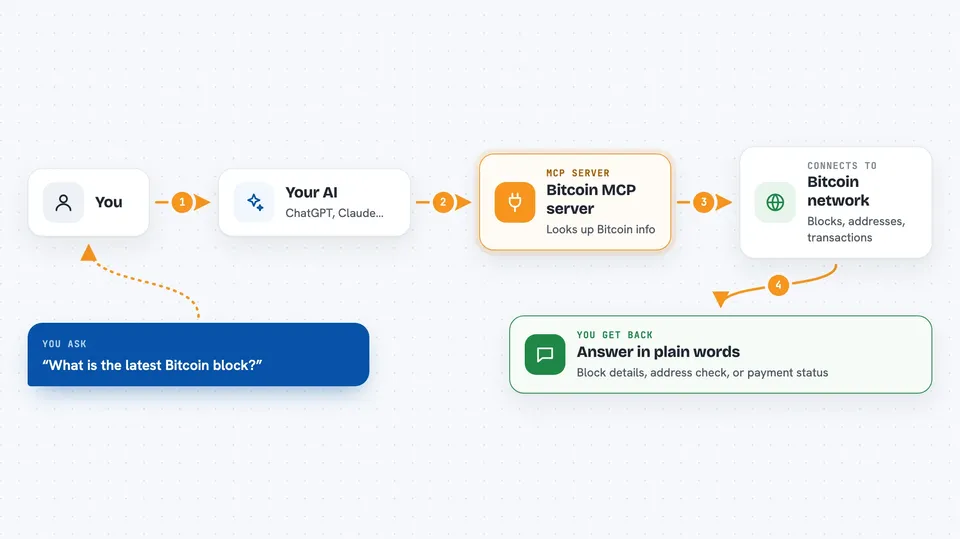
You ask your AI something about Bitcoin in plain words. Your AI passes that request to this helper program running on your computer. The helper talks to the Bitcoin network or to your Lightning wallet, gathers the answer, and hands it back. Your AI then explains the result to you in the chat. You never have to open a block explorer or copy long codes around.
 Click to zoom
What you can do with it
- Create a new Bitcoin key pair with an address, public key, and private key
- Check whether a Bitcoin address is valid or has a typo
- Decode a raw Bitcoin transaction into readable details
- Look up the latest block on the Bitcoin network
- Fetch details about a specific transaction by its ID
- Decode a Lightning invoice to see what it is asking for
- Pay a Lightning invoice from your LNBits wallet
Try asking your AI
- “What is the latest block on the Bitcoin network?”
- “Is this Bitcoin address valid: bc1q...”
- “Decode this raw transaction for me and explain what it does”
- “Decode this Lightning invoice and tell me the amount and who it is for”
What it gives back to you
You get answers written in normal language right in the chat. Depending on what you asked, that could be block details like height and time, a list of transaction details, a yes or no on an address, or a readable breakdown of an invoice. If you asked it to pay a Lightning invoice, it tells you whether the payment went through.
Before you start
What you need
- The Claude desktop app or another AI app that supports MCP servers
- Node.js installed on your computer so the npx command can run
- For Lightning payments: an LNBits wallet and its connection details
Good to know
It can create real Bitcoin keys and, if you connect a Lightning wallet, it can send real payments, so be careful with what you ask it to do.
Install it with your AI
Add Bitcoin MCP server to your AI, no technical skills needed
You don't install anything by hand. You copy one prompt, paste it into an AI that can work on your computer, and it checks, installs and connects the server for you, asking you when it needs something.
Sign in to get the install prompt
Members get a ready-made prompt that lets the Claude desktop app check Bitcoin MCP server, install it and connect it for them, step by step. You don't need any technical skills: you copy, paste and answer a few questions. Your connected AI can also find and install any of the 4,361 MCP servers here for you.
Who it's for
Anyone curious about Bitcoin who wants to check addresses, blocks, and transactions through a normal chat, without learning a block explorer.


