MCP server · Finance and crypto
Web3 MCP server
by tumf
Lets your AI look up NFTs, tokens and blockchain activity across Ethereum, BSC, Polygon and Avalanche.
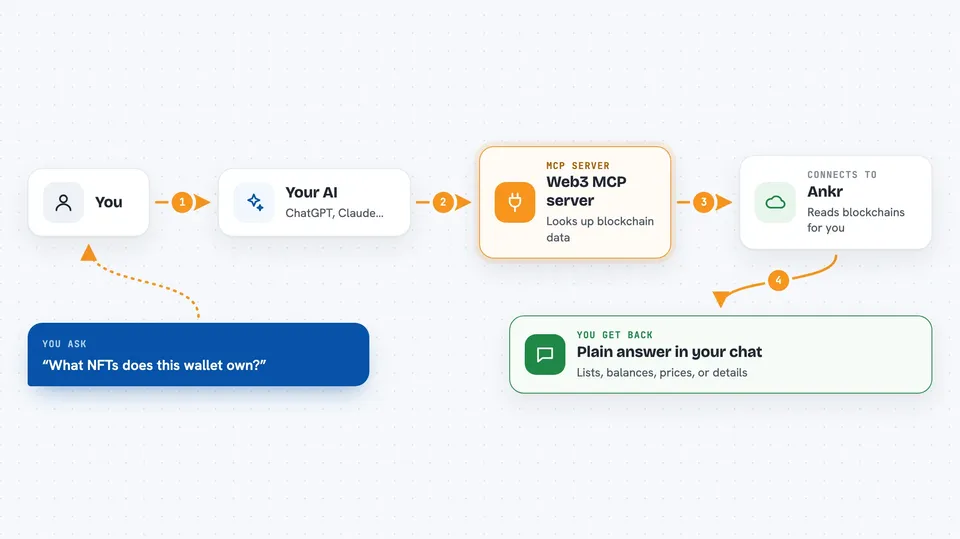
This is a helper that connects your AI to public blockchain data. It uses a service called Ankr to fetch things like who owns an NFT, how many tokens a wallet holds, or what a transaction did. It is handy if you work with crypto, NFTs or Web3 and want quick answers without opening five different explorer websites.
What is an MCP server? The 30-second version
On its own, your AI can only chat with you. An MCP server is a small helper program that gives your AI a new skill or a connection to an outside service. This one connects your AI to Ankr, a service that reads blockchain data. So when you ask about a wallet or an NFT, your AI can go and look it up instead of guessing.
What this MCP server does
You ask your AI a question about a wallet, an NFT or a token. Your AI passes that question to this helper. The helper talks to Ankr, which reads the blockchain for you. Ankr sends back the details, and your AI turns them into a normal answer in your chat. You never have to visit a blockchain explorer or copy long addresses around.
 Click to zoom
What you can do with it
- List the NFTs owned by a wallet address
- Check token balances for a wallet
- Look up the current price of a token
- See who holds a specific NFT collection
- Read the transfer history of an NFT or token
- Look up a transaction by its hash
- Get basic statistics for a blockchain
Try asking your AI
- “What NFTs does this wallet own? 0x1234...abcd”
- “How many USDC does this address hold right now?”
- “What is the current price of this token?”
- “Show me the recent transfers of this NFT collection.”
What it gives back to you
You get back plain answers in the chat: lists of NFTs, token balances, prices, holder counts, or transaction details. Your AI usually summarises them in a sentence or a short table. Nothing is changed on the blockchain. It only reads data.
Before you start
What you need
- An Ankr endpoint URL (a web address from Ankr that lets the helper read blockchain data)
- An Ankr private key (optional, but recommended so your requests are allowed through)
- Python and the uv tool if you run it yourself
Good to know
It only reads public blockchain data, but the answers depend on Ankr being correct and up to date, so double check anything important before acting on it.
Install it with your AI
Add Web3 MCP server to your AI, no technical skills needed
You don't install anything by hand. You copy one prompt, paste it into an AI that can work on your computer, and it checks, installs and connects the server for you, asking you when it needs something.
Sign in to get the install prompt
Members get a ready-made prompt that lets the Claude desktop app check Web3 MCP server, install it and connect it for them, step by step. You don't need any technical skills: you copy, paste and answer a few questions. Your connected AI can also find and install any of the 4,361 MCP servers here for you.
Who it's for
People who work with crypto, NFTs or Web3 and want quick blockchain answers without leaving their chat.