MCP server · Chat
magents MCP server
by abnegate
Let your AI see and continue the work happening in your other coding agent chats.

magents is a helper that connects the coding agents you already use, like Claude Code, Codex, Cursor and Grok. It lets one agent read what another agent was doing, send a message into a live chat, or start a fresh chat for a separate task. It is handy if you switch between agents and are tired of copying context by hand.
What is an MCP server? The 30-second version
On its own, your AI can only chat with you in the window you have open. An MCP server is a small helper program that gives your AI a new skill or a connection to something else. This one connects your AI to the coding agent sessions already saved on your computer, so it can look them up, read them, and pass messages between them. You just ask in plain words, and the helper does the running around.
What this MCP server does
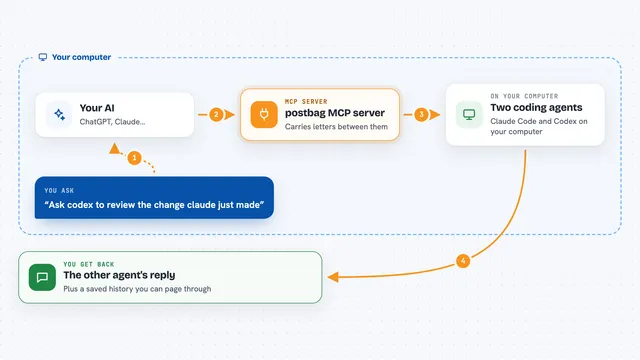
You ask your AI something like what was Claude working on, or tell Codex to pick up where Grok left off. Your AI sends that request to magents. magents looks at the sessions saved on your machine, finds the right one, and reads a short summary of it. Then it hands that summary back to your AI, or sends a message into the other live chat for you. You get the answer or the handoff in your current chat, without copying and pasting anything.
 Click to zoom
What you can do with it
- List the coding agent sessions running or recently active on your machine
- Read a short handoff summary of what another session was doing
- Search across your saved transcripts for a phrase or topic
- Send a message into another live agent chat without leaving yours
- Hand off your current session into another live chat so it continues the same work
- Start a fresh headless session for a task that can run on its own
- Look up files another session edited
Try asking your AI
- “What was Claude working on in the disaster recovery branch?”
- “Hand this off to Grok and tell it to continue from here.”
- “Search my recent sessions for anything about dedicated databases.”
- “Start a Codex session to run the test suite in a separate folder and report back.”
What it gives back to you
You get short summaries, lists of sessions, search results, and the paths of files another session touched. When you send a message or hand off, magents tells you whether the delivery was accepted, not whether the other agent finished. Everything shows up as normal chat text in the window you are already using.
Before you start
What you need
- macOS or Linux (some features only work on Unix)
- At least one supported coding agent installed, like Claude Code, Codex, Cursor or Grok
- The magents program installed (Homebrew, apt, a downloaded file, or built from source)
- A restart of your agent session after install so the new tools appear
Good to know
This tool can read your saved agent transcripts and send messages into your live chats, so use it only on machines and projects where that is okay.
Install it with your AI
Add magents MCP server to your AI, no technical skills needed
You don't install anything by hand. You copy one prompt, paste it into an AI that can work on your computer, and it checks, installs and connects the server for you, asking you when it needs something.
Sign in to get the install prompt
Members get a ready-made prompt that lets the Claude desktop app check magents MCP server, install it and connect it for them, step by step. You don't need any technical skills: you copy, paste and answer a few questions. Your connected AI can also find and install any of the 4,361 MCP servers here for you.
Who it's for
Developers and technical folks who already run more than one coding agent and want them to share context without manual copy and paste.