MCP server · Coding
Agent-MCP multi-agent framework
by rinadelph
Lets your AI run a team of helper agents that share notes and split coding work.
Agent-MCP is a tool for people who want more than one AI helper working on a coding project at the same time. It lets you set up several AI agents, give each one a job, and have them share what they learn. It is aimed at experienced developers, not beginners.
What is an MCP server? The 30-second version
On its own, your AI can only chat with you. An MCP server is a small helper program that gives your AI a new skill or a connection to something else. This one connects your AI to a multi-agent system, so it can create helper agents, hand out tasks, and look things up in a shared project memory. You stay in charge; the AI just gets new abilities when you ask.
What this MCP server does
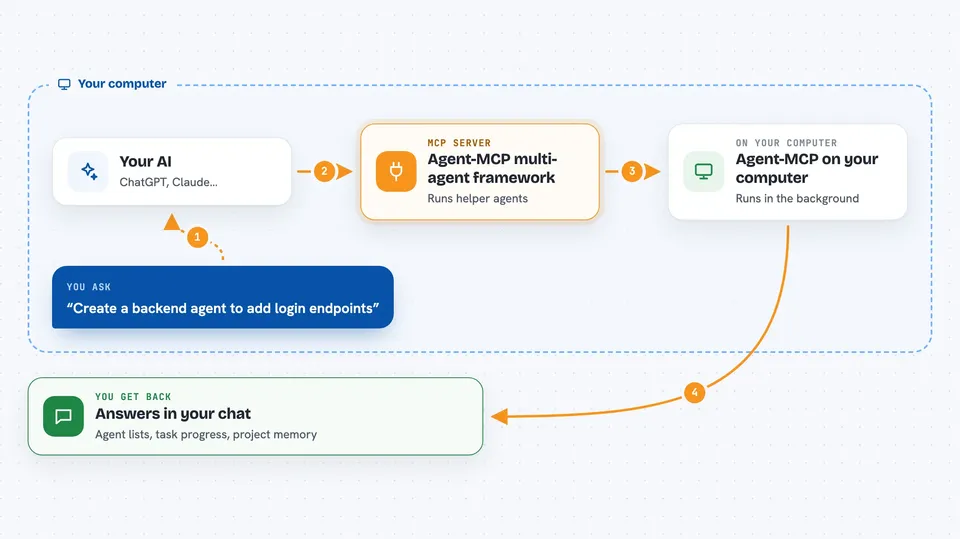
You talk to your AI as usual and ask it to set up agents or assign work. Your AI passes that request to Agent-MCP, which runs in the background on your computer. Agent-MCP creates the agents, gives them tasks, and keeps a shared memory of the project so nothing gets lost. When you ask a question, it searches that memory and sends an answer back. You see the results in your chat, and can also open a dashboard to watch the agents work.
 Click to zoom
What you can do with it
- Create specialized helper agents for backend, frontend, testing, or other roles
- Assign tasks to specific agents and track their progress
- Store and search your project's knowledge in a shared memory
- Send messages between agents or broadcast updates to all of them
- See a live dashboard of which agents are active and what they are doing
- Query the project memory to recall past decisions and patterns
Try asking your AI
- “Create a backend agent that specializes in API development”
- “Assign the task of adding user login endpoints to the backend agent”
- “What is our current database schema?”
- “List all active agents and what they are working on”
What it gives back to you
You get answers in your chat: lists of agents and their status, task progress, and text pulled from the project memory. When you ask a question, it replies with the matching information it found. When you create or assign something, it confirms what it did. The dashboard shows the same information as a live picture.
Before you start
What you need
- Python 3.10 or newer (for the recommended version)
- Node.js 18 or newer and npm 9 or newer
- An OpenAI API key (a kind of password for AI services; you get one from OpenAI)
- A project folder on your computer to point it at
Good to know
This tool creates agents that can read and change files in the project folder you point it at, so use a copy or a safe folder until you trust it.
Install it with your AI
Add Agent-MCP multi-agent framework to your AI, no technical skills needed
You don't install anything by hand. You copy one prompt, paste it into an AI that can work on your computer, and it checks, installs and connects the server for you, asking you when it needs something.
Sign in to get the install prompt
Members get a ready-made prompt that lets the Claude desktop app check Agent-MCP multi-agent framework, install it and connect it for them, step by step. You don't need any technical skills: you copy, paste and answer a few questions. Your connected AI can also find and install any of the 4,361 MCP servers here for you.
Who it's for
Experienced developers and technical teams who already use AI coding assistants and want to coordinate several agents on a larger codebase.