MCP server · Coding
Owlex MCP server
Ask several AI coding helpers the same question and get one combined answer from your AI.
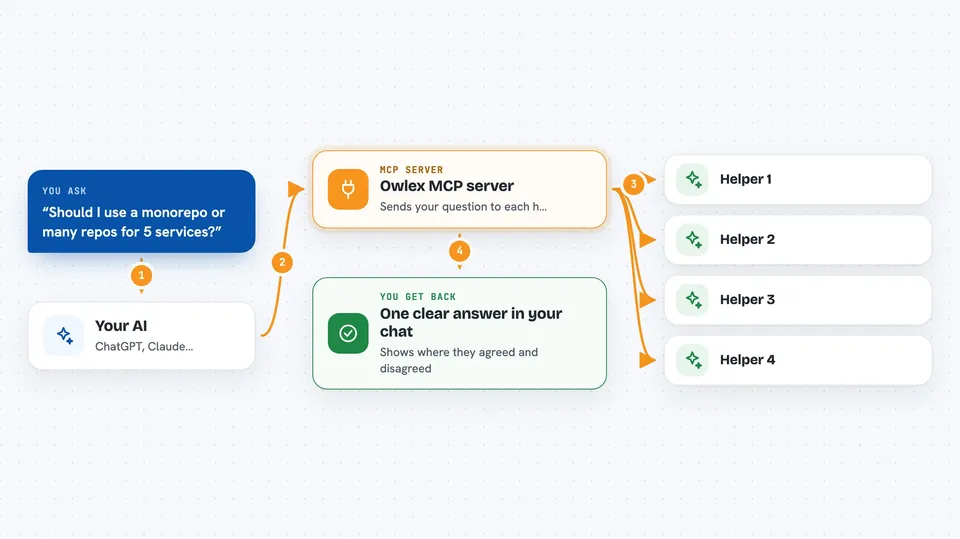
Owlex is a helper that lets your AI ask other AI coding assistants for their opinion, all in one go. It is handy when you are stuck on a tricky decision and want more than one point of view. You stay in your normal chat and Owlex does the running around.
What is an MCP server? The 30-second version
On its own, your AI can only chat with you. An MCP server is a small helper program that gives your AI a new skill or a connection to another app. Owlex is that helper here: it connects your AI to other command line coding assistants like Codex, Gemini and OpenCode. When you ask for a second opinion, your AI uses Owlex to reach those other assistants and bring their answers back to you.
What this MCP server does
You type a question in your chat, for example about a design choice or a bug. Your AI passes that question to Owlex. Owlex sends it to each connected assistant, one by one, and collects their answers. If you want, it runs a second round where the assistants see each other's answers and can change their minds. Then your AI reads everything and writes one clear answer for you.
 Click to zoom
What you can do with it
- Ask several AI coding assistants the same question at once
- Run a second round where the assistants review each other's answers
- Assign specialist roles like security, performance or skeptic to each assistant
- Use ready made teams such as security_audit or code_review
- Start or resume a one on one session with a single assistant
- Run the council in the background and check the result later
- Cancel a running council task if you change your mind
Try asking your AI
- “Should I use a monorepo or multiple repos for 5 microservices?”
- “Review this auth flow and tell me what could go wrong.”
- “Is this database design secure enough for customer data?”
- “Run the security_audit team on this pull request description.”
What it gives back to you
You get a written answer in your chat, made by your AI after reading all the other assistants. It usually includes their points of view, where they agreed, and where they disagreed. If you asked for a second round, you also see how their answers changed. For background runs, you get a task you can check later for the result.
Before you start
What you need
- The uv tool installed on your computer
- At least one command line AI assistant set up, such as Codex, Gemini or OpenCode
- An OpenRouter API key if you want to use the ClaudeOR assistant (a kind of password for apps; OpenRouter gives you one when you sign up)
- The Claude Code app or another AI app that supports MCP servers
Good to know
Some assistants can make changes or spend money on API calls, so use the council for important questions and keep an eye on which assistants you turn on.
Install it with your AI
Add Owlex MCP server to your AI, no technical skills needed
You don't install anything by hand. You copy one prompt, paste it into an AI that can work on your computer, and it checks, installs and connects the server for you, asking you when it needs something.
Sign in to get the install prompt
Members get a ready-made prompt that lets the Claude desktop app check Owlex MCP server, install it and connect it for them, step by step. You don't need any technical skills: you copy, paste and answer a few questions. Your connected AI can also find and install any of the 4,361 MCP servers here for you.
Who it's for
Developers and technical teams who use AI coding assistants and want a second opinion on important decisions.