MCP server · Research · official
PickADive MCP server
by afiliptsov · official
Ask your AI about dive conditions, best months to visit, and marine life seasons at dive sites worldwide.

This is a helper for your AI that answers scuba diving questions. It knows about thousands of dive sites around the world, from local weekend spots to faraway destinations. It is handy if you are planning a dive trip or wondering whether this Saturday is a good day to get in the water.
What is an MCP server? The 30-second version
On its own, your AI can only chat with you using what it already learned. An MCP server is a small helper program that gives your AI a new skill or a connection to a service. This one connects your AI to PickADive, a dive planning site. Once it is connected, your AI can look up dive conditions, site facts, and marine life seasons for you when you ask.
What this MCP server does
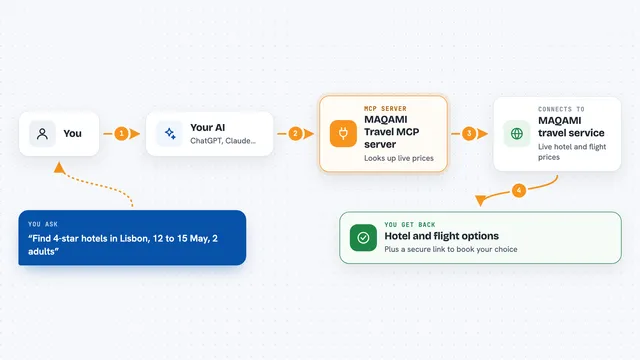
You ask your AI a diving question, like whether this weekend is good near a certain town. Your AI sends the question to this helper. The helper checks PickADive's dive data and sends back a ranked list of good time windows, with wave height, wind, and links to the sites. You see the answer in your chat, in plain words, with the details you need to plan.
 Click to zoom
What you can do with it
- Find good dive windows near a place for a specific day
- See the best months to visit a dive destination
- Look up when a species like whale sharks is most often seen
- Get facts about a named dive site, like depth and hazards
- See which world regions have good diving right now
- Compare several destinations before booking a trip
Try asking your AI
- “Where can I dive near Boston this Saturday?”
- “When should I book a trip to Komodo?”
- “When and where do whale sharks peak?”
- “How deep is Molasses Reef and what are the hazards?”
What it gives back to you
You get answers in your chat: ranked time windows with wave height, wind speed, and timing, or a month-by-month summary for a destination. Site facts come back as short lists of depths, difficulty, access, and hazards. Every answer includes a link to the source page, so you can check it yourself.
Before you start
Good to know
Forecasts are planning context only, never a safety clearance, so always check conditions at the water and dive within your training.
Install it with your AI
Add PickADive MCP server to your AI, no technical skills needed
You don't install anything by hand. You copy one prompt, paste it into an AI that can work on your computer, and it checks, installs and connects the server for you, asking you when it needs something.
Sign in to get the install prompt
Members get a ready-made prompt that lets the Claude desktop app check PickADive MCP server, install it and connect it for them, step by step. You don't need any technical skills: you copy, paste and answer a few questions. Your connected AI can also find and install any of the 4,361 MCP servers here for you.
Who it's for
Scuba divers, dive trip planners, and travel agents who want quick, honest answers about dive conditions and destinations.