MCP server · Research · official
LetsFG MCP server
by LetsFG · official
Your AI can search flights and hotels and book them, with nothing booked until you approve by email.
LetsFG is a service that searches flights and hotels from many airlines and booking sites, then shows you one total price. This MCP server connects that service to your AI assistant, so you can just ask for a trip and get real options back. It is handy if you plan trips or book travel for work and hate opening a dozen tabs.
What is an MCP server? The 30-second version
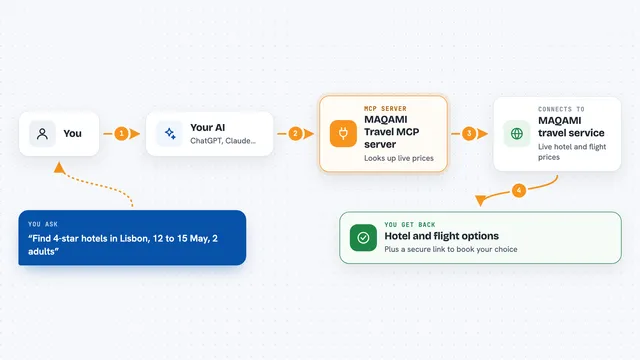
On its own, your AI can only chat with you. An MCP server is a small helper that gives your AI a new skill or a connection to a service. This one connects your AI to LetsFG, so when you ask about a flight or hotel, the AI can look up real prices and times there for you. Nothing is booked until you approve it by email.
What this MCP server does
You tell your AI where you want to go, the dates, and how many people. The AI uses this helper to ask LetsFG, which checks hundreds of airlines, nearby airports, bag prices and on-time records. LetsFG sends back the best options with one total price, and your AI shows them in the chat. If you pick one, your AI can start a booking, but nothing is charged or ticketed until you approve it by email.
What you can do with it
- Search flights between two cities on the dates you choose
- Compare prices across airlines and nearby airports
- Check bag fees and each flight's on-time record
- Search hotels for your stay and compare total prices
- Start a flight booking and hold the fare
- Get a real airline booking reference once you approve
Try asking your AI
- “Find me the cheapest flight from Chicago to Paris on September 16, returning September 24, for one person with a carry-on bag”
- “What nearby airports should I check for a trip from San Francisco to London in October?”
- “Show me hotels near the main train station in Warsaw for two nights, free cancellation only”
- “Book the second option and hold it, I will confirm by email”
What it gives back to you
You get a short list of flights or hotels in the chat, each with the price, times, airline or property name, and notes like bag fees or on-time record. If you start a booking, you get a status and, once approved, a real airline booking reference. Prices stay the same if you run the search again. Nothing is charged until a booking is confirmed.
Before you start
What you need
- An AI assistant that can use MCP servers, like Claude, ChatGPT, Cursor or Windsurf
- A LetsFG connection approved once at letsfg.co/connect, one tap, no card
- A card on file before your first booking (nothing is charged to add it)
Good to know
Booking holds the full price on your card and a real ticket or room is bought once you approve by email, so only approve a trip you actually want.
Install it with your AI
Add LetsFG MCP server to your AI, no technical skills needed
You don't install anything by hand. You copy one prompt, paste it into an AI that can work on your computer, and it checks, installs and connects the server for you, asking you when it needs something.
Sign in to get the install prompt
Members get a ready-made prompt that lets the Claude desktop app check LetsFG MCP server, install it and connect it for them, step by step. You don't need any technical skills: you copy, paste and answer a few questions. Your connected AI can also find and install any of the 4,609 MCP servers here for you.
Who it's for
Anyone who books flights or hotels often, like frequent travelers, executive assistants, and small business owners planning trips.