
MCP server · Coding
Agent Blueprint MCP server
Lets your AI browse, summarize, and download AI agent blueprints from Agent Blueprint.
This is a helper that connects your AI assistant to Agent Blueprint, a service that holds ready-made plans for AI agents. Once connected, your AI can look up those plans for you and pull them down as files. It is handy if you plan or roll out AI projects and want the details without clicking around a website.
What is an MCP server? The 30-second version
On its own, your AI can only chat with you. An MCP server is a small helper program that gives your AI a new skill or a connection to an app or service. This one connects your AI to Agent Blueprint, so when you ask about a blueprint, the AI can go look it up or fetch it for you. You just talk normally, and the helper does the behind-the-scenes work.
What this MCP server does
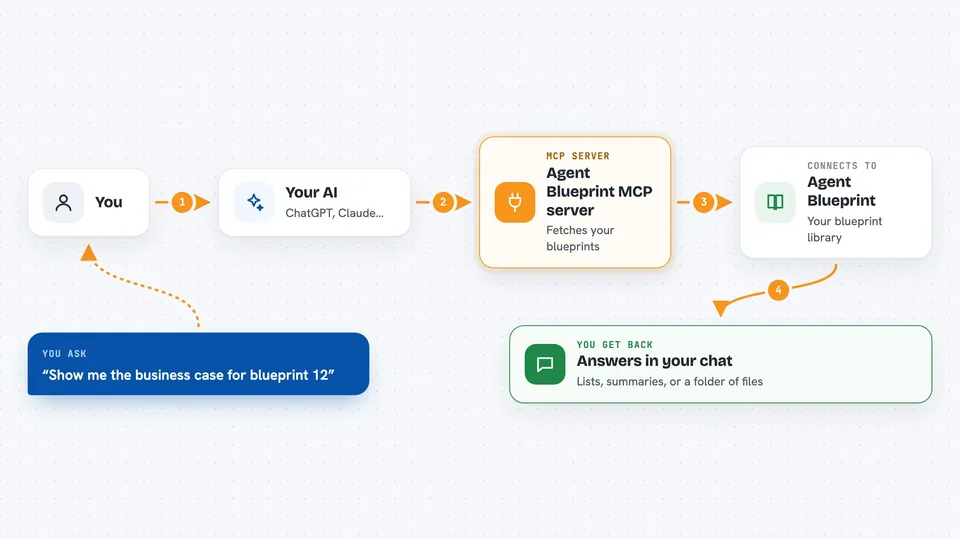
You ask your AI something like "list my blueprints" or "show me the business case for blueprint 12." The AI passes that request to this helper. The helper talks to Agent Blueprint using your API token, which is like a password that proves it is you. Agent Blueprint sends back the list or summary, and the AI shows it to you in the chat. If you want the full package, the helper can download the whole blueprint as a folder of files.
 Click to zoom
What you can do with it
- List all your blueprints with short summaries
- Get a blueprint summary with its agents, phases, and pattern
- Read the business case, including ROI and pilot economics
- Read the implementation plan with epics and timeline
- Look at use case analysis and implementation spec details
- Create or update a business profile for your organization
- Generate use cases, blueprints, or run the full pipeline
- Download a blueprint as an Agent Skills folder for coding agents
Try asking your AI
- “List my Agent Blueprint blueprints.”
- “Show me the business case for the customer service blueprint.”
- “What is the implementation plan for blueprint 42?”
- “Download blueprint 42 as an Agent Skills directory.”
What it gives back to you
You get back answers in the chat: a list of blueprints, a summary with titles and phases, or numbers like ROI and timeline. For deeper detail, it can hand you a folder of markdown files covering the business context, agent specs, financial case, roadmap, and guardrails. When you start a generation job, it returns an ID you can use to check progress.
Before you start
What you need
- An Agent Blueprint account
- An API token from Agent Blueprint (Settings > API Tokens, shown once)
- Node.js installed if you run it with npx
Good to know
It can create business profiles and start blueprint or pipeline generation jobs on your account, so double-check before you ask it to run those.
Install it with your AI
Add Agent Blueprint MCP server to your AI, no technical skills needed
You don't install anything by hand. You copy one prompt, paste it into an AI that can work on your computer, and it checks, installs and connects the server for you, asking you when it needs something.
Sign in to get the install prompt
Members get a ready-made prompt that lets the Claude desktop app check Agent Blueprint MCP server, install it and connect it for them, step by step. You don't need any technical skills: you copy, paste and answer a few questions. Your connected AI can also find and install any of the 4,361 MCP servers here for you.
Who it's for
People who plan or roll out AI projects, like product owners, consultants, and business analysts working with coding agents.



