MCP server · Developer tools
CICADA MCP server
by wende
Lets your AI look up code structure, function usage and git history in your project.
CICADA is a helper that gives your AI assistant a map of your codebase. Instead of your AI opening whole files to find one function, it can ask CICADA for just the parts it needs. It is made for people who work with code, especially in Elixir and Python projects.
What is an MCP server? The 30-second version
On its own, your AI can only chat with you. An MCP server is a small helper program that gives your AI a new skill or a connection to something else. This one connects your AI to your local code project, so it can look up modules, functions and git history for you. You ask a question in plain words, and the AI uses CICADA behind the scenes to find the answer.
What this MCP server does
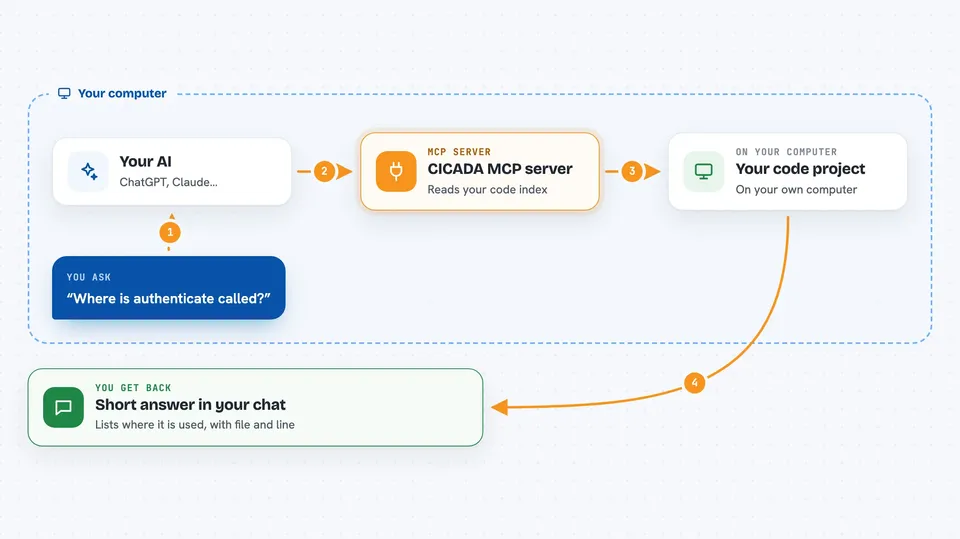
You ask your AI something like where a function is used. The AI sends that question to CICADA on your computer. CICADA reads a pre-built index of your code and finds the matching modules, functions and call sites. It sends back a short, structured answer. Your AI then explains it to you in the chat, without dumping whole files.
 Click to zoom
What you can do with it
- Find where a function is defined and every place it is called
- List all the functions in a module with their signatures and docs
- See what a module depends on and what depends on it
- Search your code by concept, like authentication or billing
- Check the git history and pull request behind a line of code
- Drill into a search result to see more detail
- Run custom queries against the code index
Try asking your AI
- “Show me the functions in MyApp.User”
- “Where is authenticate called?”
- “Find code related to API authentication”
- “Which PR introduced line 42 in billing.ex?”
What it gives back to you
You get back short, structured answers in the chat. That can be a list of functions with their signatures, a list of call sites with file and line numbers, or a summary of git commits and pull requests. It is written in a compact format so your AI has more room left for thinking.
Before you start
What you need
- A code project on your computer
- The uv tool installed (a small program that installs and runs CICADA)
- An editor that supports MCP, like Claude Code, Cursor, VS Code, Gemini, Codex, OpenCode or Zed
- Optional for pull request features: the GitHub command line tool gh, signed in
Good to know
The author has discontinued this project and advises against using it, so treat it as unsupported software.
Install it with your AI
Add CICADA MCP server to your AI, no technical skills needed
You don't install anything by hand. You copy one prompt, paste it into an AI that can work on your computer, and it checks, installs and connects the server for you, asking you when it needs something.
Sign in to get the install prompt
Members get a ready-made prompt that lets the Claude desktop app check CICADA MCP server, install it and connect it for them, step by step. You don't need any technical skills: you copy, paste and answer a few questions. Your connected AI can also find and install any of the 4,361 MCP servers here for you.
Who it's for
Developers and anyone who uses an AI assistant to explore or understand a codebase, especially in Elixir or Python projects.