MCP server · Coding
Bernstein MCP server
Lets your AI run and coordinate coding agents in parallel, with a clear record of every step.
Bernstein is a helper that runs other AI coding agents for you, in an organised way. You give it a goal, and it splits the work into tasks, runs them side by side, and keeps a record of what happened. It is handy if you work with AI coding tools and want more control and less mess.
What is an MCP server? The 30-second version
On its own, your AI can only chat with you. An MCP server is a small helper program that gives your AI a new skill or a connection to another tool. This one connects your AI to Bernstein, which is a system that runs and watches coding agents for you. So when you ask your AI to get some coding work done, it can pass that to Bernstein and bring back the results.
What this MCP server does
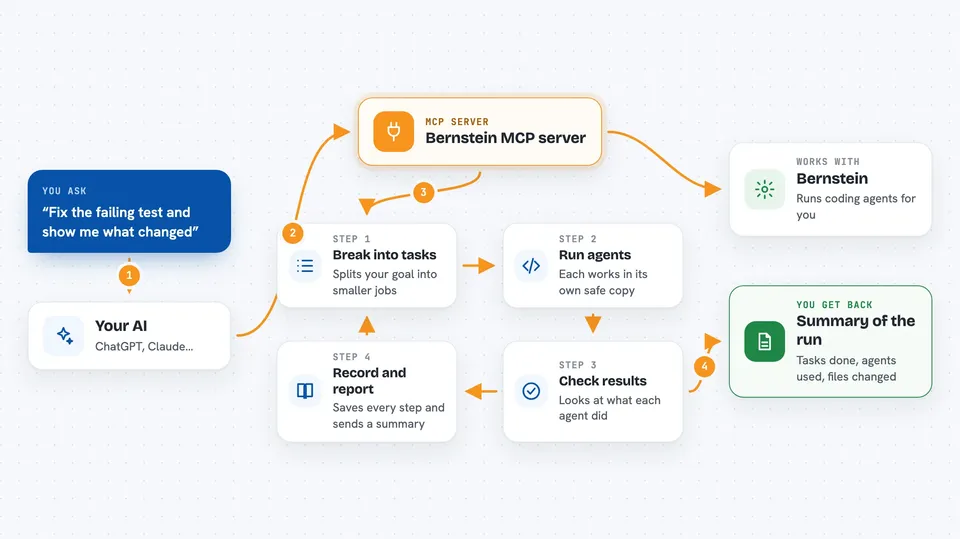
You tell your AI what you want done, like fixing a test or building a small feature. Your AI sends that goal to Bernstein. Bernstein breaks the goal into smaller tasks, gives each task to a coding agent, and runs them in separate safe copies of your project so they do not step on each other. It checks the results, records every step, and hands back a summary of what was done and what changed.
 Click to zoom
What you can do with it
- Run several coding agents at the same time on different parts of a job
- Keep each agent in its own separate copy of your project so changes do not clash
- Record every step of a run so you can check it later
- Route tasks to different agents based on cost or ability
- Show you a live view of what is running and what is finished
- Produce a signed receipt you can verify offline
- Handle non-code work like reports or datasets with the same tracking
Try asking your AI
- “Fix the failing test in tests/test_foo.py and show me what changed”
- “Run three agents in parallel to add logging to the payment module”
- “Give me a record of everything that happened in the last run”
- “Use the cheaper agent for the simple tasks and the better one for the hard parts”
What it gives back to you
You get back a summary of the run: which tasks were done, which agent did them, and what files changed. If something failed, it tells you where and why. You can also get a signed receipt file that proves the run was not tampered with, which you can check later without needing the original system.
Before you start
What you need
- A coding agent installed and logged in, like Claude Code or Codex
- Python 3.10 or newer, or a way to run Python tools
- The Bernstein tool installed (the README shows a one-line install command)
Good to know
This tool can run coding agents that change files in your project, so make sure you have backups or use it on a copy first.
Install it with your AI
Add Bernstein MCP server to your AI, no technical skills needed
You don't install anything by hand. You copy one prompt, paste it into an AI that can work on your computer, and it checks, installs and connects the server for you, asking you when it needs something.
Sign in to get the install prompt
Members get a ready-made prompt that lets the Claude desktop app check Bernstein MCP server, install it and connect it for them, step by step. You don't need any technical skills: you copy, paste and answer a few questions. Your connected AI can also find and install any of the 4,361 MCP servers here for you.
Who it's for
Developers and technical teams who already use AI coding agents and want to run them in a more organised, trackable way.